iRIS8 - Addressable Fire Alarm Panel – Installer Programming
9
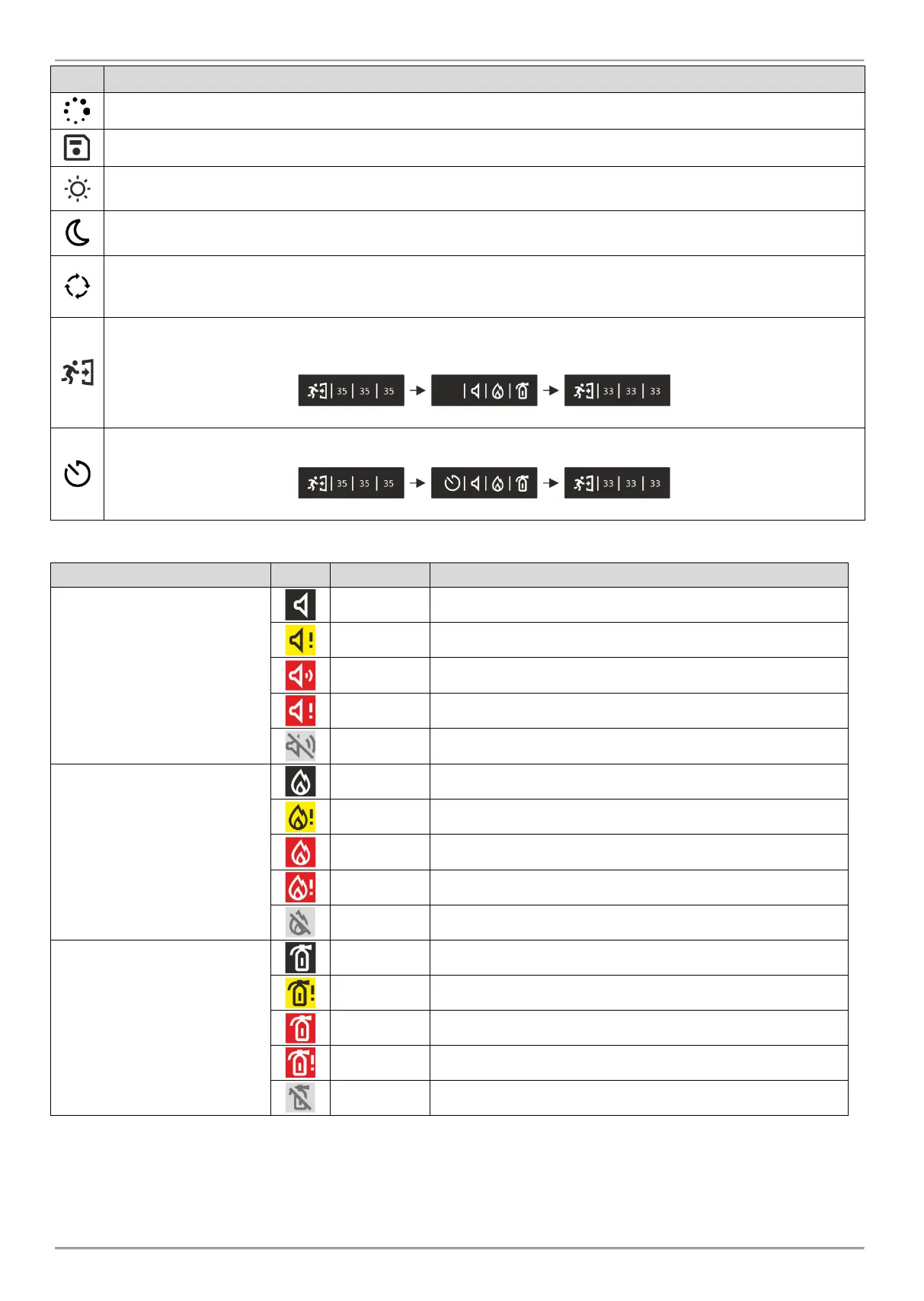
Loading data; Resetting. The icon is flashing while the process is running on.
Saving configuration. The icon is active during running of saving data process.
Day time operation mode. The process signals from detectors are with enhanced sensitivity (set for
every detector).
Night time operation mode. The process signals from detectors are with enhanced sensitivity (set for
every detector).
Addressing Mode is running on. The panel is in operating mode for setting or changing device addresses, self-
or auto-addressing procedure; the panel does not follow the status of the devices and is idle for other kind of
operations till the end of the addressing procedure.
Evacuation time for leaving the premises is running on. The icon is flashing together with the other active icons
and back counting time for leaving the premises before panel outputs* activation.
Set Delay for panel outputs* activation. The icon is flashing, changing with the icon for evacuation.
The icons for current status of the panel have the following meaning:
Sounders
(loop devices, panel outputs*)
Not activated Sounder outputs.
Not activated Sounder outputs; fault detected.
Activated Sounder outputs.
Activated Sounder outputs in fault.
Sounder outputs are disabled.
Fire Brigade Output
(panel*)
Standby mode, not activated Fire Brigade output.
Not activated Fire Brigade output; fault detected.
Activated Fire Brigade output.
Activated Fire Brigade output in fault.
The Fire Brigade output is disabled.
Fire Protection
(Extinguishing) Output
(panel*)
Not activated Fire Protection output.
Not activated Fire Protection output; fault detected.
Activated Fire Protection output.
Activated Fire Protection output in fault.
The Fire Protection output is disabled.
* Outputs type Sounder, Fire Brigade and Fire Protection (Extinguishing) of the iRIS8 fire alarm panel or other fire panel in the network from which the
fire event is received.
** Attention: The iRIS8 indication shows that there are one or more fire panels in the network with disabled for operation output. You can check the
DISABLE events menu to review the numbers of these panels.














 To Next Page