Mail Alert
Mail alert is designed to keep system administrator or other relevant personnel alerted of any
unexpected events that might have occurred to the network computers or server for monitoring
efficiency. With this alert system, appropriate solutions may be tackled to fix problems that may
have arisen so that the server can be properly maintained.
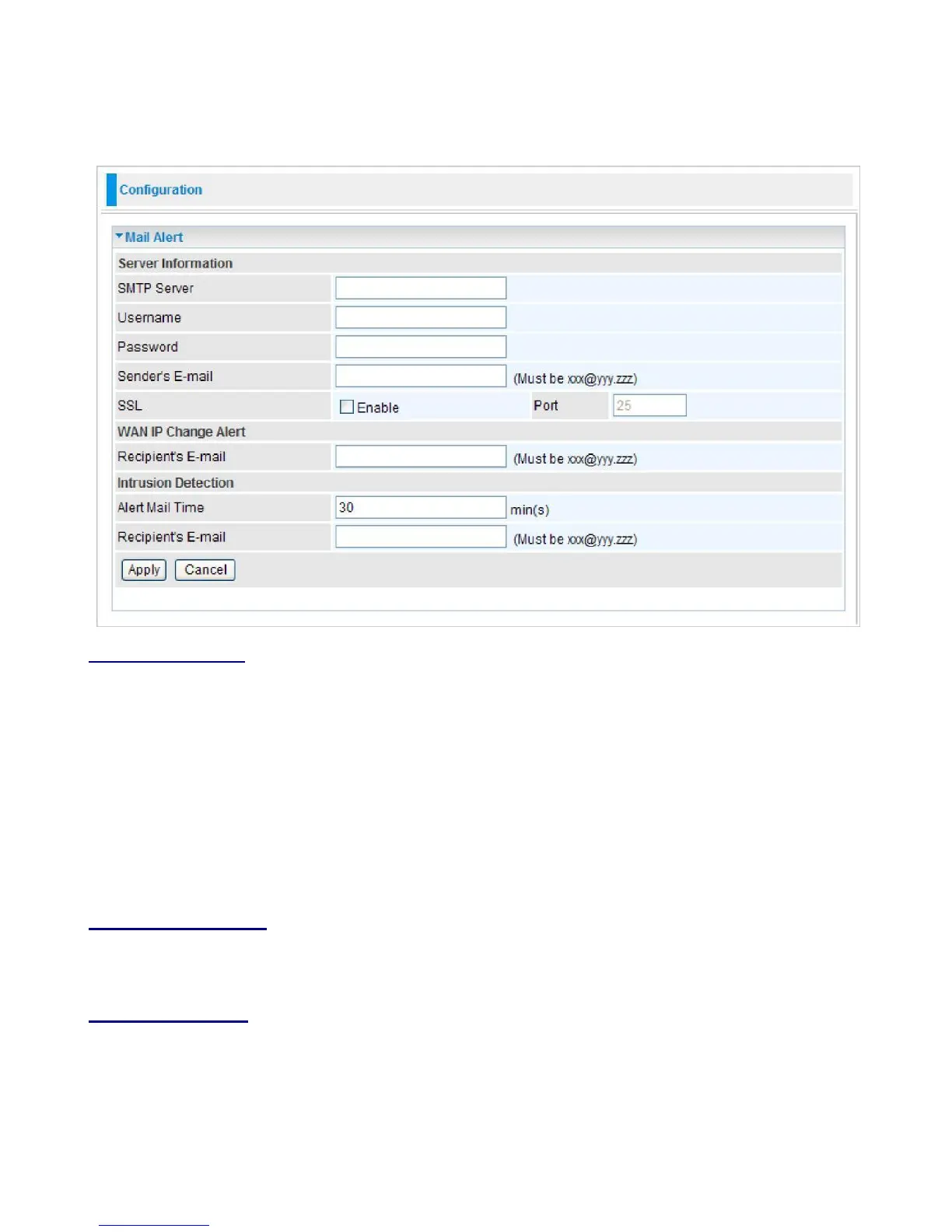
Server Information
SMTP Server:
Enter the SMTP server that you would like to use for sending emails.
Username:
Enter the username of your email account to be used by the SMTP server.
Password:
Enter the password of your email account.
Sender’s Email:
Enter your email address.
SSL:
Tick this box if you want to enable SSL function.
Port:
Enter the port number.
WAN IP Change Alert
Recipient’s Email:
Enter the email address that will receive the alert message once a computer /
network server failover occurs.
Intrusion Detection
Alert Mail Time:
Designate frequency of alerts.
Recipient’s Email:
Enter the email address that will receive the alert message once an WAN IP
change has been detected.
Click Apply to confirm the settings.



 To Next Page