CONFIGURATION SETTINGS | 23
Ducking System
e ducking function serves several purposes:
♦ Provides “aesthetic” control over the caller that many programmers prefer. Allows the
announcer to “override” the caller in a way that sounds natural and appropriate.
♦ Reduces feedback when the Hx is used like a speakerphone in an “open
loudspeaker’”situation.
♦ Dynamically improves eective trans-hybrid loss to reduce leakage, when necessary.
When used, the Hx inserts a controlled loss (ducking) into whichever audio path (send or
receive) is not active at the moment. When the caller is speaking, this loss is inserted in the
announcer path, and when the announcer is speaking, the caller gain is reduced. e eect
is “seesaw-like”. Normally, the gain reduction is symmetrical, but, if Feedback Reduction is
enabled, the hybrid will have more ducking in the announcer-to-caller direction.
You’ll probably need more ducking when using an open loudspeaker. As noted above, ducking
helps prevent feedback and reduces echo returned to the caller.
You can select how much of this eect you prefer, from Half Duplex, which makes the hybrid
operate like a ‘one-way-at-a-time’ speakerphone, to Full Duplex (0dB) which disables ducking
altogether. e default is –6 dB.
Signal Flow and Audio Processing
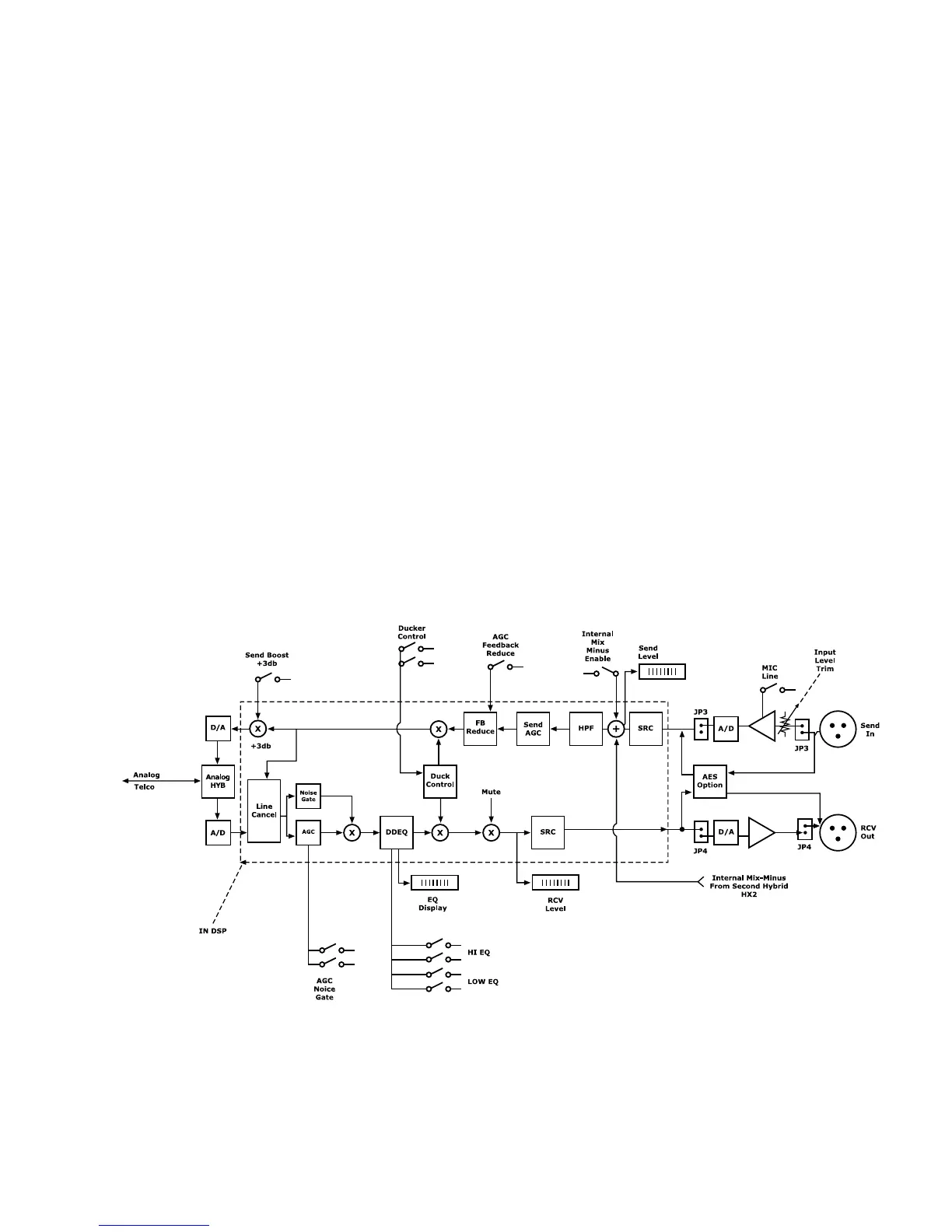
e above gure illustrates the signal processing chain in both the SEND input to the caller, as
well as the caller receive to RCV output path. e Ducker is involved in both processing paths.
e gure also shows which processing stages that you can adjust via the SETTINGS and OP-
TIONS bank of DIP switches in the rear of the hybrid unit. See Section 4.1 for further details
regarding the DIP switch settings.


 To Next Page