Need help?
Do you have a question about the Telstra MF65 and is the answer not in the manual?
Lists the system requirements for connecting to the Wi-Fi router.
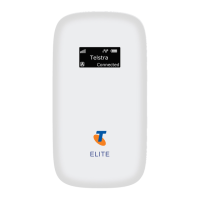
Identifies key indicators and ports on the Telstra MF65 device.
Step-by-step instructions for inserting the USIM card.
Details on adding a memory card and inserting the battery.
Instructions on how to power on the Wi-Fi hotspot device.
Explains the meaning of different LED light patterns for status indication.
Guide on how to connect devices to the Wi-Fi hotspot.
Detailed steps for connecting a Windows 7 computer to the Wi-Fi.
Instructions for using the ZTE Wi-Fi Monitor app on Android.
Key settings like browser homepage, default SSID, and password reset.
How to access the device homepage via a web browser.
Explains the various icons displayed on the device homepage.
Details on the connection status and managing connected devices.
Guide on using the wizard to review and set basic parameters.
How to set the device to automatic or manual network connection.
Options for automatic network selection and device locking information.
Steps to create and set APN profiles for network access.
How to change the administrator password and restore factory defaults.
Managing USIM PIN status, changing the PIN, and PUK code.
Procedures for resetting to factory defaults and restarting the device.
Configuring Wi-Fi sleep time for power saving.
How to check for and install software updates for the device.
Setting up firewall policies to filter network traffic.
Enabling port forwarding for external access to LAN devices.
Configuring port mapping for external access to LAN services.
Managing remote management, PING, and Universal Plug and Play.
Enabling DMZ to open ports for a specific IP destination.
Configuring IP address, subnet mask, and DHCP server.
Instructions for composing, sending, and managing SMS messages.
Adding and managing contacts for SMS.
Viewing, adding, and editing contacts stored on the SIM card.
Configuring SD card sharing via USB or Web Share.
Accessing details like IMEI, IMSI, signal strength, and software versions.
Viewing connected time and data usage statistics.
Guide for installing the device software via USB.
Important notes for USB installation and uninstallation.
Details on charging time, temperature limits, and conditions.
Information on accessing the user guide and online support.
Information on microSD card formats and safe removal.
Solutions for Wi-Fi connection, signal, and data connection issues.
Troubleshooting for SIM lock, PUK, and overseas roaming.
Solutions for problems with microSD card recognition.
Precautions regarding interference and device handling.
Guidelines for operating environment and usage restrictions.
Advice on antenna use and RF energy transmission.
Compliance statement regarding human exposure to RF energy.
Technical details on network compatibility, dimensions, and data rates.
Supported OS, memory, battery capacity, and charge times.
Information on device standby and operation times.
 Network
| UMTS compatibility | 850, 2100 MHz |
|---|---|
| GSM compatibility | 850, 900, 1800, 1900 MHz |
| HSPA+ download speed | 21.6 Mb/s |
 Power
Power| voltage | 5 V |
|---|---|
| nominal current | 500 mA rms |
| max current | 700 mA rms |
 Battery
| battery capacity | 1500 mAh |
|---|---|
| charge time with charger | 3 hours |
| charge time via USB | 4 hours |
 Operating Environment
| operating temperature | -5ºC to +45ºC |
|---|---|
| standby time | Up to 100 hours |
| operation time | Up to 4 hours |
 Weight and Dimensions
| dimensions | 102 x 50 x 13.7 mm |
|---|---|
| weight | 75 g |


 To Next Page