- 8 -
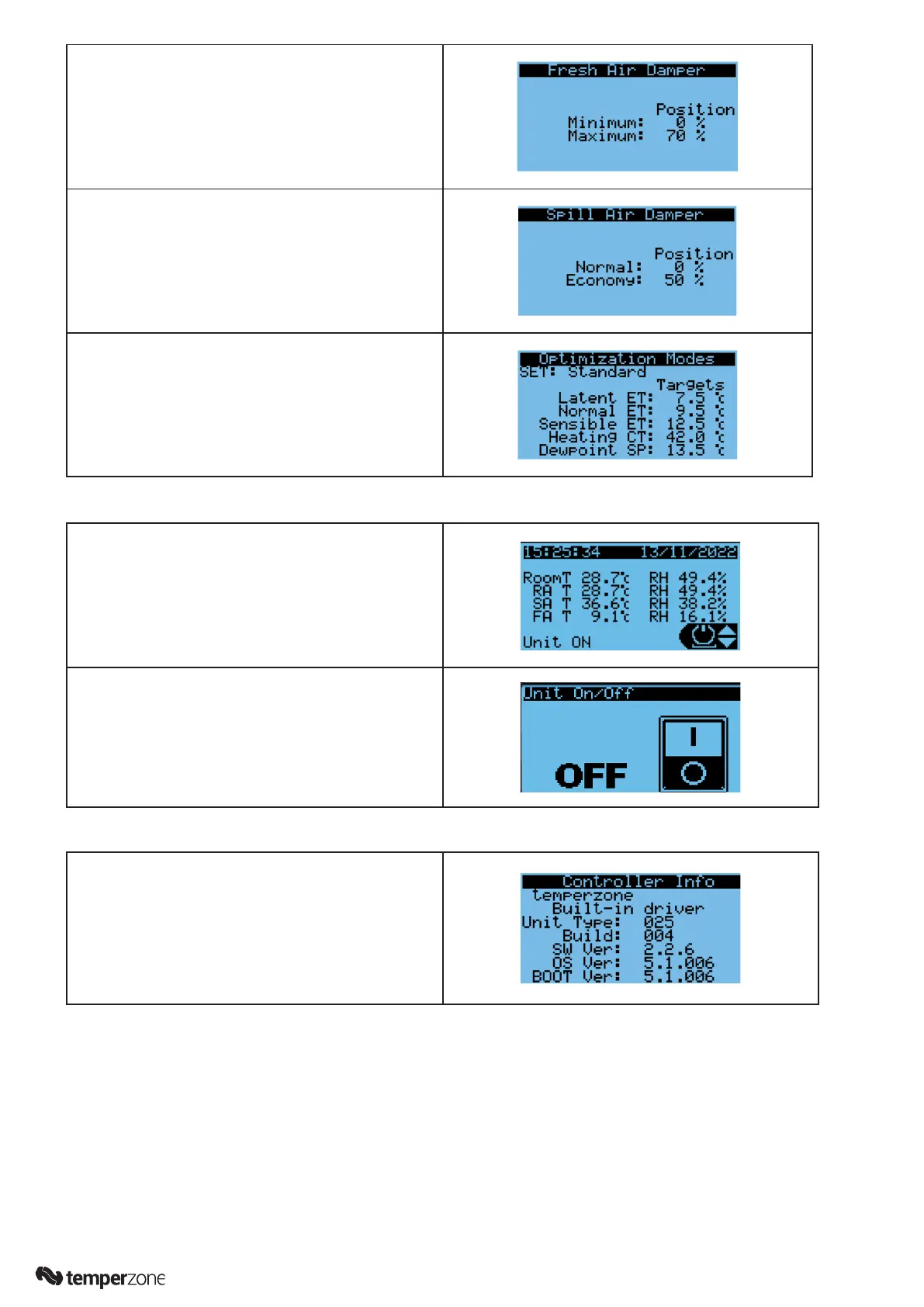
Note: Spill Air option is only applicable to downward
discharge/upward return air units supplied with a
Spill Air damper.
Return to the Main Menu (↵)
16. Main Menu/Settings/Optimization
Quick settings for how the unit operates and controls
the coil temperatures during each of the comfort
modes. Chose between Standard, High Efciency
and High Performance modes. A manual mode
is also provided that allows for each setting to be
tailored.
To Power ON the unit from the controller, follow the below instructions:
1. From the Home screen (shown here), use the Up/
Down keys (↑/↓) to select the ON/OFF symbol, as
shown in the lower righthand corner. Press enter (↵).
2. At the next screen use the Up/Down keys (↑/↓) to turn
the unit ON then press enter (↵) to conrm.
To identify the Controller software version (and other status information):
From the Home screen, use the Up/Down keys (↑/↓) to
select the ON/OFF symbol as shown in the screen in the
lower righthand corner (see Step 1 above).
Use the Up/Down keys (↑/↓) to select ‘i’. Press enter (↵)
Other information available by scrolling down (↓), includes
Target Setpoints and operating Status conditions.
Press esc key (⟲) to go back to the Home screen.



 To Next Page