- 5 -
7. OPERATION
7.1 BMS – BACnet
Congure the IP address as required, see Appendix for details.
Once connected to the BMS server, to start the unit via BACnet if the room temperature and RH% sensors are connected directly
to the controller and the indoor fan speed has been set using the PGD then all that needs to be done is to write to the below
BACnet objects.
Type Object
Instance
Object Name Read/Write Units Default Range Description
BinaryValue 1 BMS.Unit_OnOff RW Bool 0 0 to 1 Enable Unit to run
AnalogValue 30 BN.SP_Cooling RW °C 22 15.1~35.0 Cooling SP, must be > heat SP
AnalogValue 31 BN.SP_Heating RW °C 20 15.0~34.4 Heat SP, must be < cool SP
If the Room temperature and RH% are measured by the BMS then the below objects also need to be written.
Type Object
Instance
Object Name Read/Write Units Default Range Description
BinaryValue 4 BMS.RoomT_RH_
ORide
RW Bool 0 Bool Use BACnet Room temp and
RH (BMS_RoomT and BMS_
Room_RH) for control
AnalogValue 36 BN.0V_RoomAirT RW °C - 5-35 Room temperature written by
BMS
AnalogValue 37 BN.0V_RoomRH RW RH% - 0-100 Room RH% written by BMS.
To adjust the air ow via BACnet the following object need to be written.
Type Object
Instance
Object Name Read/Write Units Default Range Description
AnalogValue 44 BN.SP_Air_Flow_
Setpoint
RW l/s 10000 0-13750 Air ow l/s setpoint
BACnet license pre-installed in temperzone factory.
7.2 BMS Modbus
For information regarding using Modbus commands, please ask temperzone.
7.3 Stand Alone Unit
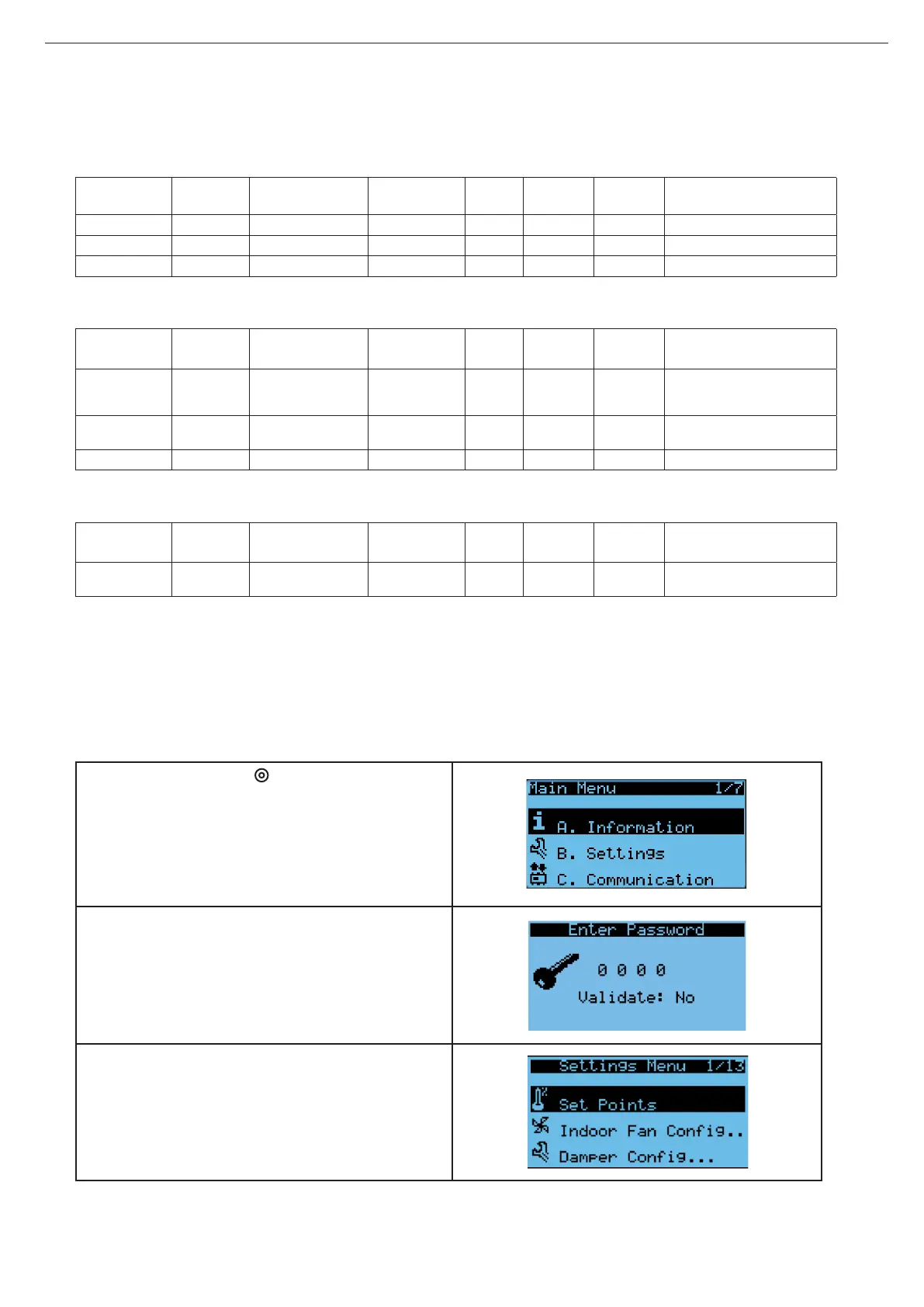
Master controller site set-up:
1. Press Program button .to bring up the Main Menu
2. Press (↓), then select ‘B. Settings’ (↵).
Enter password to login. Default password is ‘2100’;
this can be changed by user. Validate the password
(↵) to conrm.
3. Select ‘Set Points’ (↵)



 To Next Page