Teradek, LLC 2020. All rights reserved. v1.3-0620
AUDIO SETTINGS
Configure Bolt’s Audio settings. If Beep on REC is activated, you will hear a short
tone whenever the camera begins or stops recording. The Mute Settings allow you to
completely mute audio or only mute audio while recording.
● Resolutions List - Select a specific output resolution:
● 4Kp - 23.98/24/25/29.97/30/50/59.94/60
● 1080p - 23.98/24/25/29.97/30/50/59.94/60
● 1080psf - 23.98/24/25/29.97/30
● 1080i - 50/59.94/60
● 720p - 50/59.94/60
● 480p - 59.94/576p - 50 (via HDMI ports only)
● 480i (NTSC)
● 576i (PAL)
TEST PATTERN
The Test Pattern menu allows you to select a video resolution format to output a test
pattern over HDMI or SDI.
BLUETOOTH SETTINGS
Use the Bluetooth menu to enable or disable Bluetooth communication.
● Enable Bluetooth - Allows the transmitter and
receiver to be paired and
communicate with the
Bolt App
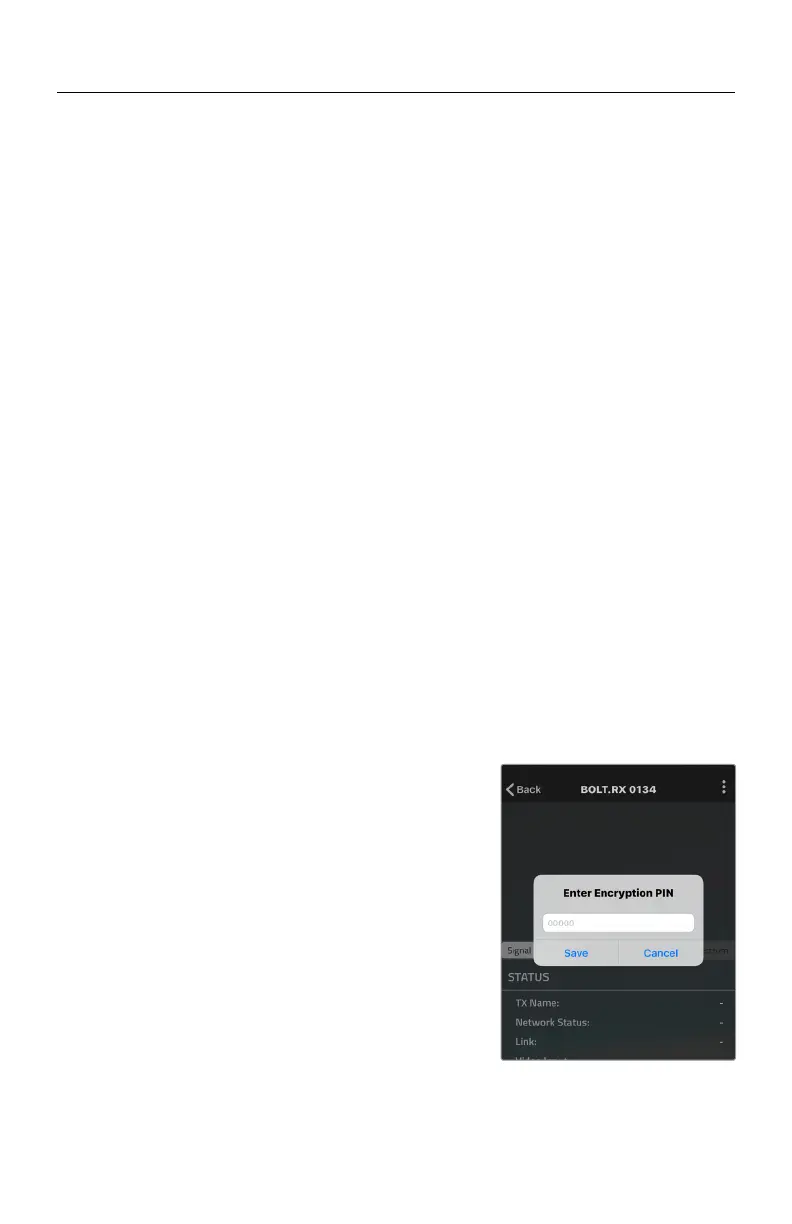
● Use Bluetooth PIN - Enables the use of a PIN for
authentication when using
the Bolt App (see image)
● Change PIN - Press the Menu joystick
towards the right to change
the Bluetooth PIN
NOTE: Bluetooth is disabled by default. In order to
configure your Bolt 4K devices via the Bolt App, you
must first enable Bluetooth.
● Beep on REC
- Short tone when the camera begins or stops recording
● Mute Settings - Select an option:
● O
● Mute while record
● On
19


 To Next Page
 Loading...