VIDEO OSD SETTINGS
Choose when to display the On-Screen Display (OSD).
DISPLAY SETTINGS
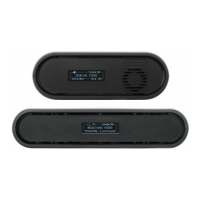
Use the Display Settings to control the OLED display operation. By default, the
OLED display will invert every 10 minutes. You can set the display to invert every 30
minutes (lengthens the display life), or it can dim or turn o after either 10 minutes or
10 seconds.
RESET ALL SETTINGS
Reset all configurable options to their factory defaults.
DEVICE INFO
Displays the model and serial number.
FIRMWARE VERSIONS
Displays the device's current firmware versions.
● Invert every 30 min
● Dim every 10 min
● Dim after 10 sec
● Dim after 10 min
● O after 10 sec
● No BurnIn Prevention
● Never show
- Disable OSD
● Show when operating
- Hide OSD until it is activated by the joystick.
● Show when no video - Display OSD when there is no video feed; hide
OSD when video appears (default).
● Always show - Always display OSD unless temporarily
deactivated by the joystick
20



 To Next Page