Teradek, LLC 2020. All rights reserved. v1.3-0620
BOLT MANAGER
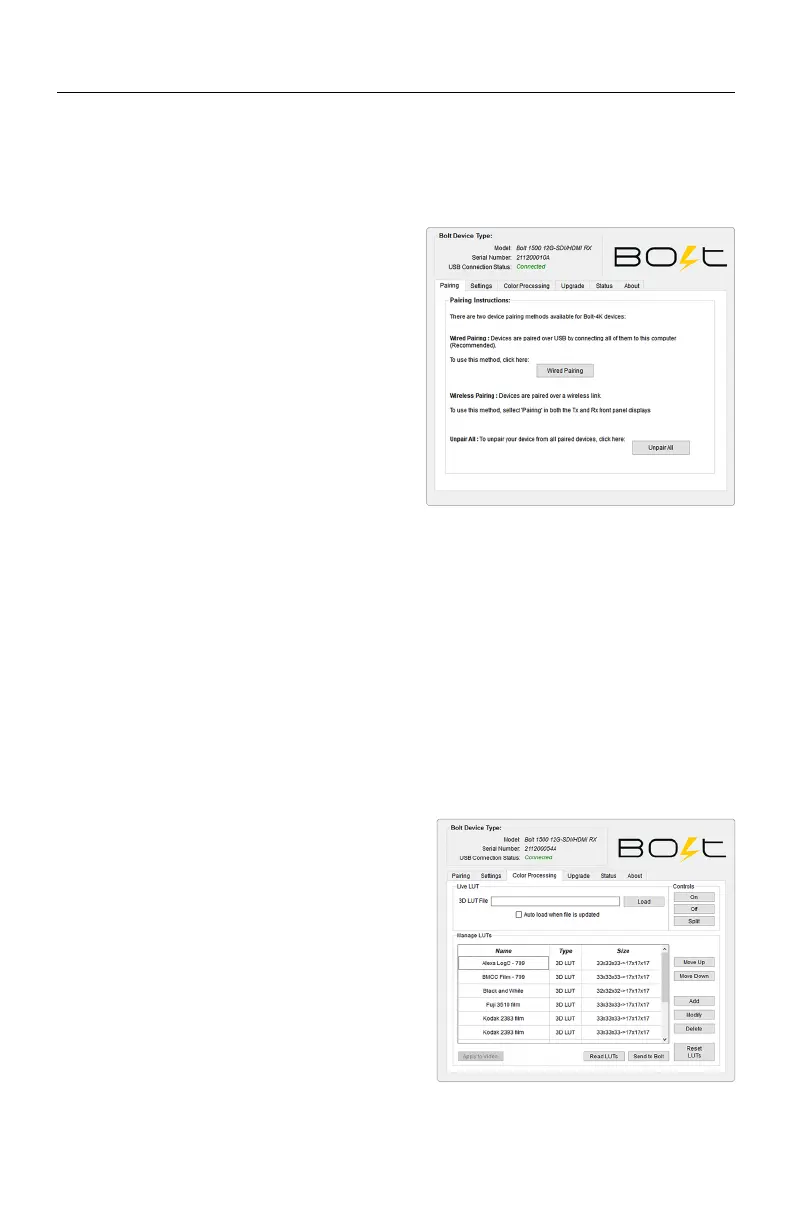
With Bolt Manager, you can configure all of your Bolt 4K devices at once. Available as
software for Windows and Mac, Bolt Manager allows you to pair multiple receivers to
your transmitter, select frequencies, load 3D LUTs, and perform firmware upgrades.
● Pairing - Pair or unpair your devices.
● Settings - Select the operating region (TX)
and modify the RX/TX name.
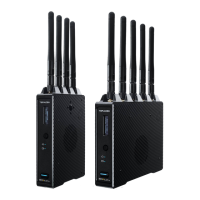
● Color Processing - Allows you to apply
3D LUTS to the receiver's video output.
● Upgrade - Update your devices with the
latest firmware.
● Status - Displays detailed information
about configuration and update statuses.
● About - Displays the software version and
License Agreement.
CONFIGURATION OPTIONS
SETTINGS
Color processing allows users to apply 3D
LUTs directly to the receiver’s video output
or to add, remove, and modify up to 16 LUTs
stored in Bolt 4K’s memory.
Live LUT - Click Load and browse for a 3D
LUT file to apply to the video output. The
following file formats are supported:
COLOR PROCESSING
● .dat (DaVinci Resolve)
● .3dl (Assimilate Scratch)
● .cube (DaVinci Resolve)
● .lut (Pomfort LiveGrade)
● .mga (Final Cut)
Select Auto load when file is updated. The LUT file will be to re-read and apply LUT
files to the video automatically whenever it is updated on your computer.
● Select Region - Configure Bolt 4K to comply with your region’s regulations
governing use of the 5GHz spectrum. Once a region is selected,
all available frequencies are enabled by default, and Bolt 4K
will automatically select an operating frequency. For all available
frequencies, refer to the FREQUENCIES BY REGION chart on
page 25. NOTE: Pairing the TX and RX is required after a
dierent region is selected.
● Select Name - Modify the transmitter or receiver’s name to make it easier to
identify among other Bolt systems that are present.
The Settings menu allows you to configure Bolt 4K's operation parameters.
NOTE: Available configuration settings will
dier between Bolt models.
21



 To Next Page