EN 25
EN
37878
05-2017
3. Bin lift operation
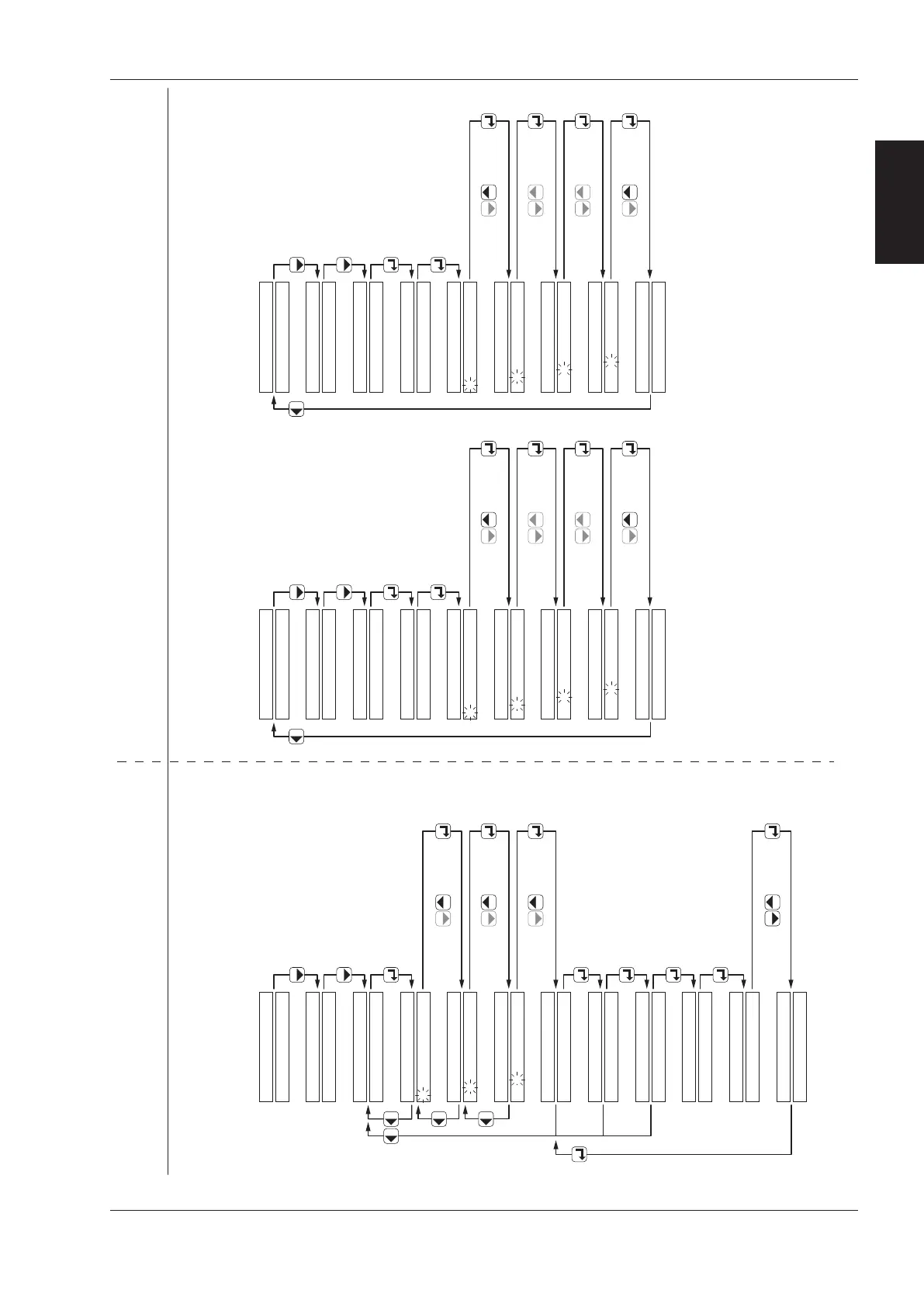
3.11.3 - 3.11.4
Diagnostic System - level 3 and 4
Bin/container counter, Machine number, Fitting date
ã Terberg Machines B.V., IJsselstein, The Netherlands
All rights reserved. No part of this book may be reproduced, stored in database or retrieval system, or published, in any form or in any way,
electronically, mechanically, by print, photoprint, microfilm or any other means without prior written permission from the publisher.
view
“MACHINE NUMBER”
enter code “1001”
ENTER CODE
0
CONFIGURATION
ENTER CODE
1 0
ENTER CODE
1 0 0
ENTER CODE
1 0 0 1
MACHINE NUMBER
1234567890
SBC10.V21 r6
CONFIGURATION
the firmware version is displayed
CONFIGURATION
TCA-PNP V1.0
ENTER CODE
view
“CONTAINER COUNTER”
(option)
ENTER CODE
1 2
ENTER CODE
ENTER CODE
1 2 3
CONTAINER
DAY COUNTER
L/H 000
R/H 000
TRADE 00
4-W DIN 00
RESET?
0
confirm withchange with
RESET?
NO
CONTAINER COUNTERS
confirm withchange with
confirm withchange with
The display shows:
Number emptied 2-wheel bins
that day
Number emptied 4-wheel containers
and 4-wheel containers with DIN-arms
RESET?
YES
Question
confirm withchange with
TCA-PNP V1.0
ENTER CODE
ENTER CODE
ENTER CODE
FITTING DATE
DATE DD/MM/YY
confirm withchange with
confirm withchange with
confirm withchange with
confirm withchange with
view
“FITTING DATE”
enter code “1002”
MONITOR
0
1 0
1 0 0
1 0 0 2
push 2x
confirm withchange with
confirm withchange with
confirm withchange with
confirm withchange with
*TERBERG OMNIDEKA*
DATE DD/MM/YY
*TERBERG OMNIDEKA*
DATE DD/MM/YY
Level 3 - Container counter Level 4 - Configuration
MONITOR
push 2x
CONFIGURATION
SBC10.V21 r6
the firmware version is displayed
*TERBERG OMNIDEKA*
DATE DD/MM/YY
MONITOR



 To Next Page