EN 27
EN
37878
05-2017
3. Bin lift operation
ã Terberg Machines B.V., IJsselstein, The Netherlands
All rights reserved. No part of this book may be reproduced, stored in database or retrieval system, or published, in any form or in any way,
electronically, mechanically, by print, photoprint, microfilm or any other means without prior written permission from the publisher.
3.11.5
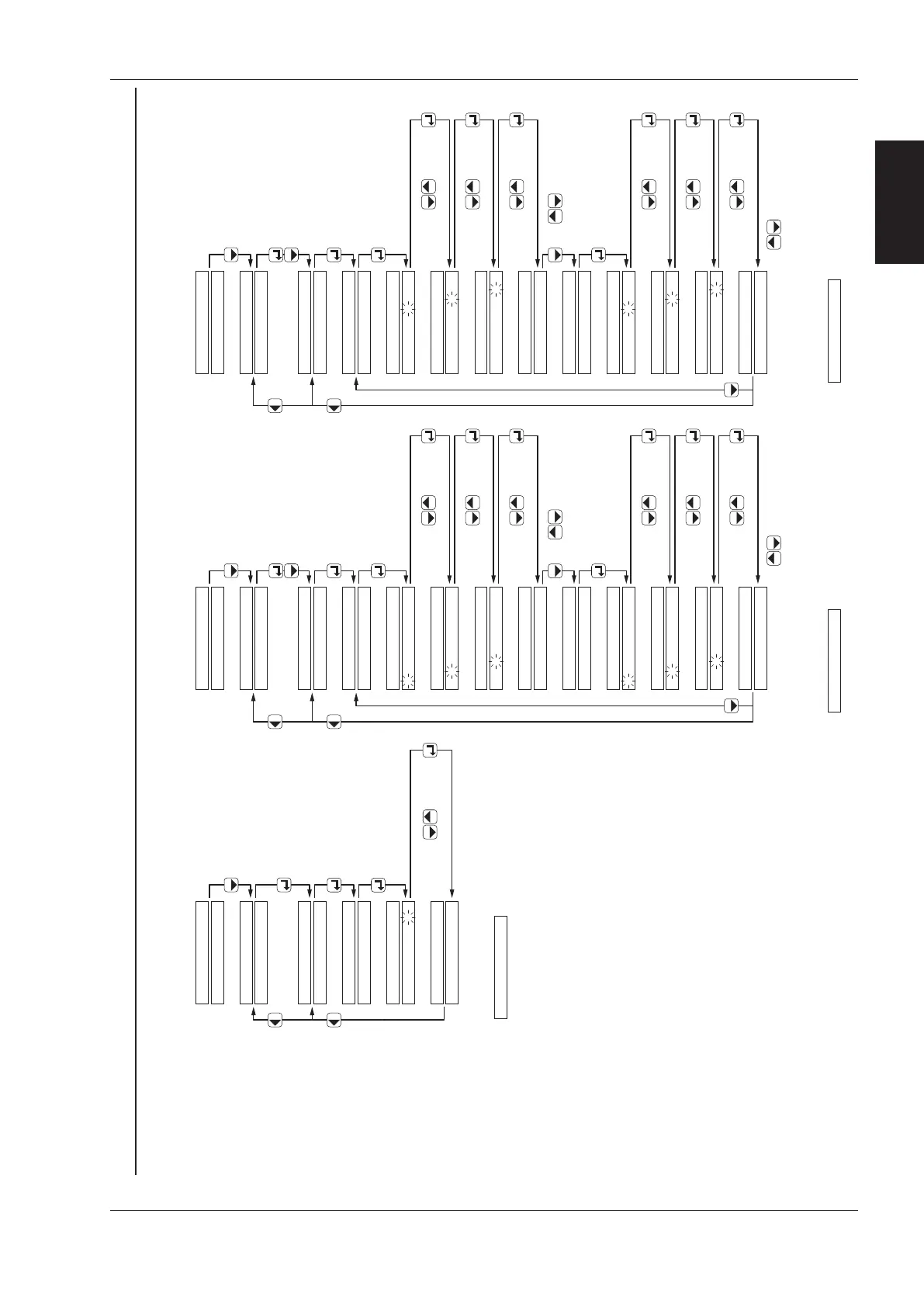
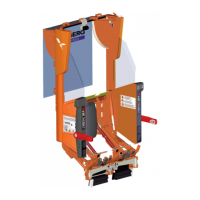
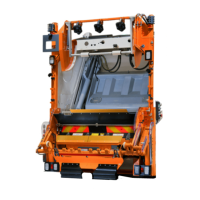
Diagnostic System - Settings
Compaction start options, Bin dump timer / Wait after dump, Single Man Trade (SMT) / Lift height
SETTINGS:
BIN DUMP TIMERS:
SETTINGS:
BIN DUMP TIME:
1.0 SECONDS
BIN DUMP TIME:
0 SECONDS
BIN DUMP TIME:
0 0 SECONDS
BIN DUMP TIME:
0 0. 0 SECONDS
MONITOR
push 3x
WAIT AFTER DUMP:
1.0 SECONDS
confirm withchange with
confirm withchange with
confirm withchange with
BIN DUMP TIME:
1.0 SECONDS
with keys you can display the
next / previous message
WAIT AFTER DUMP:
0 SECONDS
WAIT AFTER DUMP:
0 0 SECONDS
WAIT AFTER DUMP:
0 0. 0 SECONDS
confirm withchange with
confirm withchange with
confirm withchange with
WAIT AFTER DUMP:
1.0 SECONDS
with keys you can display the
previous message
SETTINGS:
SMT POSITIONS:
SETTINGS:
SMT STANDBY POS:
POSITION: 00.0%
SMT STANDBY POS:
POSITION: 0 %
SMT STANDBY POS:
POSITION: 0 0 %
SMT STANDBY POS:
POSITION: 0 0. 0 %
MONITOR
push 3x
SMT LIFT HEIGHT:
POSITION: 00.0%
confirm withchange with
confirm withchange with
confirm withchange with
SMT STANDBY POS:
POSITION: 00.0%
with keys you can display the
next / previous message
SMT LIFT HEIGHT:
SMT LIFT HEIGHT:
SMT LIFT HEIGHT:
confirm withchange with
confirm withchange with
confirm withchange with
SMT LIFT HEIGHT:
POSITION: 00.0%
with keys you can display the
previous message
POSITION: 0 %
POSITION: 0 0 %
POSITION: 0 0. 0 %
Bin DUMP TIMER
WAIT after DUMP
SETTINGS
Single Man Trade (SMT): Standby position
Lift height
Compaction start options: 2-wheel bins
4-wheel containers
Number of bins/containers before packer start
push 2x
When exceeding the max. or min. value the following message appears:
Enter value 999 for factory settings.
! VALUE OUT RANGE !
SETTINGS:
PACKER START:
SETTINGS:
MONITOR
PACKER START:
BINS FOR START: 0
push 3x
PACKER START:
BINS FOR START: 0
confirm withchange with
PACKER START:
BINS FOR START: 0
When exceeding the max. or min. value the following message appears:
Enter value 999 for factory settings.
! VALUE OUT RANGE !
When exceeding the max. or min. value the following message appears:
Enter value 999 for factory settings.
! VALUE OUT RANGE !



 To Next Page