Page 29/62
Rev. A
2017-12-04
SCANTER 1002 Radar System
User’s Manual
1255194-HO
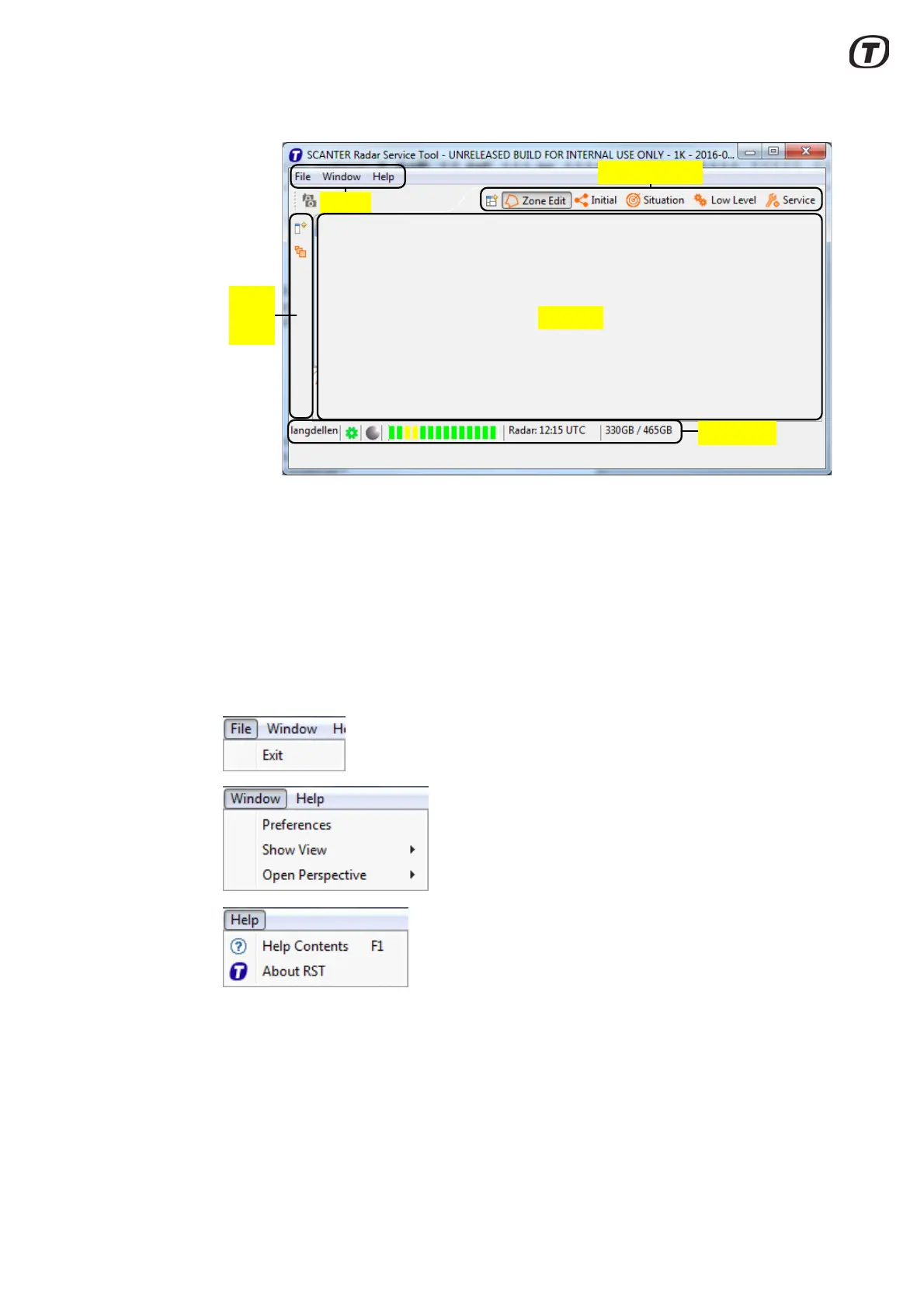
Fig. 5.1 RST, screen layout
In the “Views” area of the screen, it is possible to open interactive views for display
and handling of graphical information e.g. radar video, measurement tools, radar
control, parameters, BITE information, etc.
Presentation of these views can be selected and deselected individually.
The five default perspectives are described in section 5.5 (p. 32).
The Radar Service Tool menu bar consists of “File”, “Window” and “Help”.
Fig. 5.2 Radar Service Tool - menus and submenus
The ”File” menu is used to exit the RST, while the “Help” menu displays the RST
software version and provides information on a number of topics as well as a
search function. The help topics can also be displayed by pressing the F1 key any-
where in the RST user interface.
Menu
Views
Left
side
bar
Views
Perspectives
Status bar


 To Next Page
 Loading...