AUSTRALIA 8
Step Three - Prepare for Installation
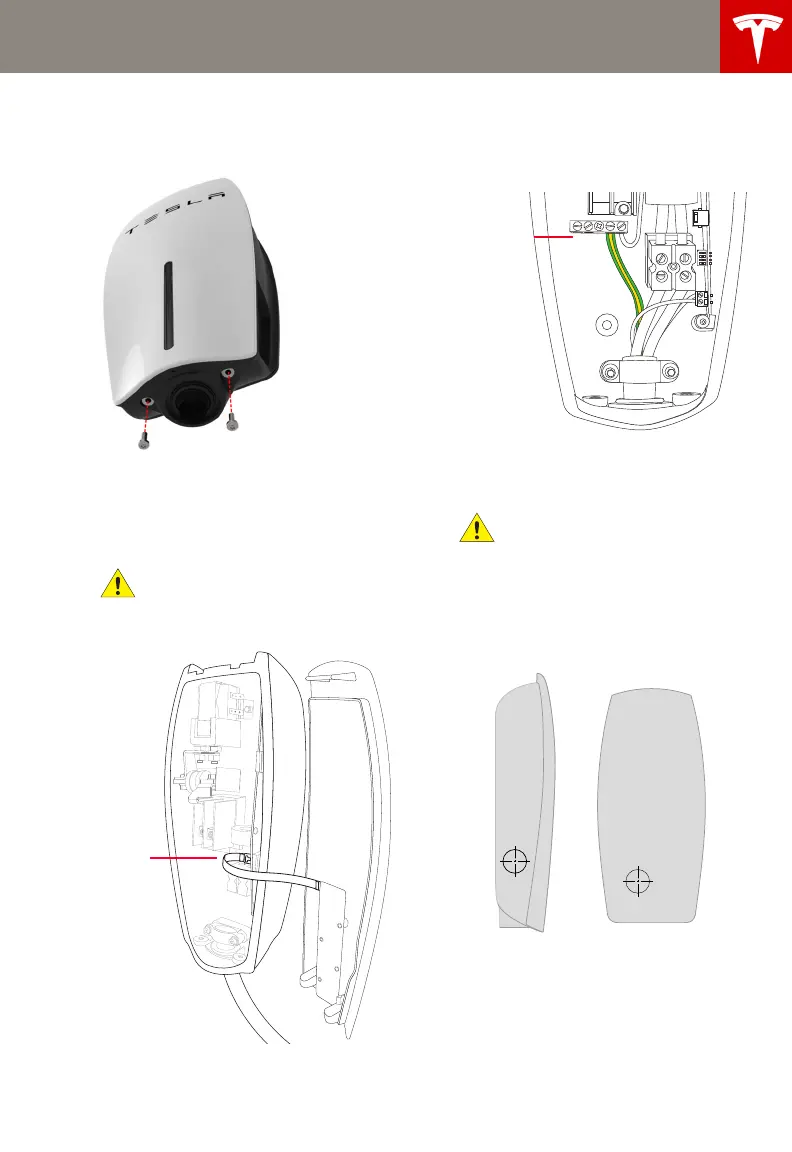
1 Using a T20 Torx driver, remove the two
security screws from the bottom of the
Wall Connector.
2 Release the front cover carefully by pulling
it towards you far enough to disconnect
the ribbon cable. Disconnect the ribbon
cable from inside the main enclosure to
fully release the front cover.
CAUTION: When removing the front
cover, do not damage the ribbon
cable. Disconnect the ribbon cable before
fully releasing the front cover.
3 Disconnect the Earth wire from the
terminal block and push it out of the way
to avoid damaging it when completing the
next step.
4 Use a 32 mm hole saw to remove the
power entry knock-out from either the
side or back of the connector.
CAUTION: When using the hole saw,
do not damage internal components.
If using the side knock-out, center the hole
saw at the indented hole and drill through
all layers. After drilling, use a sharp knife or
razor to cut and remove the rubber
molding, as indicated by the indentations
in the rubber.
NOTE: Use the back knock-out when
mounting to a pedestal or when running
wires from behind a wall.
5 Reconnect the Earth wire to the terminal
block.
Side knock-out Back knock-out
Wall_Connector_Install_Guide_Australia_Section_of_1046345-00-C.book Page 8 Thursday, July 17, 2014 10:47 AM


 To Next Page