12 • Concept C
Off and standby modes
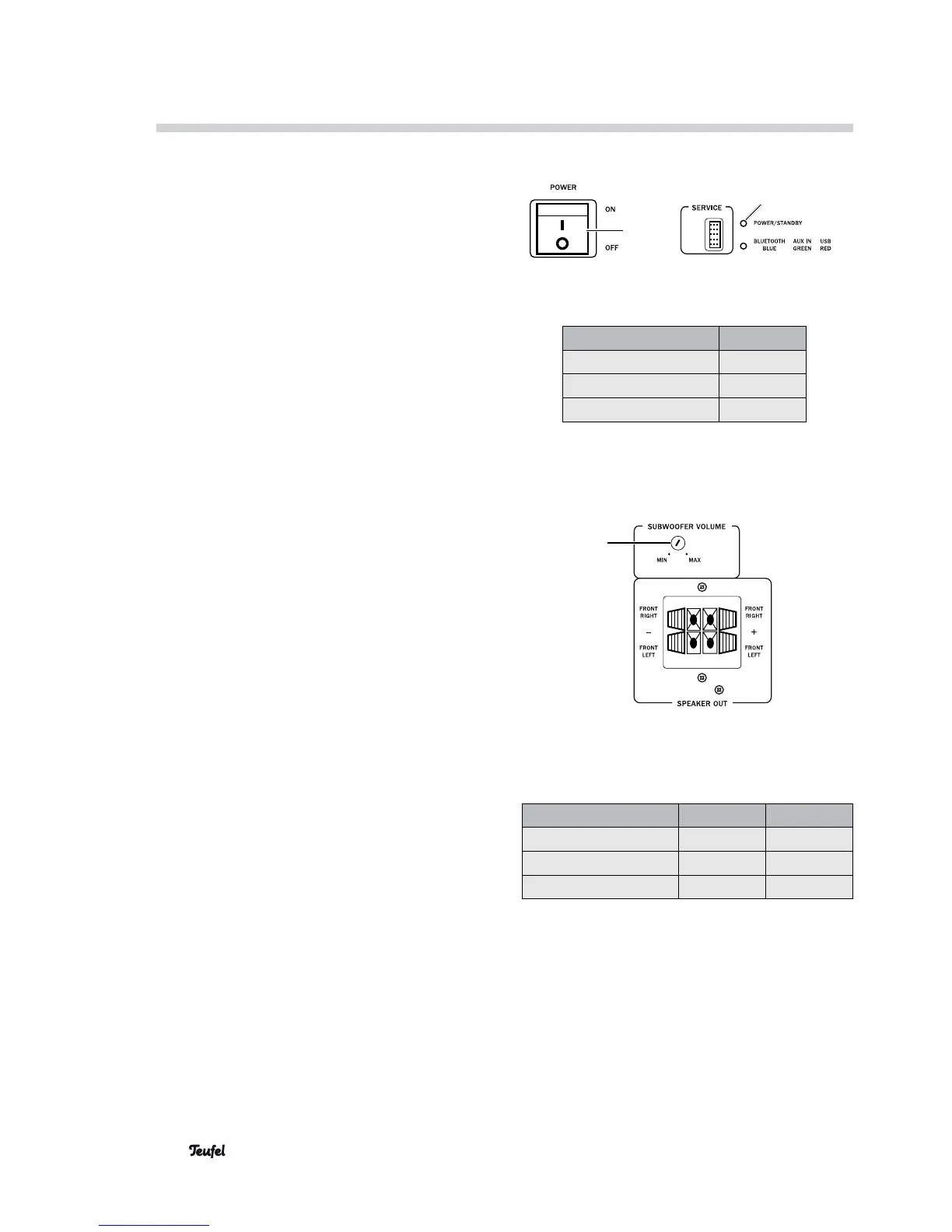
• With the power switch (14), you can turn the
subwoofer off or put it in standby mode.
In standby mode, the red LED 1 POWER / STAND-
BY (9) lights up. When the subwoofer is off, the
LED will be off.
On and standby modes
• To turn the Concept C on:
Briefly press the middle of the control dial (1) on
the remote control.
When the subwoofer is on, the green LED 1 POW-
ER / STANDBY (9) will light up.
• To put the Concept C in Standby mode:
Push and hold the middle of the control dial (1)
of the remote control until the LED ring (2) blinks
three times.
In standby mode, the red LED 1 POWER / STAND-
BY (9) will light up.
Adjusting the volume
• Adjusting the system volume:
Turn the control dial (1) on the remote control.
• Turning mute off and on:
Briefly press the control dial (1) on the remote
control.
• Adjusting the subwoofer volume:
Using a screwdriver, turn the subwoofer volume
control (12) to the desired setting.
Selecting Inputs
• Repeatedly press the side button (3). With every
push, the next input will be chosen (see table on
the right).
14
9
Subwoofer status LED 1 (9)
Off off
Standby red
On
green
Active input LED 1 (9) LED 2 (11)
USB (5)
green
red
AUX IN (6)
green
green
BLUETOOTH
green
blue
Operation and Use
12




 To Next Page