15 • Concept C
Troubleshooting
The following notes should help you to fix any malfunctions. Should this not be the case, the detailed FAQs on
our website should certainly help you. Otherwise, please contact our hotline (see page 3). Also pay attention to
the warranty notes.
Problem Possible Cause Solution
The subwoofer doesn’t
produce any sound.
The wrong input is selected. Select the correct input (see 12).
The subwoofer is on “mute.” Briefly press the control dial (1) on the remote
control.
The volume is set to “0.” Increase the volume by turning the control dial
(1) on the remote control.
The sound is not ideal. The satellite speakers are con-
nected in reverse
Connect the speakers correctly (see 10).
The subwoofer is not
working or is too weak.
The subwoofer is turned off or
has no power.
Using the power switch (14) turn the subwoofer
on. Double check the power cord and outlet.
The volume is set too low. Increase the volume using the Subwoofer Volume
(12).
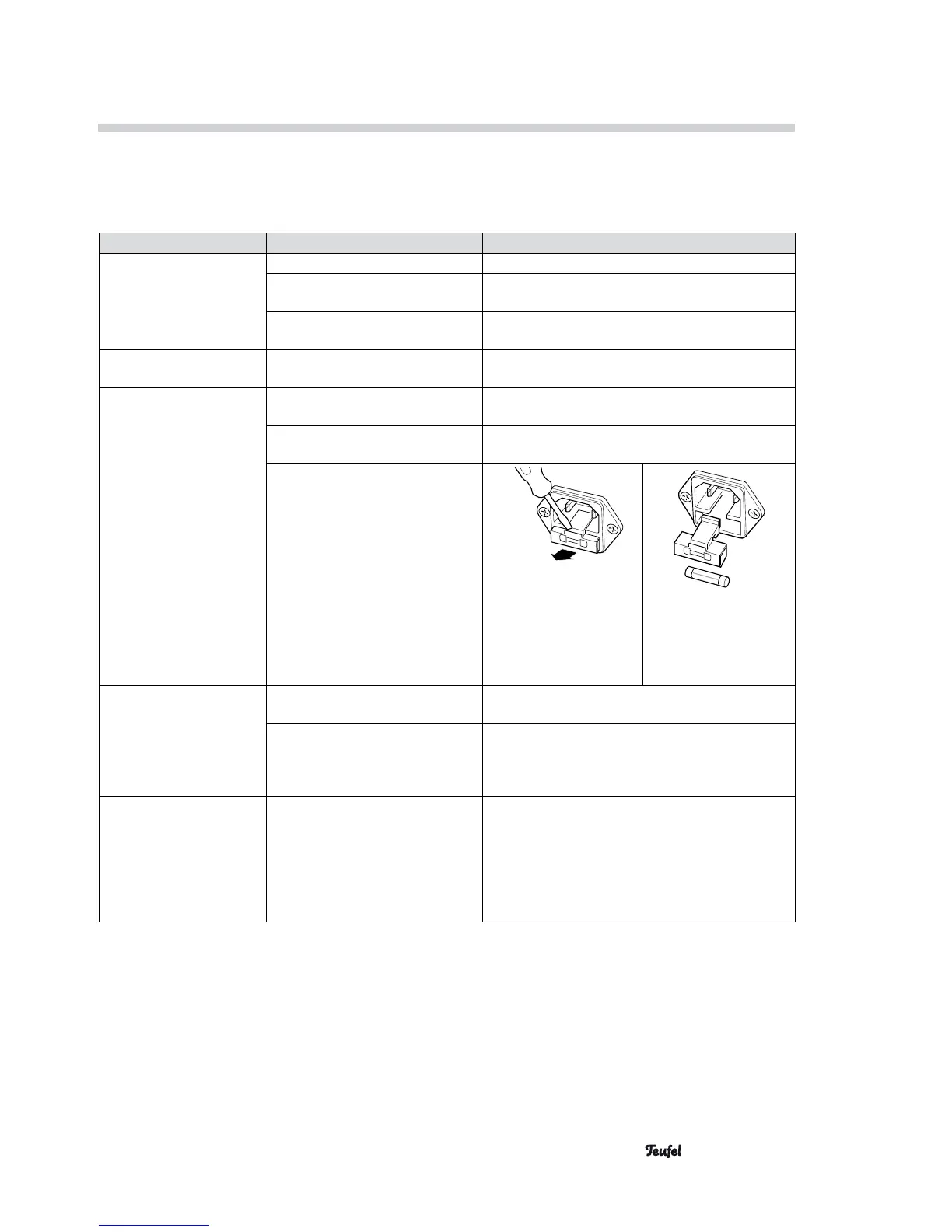
The fuse is defective. 1. 2.
Remove the power cord.
Gently pull the fuse
holder out of the power
plug socket.
Press out the old fuse
downwards. Insert a
new fuse (2 A delay)
and push back into the
holder.
The subwoofer hums. The humming is caused by prob-
lems with the power supply.
Buy a line filter and connect it to the unit.
The humming is caused by a
power strip.
Use a different power strip or connect the
subwoofer directly to the wall socket. It may also
help to insert the mains plug in the socket the
other way around.
Playback is noisy. Generally speaking, the
Concept C is a very low-noise
system. In most cases, speaker
systems with excellent resolution
in the high range area expose the
poor quality of a signal source
(e.g. from MP3 files).
Make sure that the external player emits a clear
signal to the Concept C.




 To Next Page