Appendix G
www.ti.com
28
SNAU210–March 2017
Submit Documentation Feedback
Copyright © 2017, Texas Instruments Incorporated
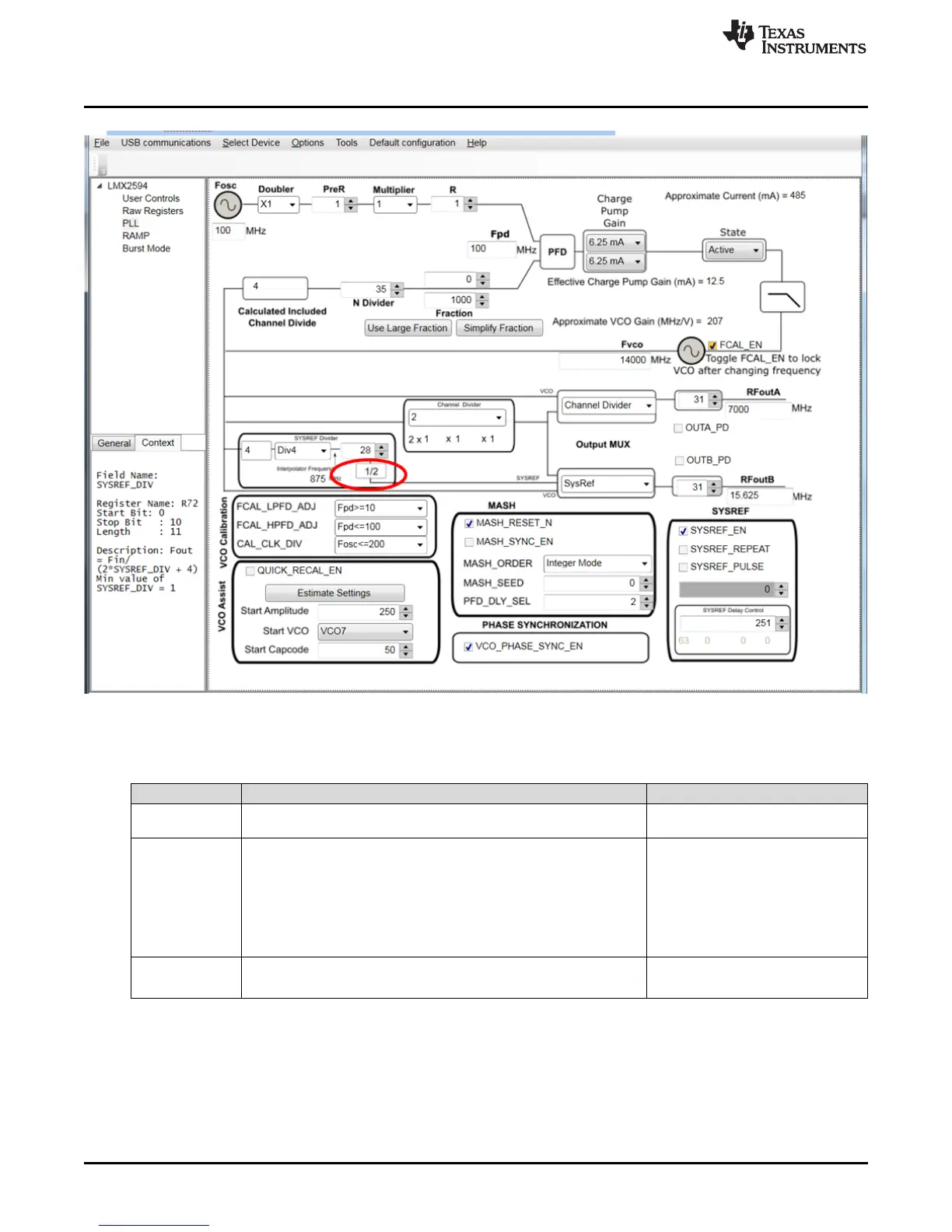
SYSREF Feature
Figure 25. Modifying SysRef Frequency
Table 8. SysRef Modes
MODE NAME DESCRIPTION TICS PRO - SYS REF SETTINGS
Master -
Continuos
LMX2594 generates SysRef pulses as long as SysRefReq pin is held
high.
Default mode. See quick start
instructions
Master - Pulse
LMX2594 generates a finite number of pulses as long as the
SysRefReq pin is held high. Note: SysRefReq must be held high for
the duration of the pulses.
• Uncheck SysRefReq under Pins
in User Controls tab
• Check SYSREF_PULSE
• Set SYSREF_PULSE_CNT to
desired number of pulses
• Check SysRefReq under Pins in
User Controls tab
Repeater
RFOUTB will repeat external input to SysRefReq pin. Output will be
reclocked to LMX2594 internal Frequency
• Uncheck SysRefReq
• Check SysRef_Repeat










 To Next Page