9
d (key with multiple menus):
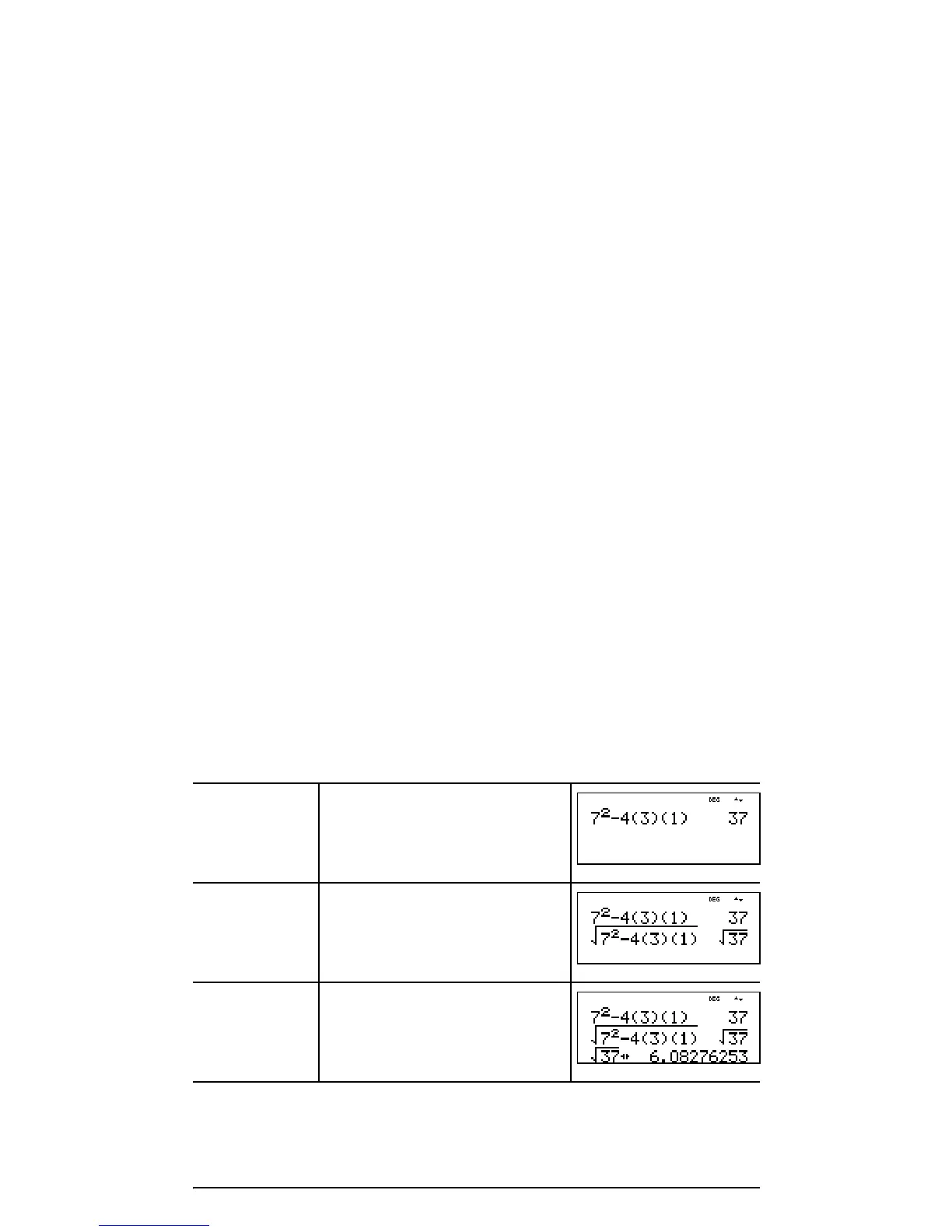
Scrolling expressions and history
! " # $
Press ! or " to move the cursor within an expression that
you are entering or editing. Press %! or % " to move
the cursor directly to the beginning or end of the expression.
After you evaluate an expression, the expression and its
result are added automatically to the history. Use # and $
to scroll through the history. You can reuse a previous entry
by pressing < to paste it on the bottom line, where you
can edit it and evaluate a new expression.
Example
MATH NUM DMS R ³´ P
1:4
n
/
d
³´U
n
/
d
1: abs( 1: ¡ 1: P ´Rx(
2: lcm( 2: round( 2: ¢ 2: P ´Ry(
3: gcd( 3: iPart( 3: £ 3: R ´Pr(
4: 4Pfactor 4: fPart( 4: r 4: R ´Pq(
5: sum( 5: int( 5: g
6: prod( 6: min( 6: ´DMS
7: max(
8: mod(
Scroll 7 F U 4
(3 )(1 ) <
%b ## <
<
r










 To Next Page