EasyManua.ls Logo

Texas Instruments TPS25730 - User Manual

Texas Instruments TPS25730
27 pages
Print Icon
To Next Page IconTo Next Page
Loading...
EVM User's Guide: TPS25730EVM
TPS25730 Evaluation Module
Description
The TPS25730D is a stand-alone USB Type-C
®
and Power Delivery (PD) controller providing cable
plug and orientation detection at the USB Type-C
connector. Upon cable plug and orientation detection,
the TPS25730D device communicates on the CC line
using the USB-PD protocol. Upon connection, the
TPS25730D enables the power path. When cable
detection and USB-PD negotiation are complete, the
negotiated voltage is passed through the power path.
Additionally, the EVM has the I2C interface accessible
by a header for debugging, as well as various test
points for signal probing.
Get Started
1. Order the EVM on ti.com
2. Download the data sheet (SLVSGP9)
3. Download the technical reference manual
(SLVUCJ7)
4. Obtain a USB PD source such as TPS25750EVM
Features
Sink only
Resistor configurable
No firmware development or external memory
required
Minimum and maximum voltage configurable
Operating and maximum current configurable
Capabilities mismatch
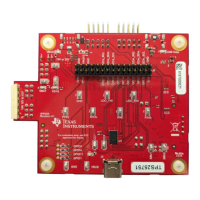
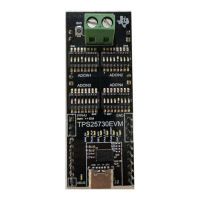
TPS25730EVM Top View
www.ti.com Description
SLVUCP4 – NOVEMBER 2023
Submit Document Feedback
TPS25730 Evaluation Module 1
Copyright © 2023 Texas Instruments Incorporated
Question and Answer IconNeed help?

Do you have a question about the Texas Instruments TPS25730 and is the answer not in the manual?

Overview

The TPS25730 Evaluation Module (EVM) is a stand-alone USB Type-C® and Power Delivery (PD) controller designed for sink-only applications. It facilitates the configuration and testing of the TPS25730 device, which manages cable plug and orientation detection at the USB Type-C connector. Once a cable is plugged in and orientation is detected, the TPS25730D communicates via the CC line using the USB-PD protocol and enables the power path. After cable detection and USB-PD negotiation are complete, the negotiated voltage is passed through the power path to the load.

Function Description:

The TPS25730 is a PD controller that enables a system to sink power through a USB-C connector, adhering to the USB-PD specification. It is designed for Standard Power Range (SPR) applications, supporting voltages between 5 V and 20 V. The EVM allows for the configuration of power settings using voltage dividers at the ADCINx pins, eliminating the need for an EEPROM, software, or a Graphical User Interface (GUI), which helps reduce Bill of Materials (BOM) cost and development time.

The power negotiation process involves:

  1. Connecting a USB-C cable from a source to the USB-C port (J2) of the TPS25730EVM.
  2. Establishing a 5 V implicit Type-C contract.
  3. The source sending its capabilities as an ordered list via the CC line.
  4. The sink (TPS25730) requesting a specific Power Data Object (PDO) from the list.
  5. The source accepting the request and sending a PS_Ready message.
  6. Power delivery from the source through the VBUS line of the USB cable, through the TPS25730 power path, and to the load via the PPHV pin.

Important Technical Specifications:

  • Power Source: The EVM is powered via the USB-C connector (J2) and requires a USB-PD capable power source operating in the Standard Power Range (SPR) of the USB-PD specification, providing between 5 V and 20 V, and no greater than 5 A.
  • Configurable Sink Capabilities:
    • Minimum voltage
    • Maximum voltage
    • Operating current
    • Maximum current
  • ADCIN Pins: The TPS25730EVM uses ADCIN1, ADCIN2, ADCIN3, and ADCIN4 input pins for configuring sink capabilities. Each ADCIN pin corresponds to a set of switches on the EVM.
    • ADCIN1: Configures minimum voltage.
    • ADCIN2: Configures maximum voltage.
    • ADCIN3 & ADCIN4: Together determine operating current and maximum current.
  • Test Points: The EVM includes several test points for signal probing:
    • TP1: VIN_3V3
    • TP2: LDO_3V3
    • TP3: LDO_1V5
    • TP4: CC1
    • TP5: CC2
  • Headers:
    • J3: Provides access to the high voltage internal power path (PPHV), I2C lines (SDA, SCL), CAP_MIS, PLUG_FLIP, DBG_ACC GPIO outputs, and the VBUS pin.
    • J4: Provides connections to ground, the four ADCIN pins, and the PLUG_EVENT GPIO output.
  • Terminal Block (J1): Allows for connecting a load to test the TPS25730 under load. The positive wire connects to the hole closest to the TI logo, and the ground wire connects to the hole closest to the SW5 switch.
  • Jumpers: Four jumpers (J5, J6, J7, J8) connect switch sets to the corresponding ADCIN pins. J5 connects to ADCIN4, J6 to ADCIN3, J7 to ADCIN2, and J8 to ADCIN1. These jumpers can be removed to populate resistors for permanent ADCIN configuration.
  • Resistor Configuration: Resistor pads R22, R23, R24, R25 are pull-up resistors for ADCIN1, ADCIN2, ADCIN3, and ADCIN4 respectively. R30, R31, R32, R33 are pull-down resistors for the same ADCINs.
  • LED Indicators: Labeled LEDs provide device status information corresponding to GPIO events:
    • SINK_EN: Indicates when PPHV is enabled (LED off when PPHV is disabled).
    • PLUG_FLIP: Indicates USB-C plug orientation (LED on when plug is upside-down).
    • DBG_ACC: Indicates if a debug accessory is connected (LED on when connected).
    • PLUG_EVENT: Indicates connection to a source device via USB-C plug (LED on when connected).
    • CAP_MIS: Indicates a mismatch in capabilities between source and TPS25730 (LED blinks continuously when mismatch occurs).

Usage Features:

  • Switch-Based Configuration: The EVM features four sets of 8-position DIP switches (SW2, SW3, SW4, SW5) for configuring the ADCINx pins. Only one switch in each set should be in the ON position for successful configuration. Each switch number corresponds to an ADCIN decoded value (0-7).
    • ADCIN1 (Minimum Voltage): Decoded values 0-4 correspond to 5V, 9V, 12V, 15V, 20V respectively. Values 5-7 are reserved.
    • ADCIN2 (Maximum Voltage): Decoded values 1, 3, 5, 7 correspond to 9V, 12V, 15V, 20V respectively.
    • ADCIN3 & ADCIN4 (Operating and Maximum Current): Configured together based on a combination of their decoded values, providing various current settings from 0A to 5A.
  • Push Button (SW5): Controls the FAULT_IN GPIO input. Pressing SW5 sets FAULT_IN to logical high.
  • Debugging: The I2C interface is accessible via a header for debugging, and various test points allow for signal probing.
  • Example Configuration: To accept 5 V-20 V and operate at 3 A, the following switch settings are required:
    • ADCIN1: Decoded value 0 (Switch 1 ON) for 5 V minimum voltage.
    • ADCIN2: Decoded value 4 (Switch 5 ON) for 20 V maximum voltage.
    • ADCIN3: Decoded value 3 (Switch 4 ON) for 3 A operating current.
    • ADCIN4: Decoded value 1 (Switch 2 ON) for 3 A maximum current. All other switches should be in the OFF position.

Maintenance Features:

  • Permanent Configuration: Jumpers (J5, J6, J7, J8) can be removed, and resistors can be populated on the board to permanently configure ADCIN settings, eliminating the need for switches. For example, for ADCIN4, R33 is connected to ground and R25 to LDO_3V3. Populating these resistors with values corresponding to a desired ADCIN decoded value provides a permanent configuration.
  • Documentation: The user guide provides detailed information on the TPS25730 data sheet (SLVSGP9) and technical reference manual (SLVUCJ7) for further understanding and troubleshooting.
  • ESD Protection: The device is sensitive to electrostatic discharge (ESD), and storage in a protective ESD bag is recommended.

Texas Instruments TPS25730 Specifications

General IconGeneral
BrandTexas Instruments
ModelTPS25730
CategoryMotherboard
LanguageEnglish

Related product manuals