2.7.4 Complete Example
Find the appropriate ADCIN decoded values for ADCIN1, ADCIN2, ADCIN3, and ADCIN4 if the system is
needed to accept 5 V-20 V, and operate at 3 A. The table below details the appropriate settings:
Table 2-10. Example Settings
ADCIN Pin Desired Behavior ADCIN Decoded Value ADCIN Switch to Turn ON
ADCIN1 Minimum voltage: 5 V 0 1
ADCIN2 Maximum voltage: 20 V 4 5
ADCIN3
ADCIN4
Operating current: 3 A
Maximum current: 3 A
3
1
4
2
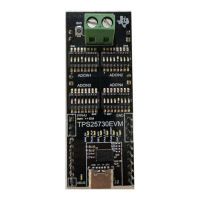
The ADCIN1 decoded value for a minimum voltage configuration of 5 V is 0. The ADCIN2 decoded value for
a maximum value of 20 V is 4. The operating current and maximum current needs to be 3 A. The combination
of ADCIN3 and ADCIN4 decoded values to meet the required combination of operating current and maximum
current is 3 and 1, respectively. Using the Switch to Decoded Table values, set the ADCIN1 switch 1 to on, the
ADCIN2 switch 5 to on, the ADCIN3 switch 4 to on, and the ADCIN4 switch 2 to on. All other switches are in the
OFF position.
Once the configuration is set, plug in the source by the USB-C connector. The PLUG_EVENT indicator LED
lights up to indicate the cable is plugged in. The CAP_MIS indicator LED blinks continuously if the Capabilities
Mismatch bit is set, which occurs when a source cannot provide a minimum power of 15 W, or a voltage inside
the range of 5 V to 20 V (including 5 V and 20 V) cannot be provided. The plug flip LED lights up if the plug is
inserted upside down.
www.ti.com Hardware
SLVUCP4 – NOVEMBER 2023
Submit Document Feedback
TPS25730 Evaluation Module 9
Copyright © 2023 Texas Instruments Incorporated






 To Next Page