42
Technical Information
Service Manual
6. Function and Control
status. If you want to turn off the light, please press LIGHT button.
Press this button again to turn on the light.
(7). Viewing ambient temperature
In unit on status, receiver light board or wired controller is
defaulted to display setting temperature. Press TEMP button to
view indoor or outdoor ambient temperature.
When
is displayed, it means the displayed temperature is
setting temperature.
When
is displayed, it means the displayed temperature is indoor
ambient temperature.
When
is displayed, it means the displayed temperature is
outdoor ambient temperature.
Note: setting temperature is always displayed in Remote
Controller.
(8). Setting X-FAN function
In cool or dry mode, press X-FAN button to set X-FAN function.
When
is displayed, X-FAN function is on.
When is not displayed, X-FAN function is off.
When X-FAN function is on, the water on the evaporator will be
blown away until turning off the unit to avoid mildew.
(9). Setting sleep function
In unit on status, press SLEEP button to turn on or turn off sleep
function.
①
When
is displayed, sleep function is on.
②
When
is not displayed, sleep function is off.
Notes:
①
Sleep function can not be set in auto and fan mode;
②
When turning off the unit or switching mode, sleep function is
cancelled;
(10). Setting I FEEL function
In unit on status, press I FEEL button to turn on or turn off I FEEL
function.
When
is displayed, I FEEL function is on.
When
is not displayed, I FEEL function is off.
When I FEEL function is turned on, the unit will adjust temperature
according to the temperature detected by the remote controller to
achieve the best air-conditioning effect. In this case, you should
place the remote controller within the valid receiving range.
(11). Setting timer
You can set the operation time of unit as you need. You can also
set timer on and timer off in combination.
Before setting, check if the time of the system is the same as the
current time. If not, please set the time according to current time.
(12). Setting timer off
①
Pressing TOFF button, “OFF” is blinking and time displaying
zone displays the timer time of last setting.
②
Press
or button to adjust the timer time.
③
Press TOFF button again to conrm setting. OFF is displayed
and time
displaying zone resumes to display current time.
4. Press TOFF button again to cancel timer and OFF is not
displayed.
13). Setting timer on
①
Pressing TON button, “ON” is blinking and time displaying zone
displays the timer time of last setting.
②
Press
or button to adjust the timer time.
③
Press TON button again to conrm setting. ON is displayed and
time displaying zone resumes to display current time.
④
Press TON button again to cancel timer and ON is not
displayed.
Introduction of special functions
(1). Setting child lock
Press
and button simultaneously to lock the buttons on
remote controller and is
displayed.
Press
and button simultaneously again to unlock the buttons
on remote controller and is not displayed.
If the buttons are locked,
blinks 3 times when pressing the
button and any operation on the button is invalid.
(2). Switching temperature scale
In unit off status, press MODE button and
button simultaneously
to switch temperature scale between
o
C and
o
F.
(3). Setting energy-saving function
In unit on status and under cool mode, press CLOCK and TEMP
button simultaneously to enter energy-saving mode.
● When
is displayed, energy-saving function is on.
● When
is not displayed, energy-saving function is off.
If you want to turn off the energy-saving function, press CLOCK
and TEMP button and is not displayed.
Note: energy-saving function is only available in cooling mode
and it will be exited when switching mode or setting sleep function.
(4). Absence function
In unit on status and under heat mode, press CLOCK and TEMP
button simultaneously to enter absence function. Temperature
displaying zone displays 8 and is
displayed.
Press CLOCK and TEMP button simultaneously again to exit
absence function. Temperature displaying zone resumes previous
display and is not displayed.
In winter, absence function can keep the indoor ambient
temperature above 0
o
C to avoid freezing.
Note: Absence function is only available in heating mode and it
will be exited when switching mode or setting sleep function.
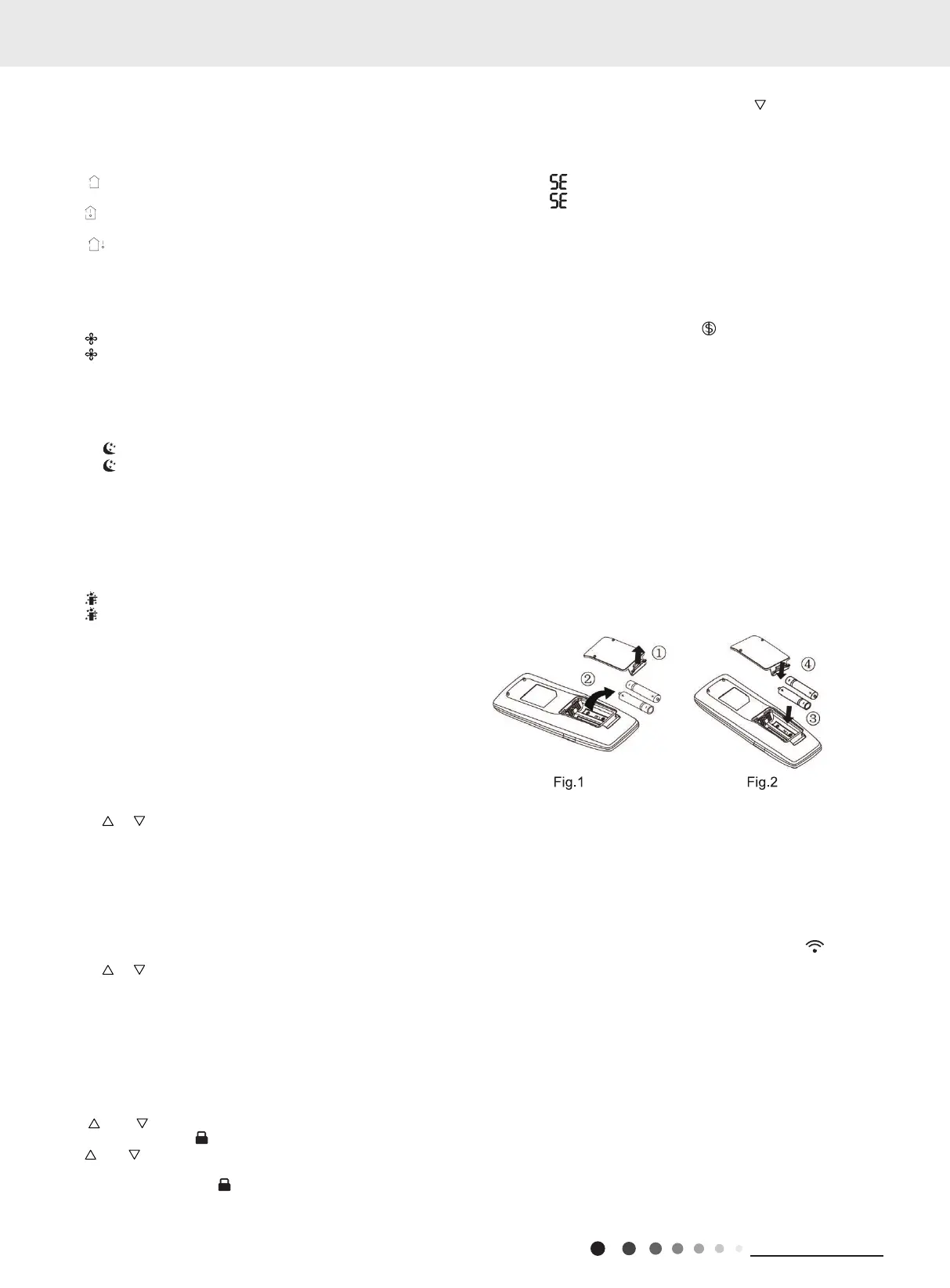
Replacing batteries in remote controller and notes
(1). Lift the cover along the direction of arrow (as shown in Fig
1
①
).
(2). Take out the original batteries (as shown in Fig 1
②
).
(3). Place two 7# (AAA 1.5V) dry batteries, and make sure the
position of “+” polar and “-” polar is correct (as shown in Fig 2
③
).
(4). Reinstall the cover (as shown in Fig 2
④
).
Notes:
①
The remote controller should be placed 1m away from the TV
set or stereo sound sets.
②
The operation of remote controller should be performed within
its receiving range.
③
If you need to control the main unit, please point the remote
controller at the signal receiving window of the main unit to
improve the receiving sensibility of main unit.
④
When the remote controller is sending signal, “
” icon will be
blinking for 1 second. When the main unit receives valid remote
control signal, it will give out a sound.
⑤
If the remote controller does not operate normally, please take
the batteries out and reinsert them after 30 seconds. If it still can't
operate properly, replace the batteries.
⑥
When replacing the batteries, do not use old or different types
of batteries, otherwise, it may cause malfunction.
⑦
When you won’t use the remote controller for a long time,
please take out the batteries.



 To Next Page