41
Technical Information
Service Manual
6. Function and Control
6.1 Remote Controller Introduction
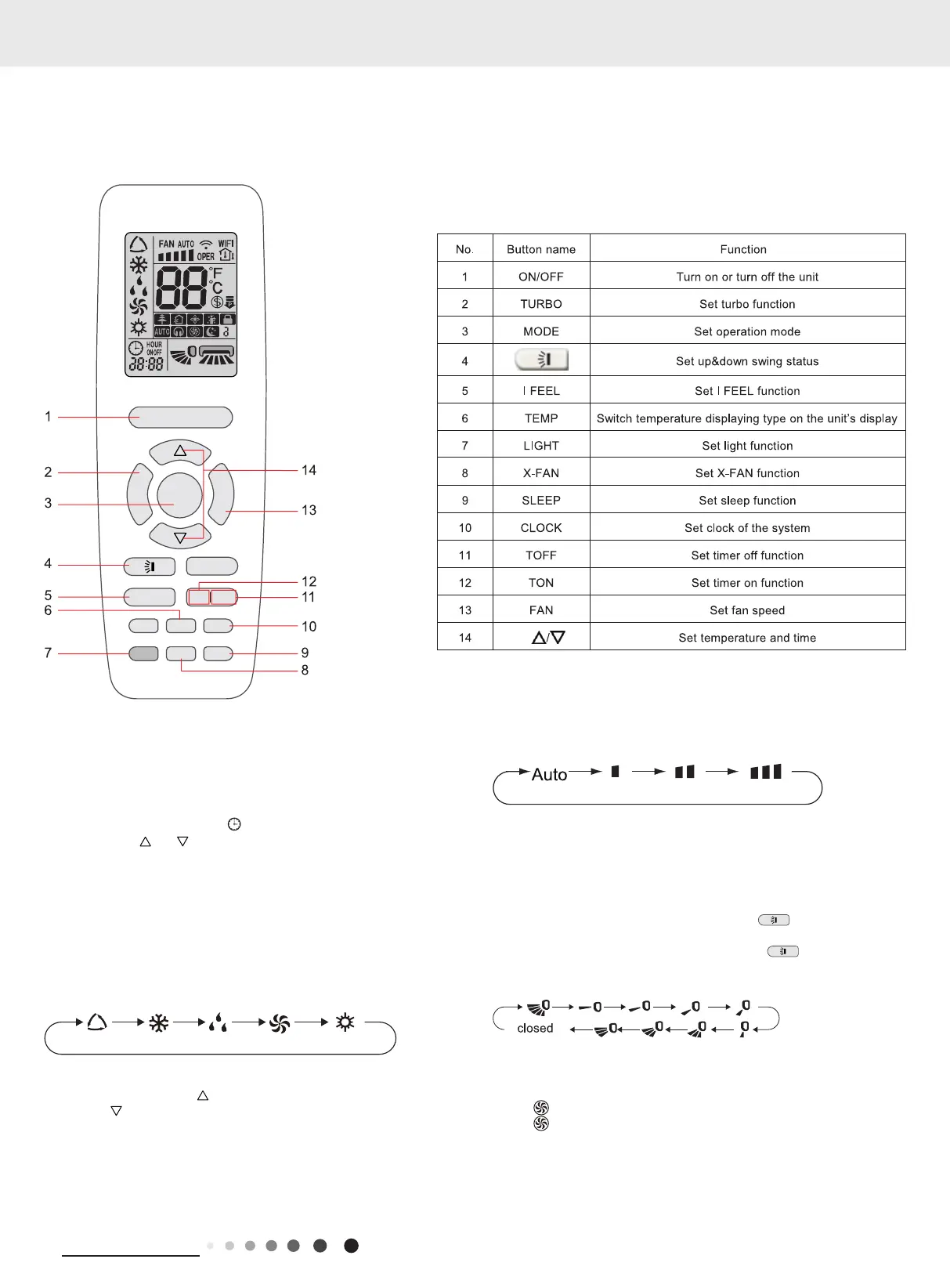
Buttom name and function intruduction
Preparation before operation
When using the remote controller for the first time or after
replacing the batteries, please set the time of the system
according to current time in the following steps:
(1). Pressing CLOCK button,
is blinking.
(2). Pressing
or button, the clock time will increase or
decrease rapidly.
(3). Press CLOCK button again to conrm the time and return to
display current time.
Introduction of operation function
(1). Selecting operation mode
In unit on status, press MODE button to select operation mode in
following sequence:
(2). Setting temperature
In unit on status, press button to increase setting temperature
and press
button to decrease setting temperature. The range of
temperature is from 16
o
C to 30
o
C.
Note: Under auto mode, manual adjustment of temperature is not
needed.
(3). Adjusting fan speed
In unit on status, press FAN button to adjust fan speed in following
ON/OFF
MODE
I FEEL
T-ON T-OFF
TEMP
CLOCK
LIGHT
X-FAN
SLEEP
TURBO
FAN
sequence:
Notes:
①
When operation mode changes, fan speed is memoried;
②
Under dry mode, fan speed is low and can not be adjusted.
(4). Setting swing function
Setting up&down swing
1). Under simple swing status, press
button to adjust
up&down swing status;
2). Under fixed-angle swing status, press
button to adjust
up&down swing angle circularly as below:
(5). Setting turbo function
Under cool or heat mode, press TURBO button to set turbo
function.
When
is displayed, turbo function is on.
When
is not displayed, turbo function is off.
When turbo function is on, the unit operates in super high speed
to achieve quick cooling or heating. When turbo function is off, the
unit operates in setting fan speed.
(6). Setting light function
The light on the receiver light board will display present operation



 To Next Page