EasyManua.ls Logo

Tharo Systems H-427+ - Error Alerts

Default Icon
61 pages
Print Icon
To Next Page IconTo Next Page
To Previous Page IconTo Previous Page
Loading...
3.5 Error Alerts
Printhead Open
Check Ribbon
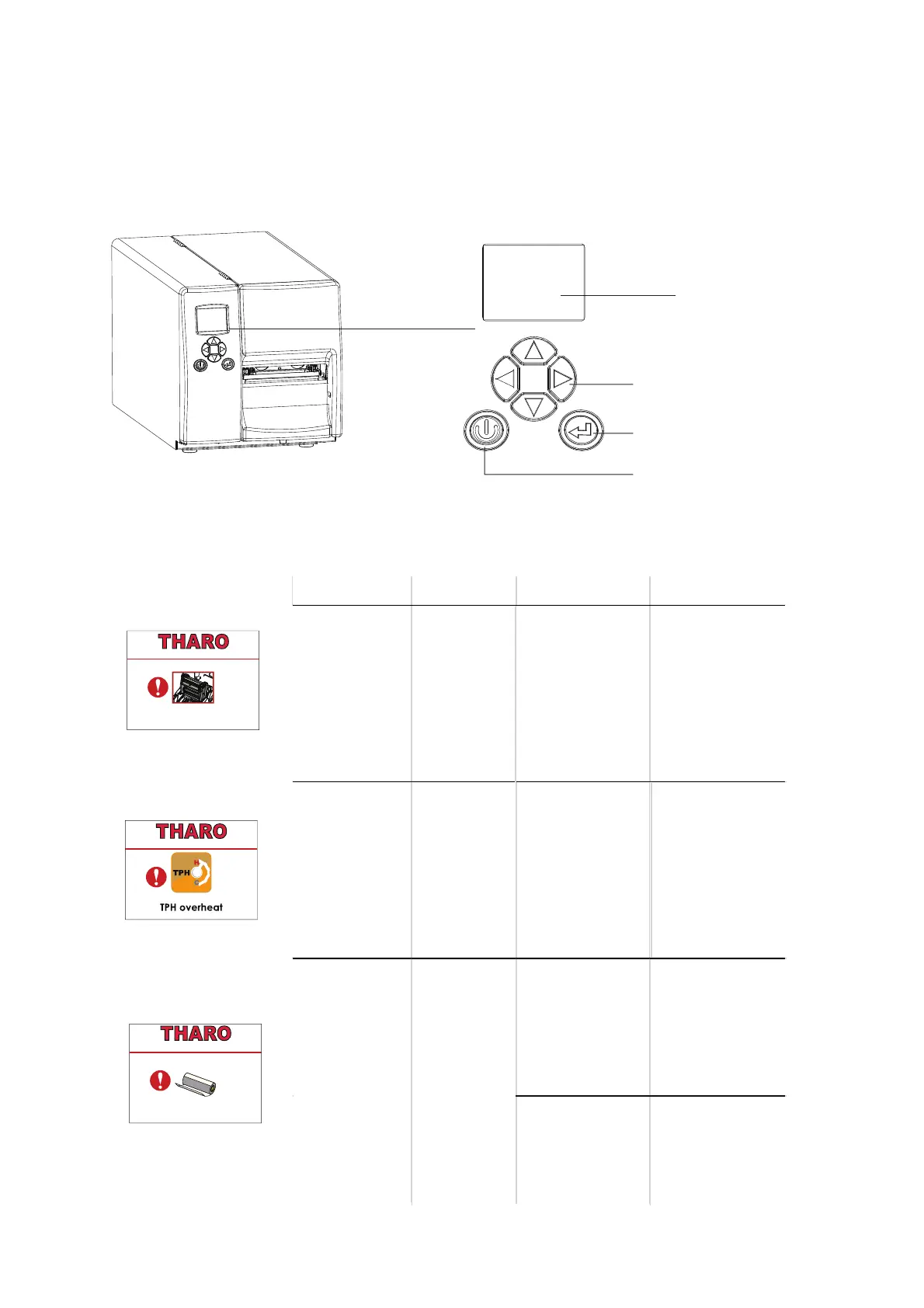
FEED BUTTON
OPERATION PANEL
POWER BUTTON
LCD SCREEN
DIRECTION KEY
26
In the event of a problem that prevents normal functioning of the printer, you will see an error message on LCD
screen and hear some beep signals. Please refer to below table for the errors, causes and possible solutions.
Type Beeps Description Solution
Print Head Error 2 x 4 beeps
The print head
mechanism is not
locked in place.
Open the print
mechanism and
close it again.
Print Head Error None
High temperature
at the print head.
Once the print
head has cooled
down, the printer
goes back to
standby mode.
No ribbon is
installed and using
Direct Thermal
label stock.
Make sure that
the printer is set to
Direct Thermal
printing mode.
The ribbon is
used up or the
label supply hub is
not mov ing.
Replace the
ribbon roll.
Media Error
2 x 3 beeps
3 Printer Settings and Control
H-427+ V1.R91
H-427+ V1.R91
H-427+ V1.R91

Related product manuals