7
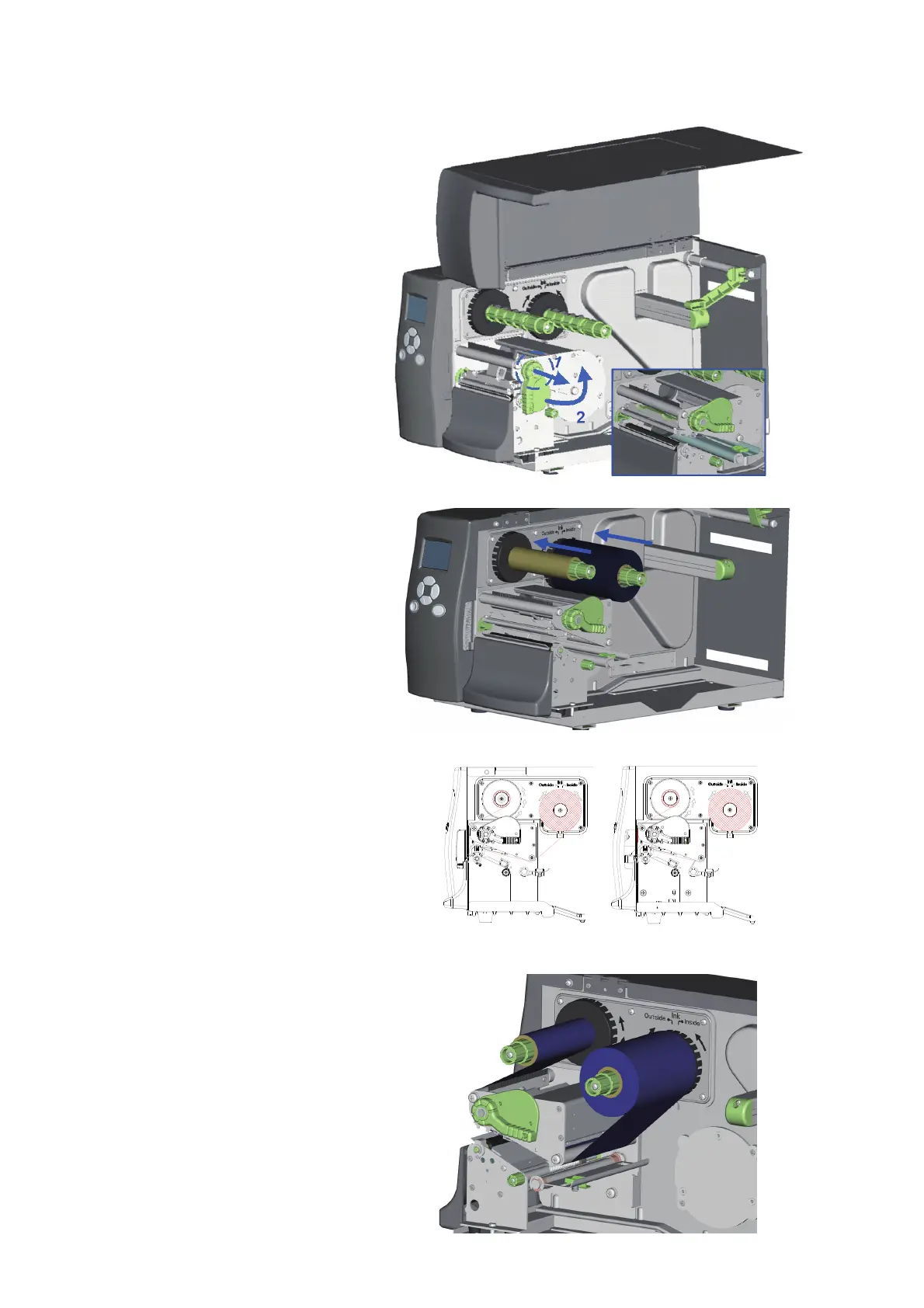
1. Open the Printer’s top cover.
2. Pull the Printhead Lever out
and rotate it upward to the
right (counterclockwise) to
open the Printhead.
3. Place the new ribbon roll
onto the Ribbon Supply Hub
and place an empty ribbon
core onto the Ribbon Rewind
Hub.
4. The figure to the right shows
two different installation
methods. One is for ink-in
ribbon and one for ink-out
ribbon.
5. Feed the ribbon from the
Ribbon Supply Hub under the
Printhead. Be sure that the
ribbon is not fed under the
Moveable Sensor.
6. Attach the end of the ribbon
to the empty ribbon core using
adhesive tape or part of a label.
7. Rotate the Printhead Lever
clockwise back to its original
position making sure it snaps
into place.
8. Close the Top Cover to complete
the ribbon installation.



 To Next Page