21
MAINTENANCE MODE
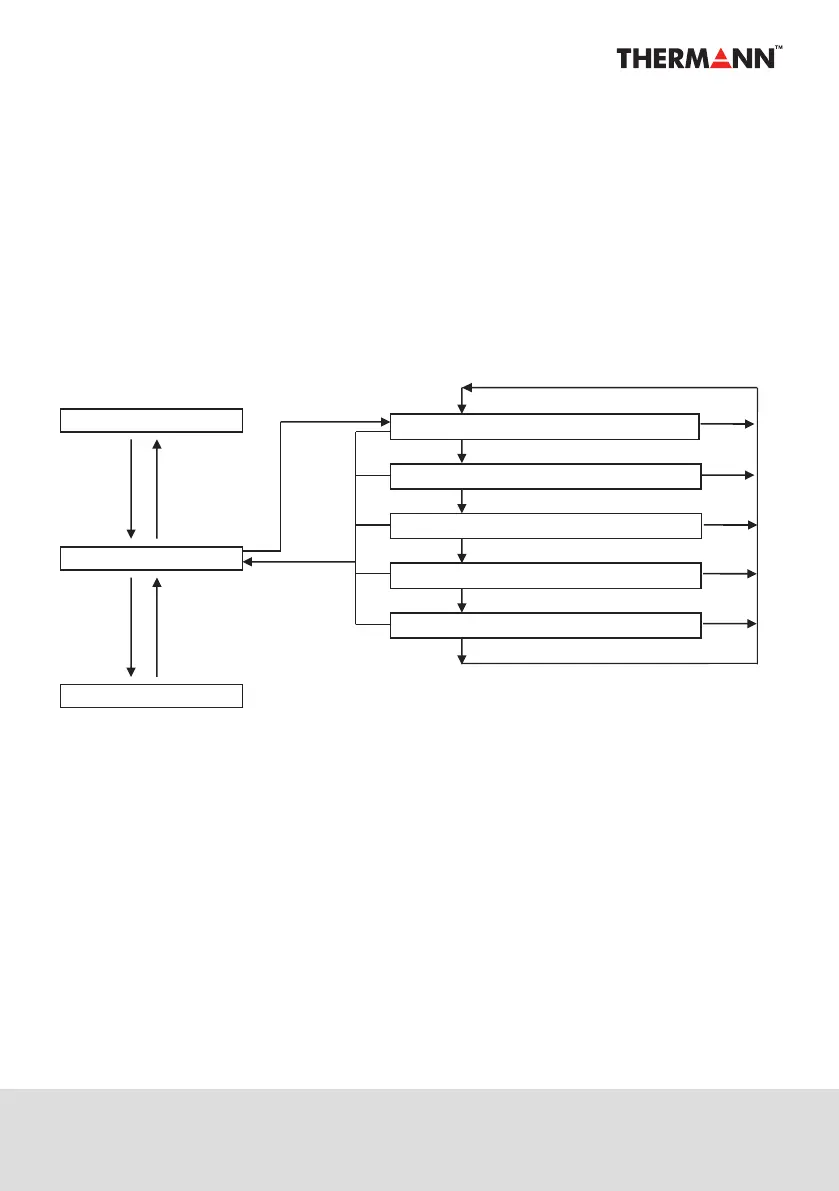
HOW TO SWITCH TO MAINTENANCE MODE
Press and hold down▲and▼keys together in the clock display mode to go to the
maintenance mode. After the mode is switched, press the Enter key to select a mode from
the five modes described above. To exit the maintenance mode, press and hold the Enter key,
or leave for more than 60 seconds with no panel operation.
Display Sleep Mode
Clock Display Mode
Clock Setting Mode
Any Key
Enter
No Operation
for 60sec
Enter
or
No Operation
for 60sec
Hold down “▲”
“▼”together
Enter
“ ” is reverse
Hold Enter
or
No Operation
for 60sec
Enter
Enter
Enter
Heat Setting Mode [H_SE]
Block out Time Setting Mode [bo ]
Error History Display Mode [Err ]
Parameter Display Mode [d_no]
Air Removing Mode [Air ]
▼
Enter
▼


 To Next Page