ThinkPadTablet2Dock
TheThinkPadTablet2Dock(hereaftercalledthedock)holdsyourtabletinanuprightpositionandfreesyour
handstodoothertasks.ItalsoprovidesyouwitheasyaccesstoconnectorsforUSBdevices,letransfers,
charging,audioinput,audiooutput,andvideooutput.
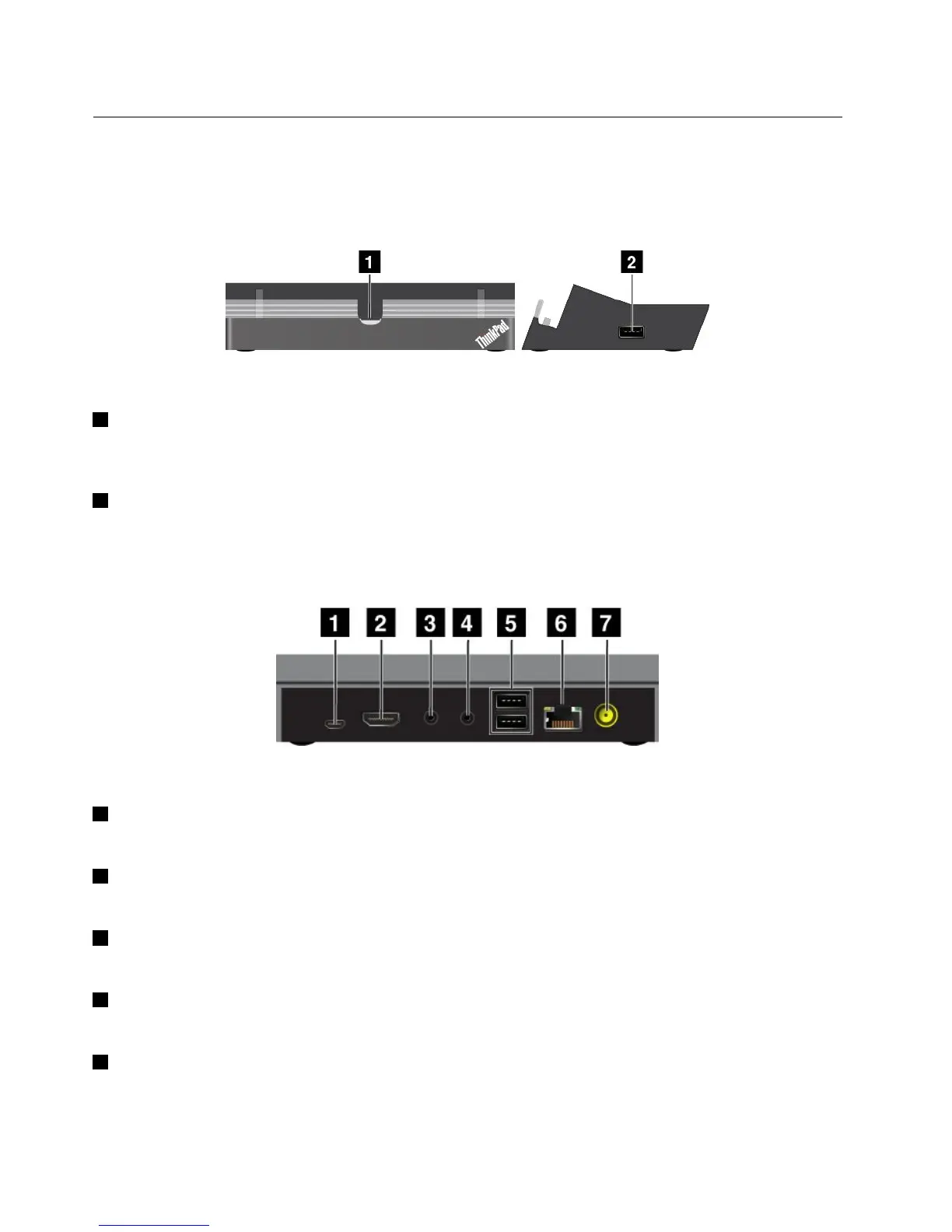
Figure6.Dockfrontviewandrightsideview
1Dockconnector
Thisconnectorestablishestheconnectionbetweenthedockandtabletwhenyourtabletisseatedinthe
dock.
2USBconnector
ConnectUSBdevices,suchasaUSBkeyboardoraUSBstoragedevice.
Note:ThisconnectoriscompatiblewiththeUSB2.0standard.
Figure7.Dockrearview
1dc-inconnector
Note:Thedc-inconnectordoesnotworkfortheThinkPadTablet2.
2HDMIconnector
Connectacompatibledigitalaudiodeviceorvideodisplay.
3Headphoneconnector
Connectaheadphoneorpoweredspeakerstolistentotheaudiooutput.
4Microphoneconnector
Connectamicrophonetocapturesound.
5USBconnectors
ConnectcompatibleUSBdevices.
28UserGuide



 To Next Page