9
Installing the product
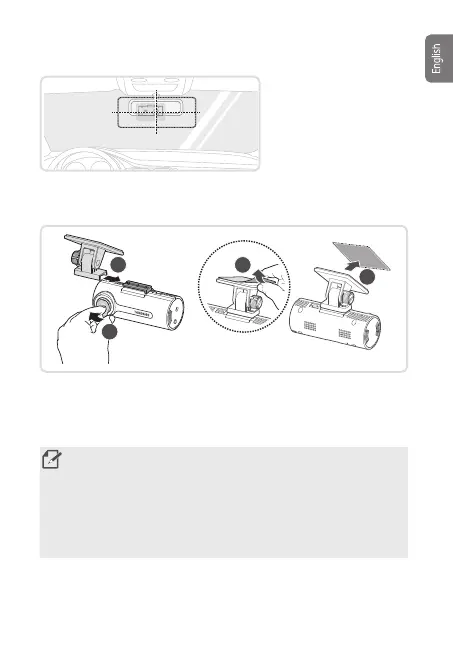
Select an installation
location that can record the
entire view in front of the
vehicle without obstructing
the driver’s vision. Ensure
that the front camera lens is
located in the center of the
windshield.
1.Refertotheguresbelowtoinstallthecameratothewindshield.
3
4
1
2
2. Remove the product from the mount, and then push the mount against
thewindshieldtoxitrmly.
3. Reattach the product to the mount, and then adjust the camera angle.
• Toconrmthecameraangle,recordavideoafterinstallationandcheck
the video using the PC viewer. If necessary, adjust the camera angle
again.
• Tightenthexscrewusingaat-headscrewdriveroracoin.
• The product may fall and be damaged during vehicle operation if it is not
rmlyxedtothemount.
• If you need to remove the mount from the windshield to alter the
installationlocation,becarefulnottodamagethewindshield’slmcoat.
F70_QSG.indb 9F70_QSG.indb 9 2021-08-09 오후 1:08:532021-08-09 오후 1:08:53



 To Next Page