12
2-4. Lane Departure Warning System (LDWS)
Audible warning noties the driver in real time when the vehicle is leaving its lane. This warning is only en-
abled when the vehicle is traveling above 50km/h (approx 30mph)
* Default setting : 80km/h (approx 50mph)
2-5. Forward Collision Warning System (FCWS)
Audible warning noties the driver in real time to avoid possible rear-end collision when the vehicle is ahead
is slowing or stopped. The warning is only enabled when the vehicle is traveling above 30km/h (approx 20
mph)
GPS LED
GPS LED
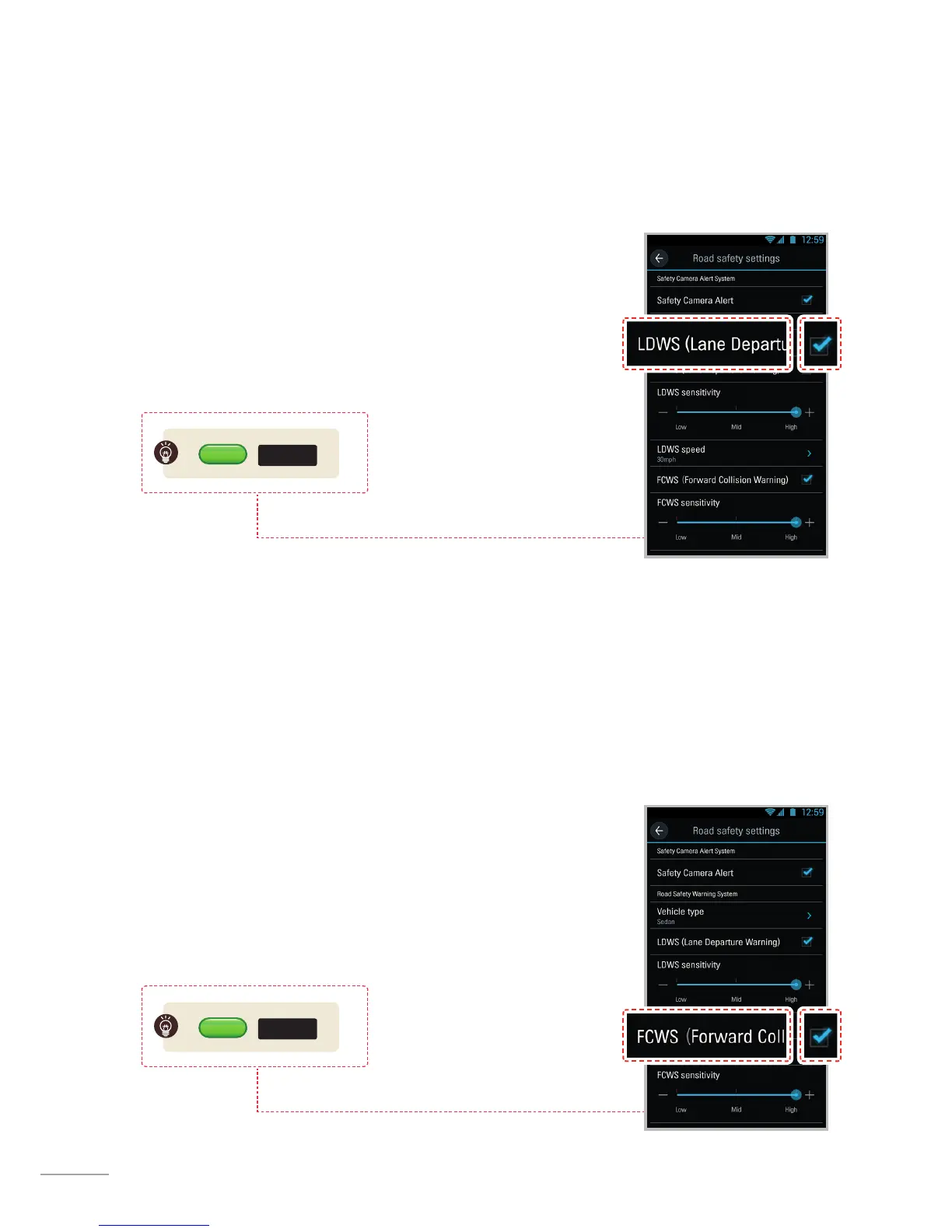
LDWS Setting
1. Verify that the GPS is connected by checking for the green light on GPS LED.
2. Enable LDWS feature by selecting "Dashcam Settings > Road safety settings
> LDWS" on the Thinkware Dash Cam Mobile Viewer.
FCWS Setting
1. Verify that the GPS is connected by checking for the green light on GPS LED.
2. Enable FCWS feature by selecting "Dashcam Settings > Road safety settings
> FCWS" on the Thinkware Dash Cam Mobile Viewer.



 To Next Page