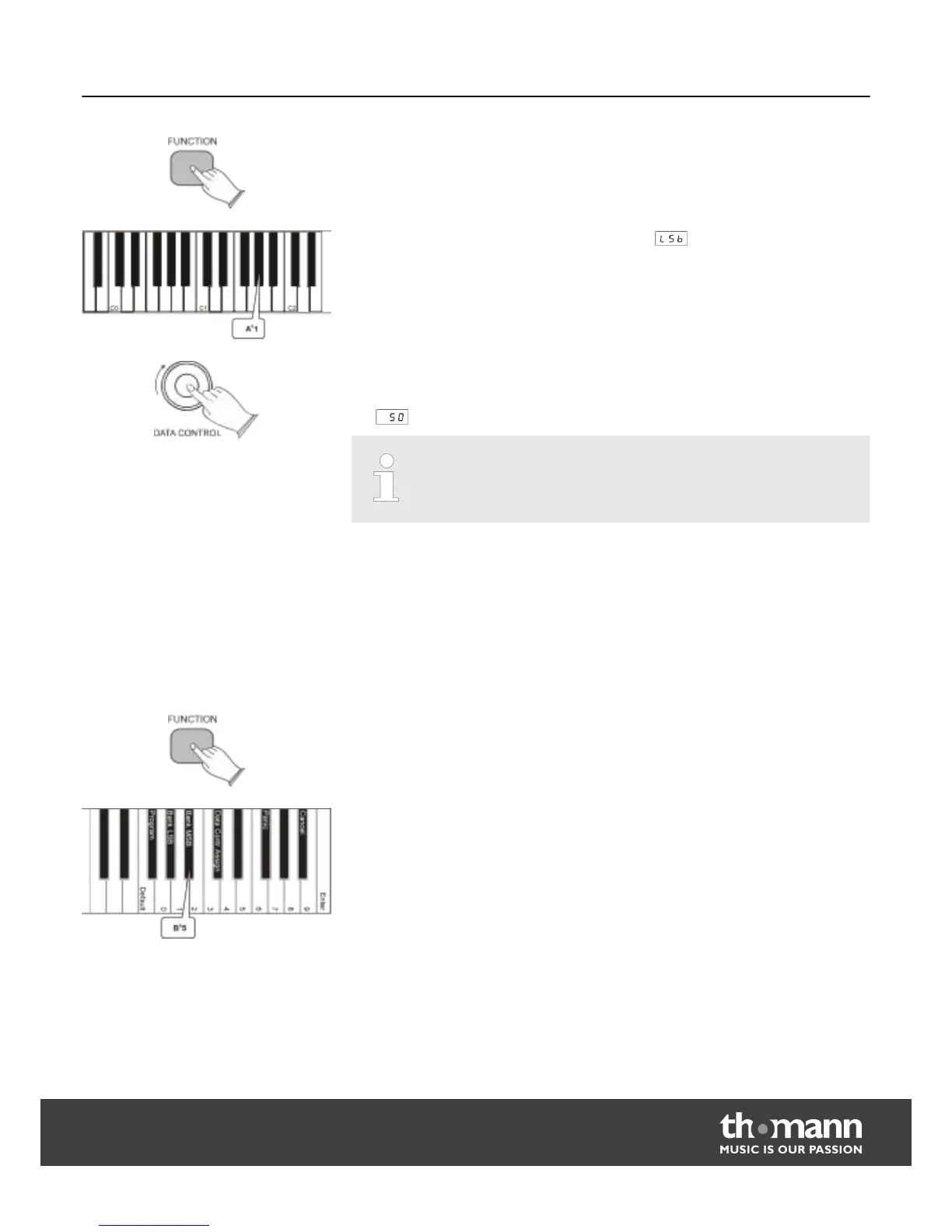
Press the [FUNCTION] button, to enter edit mode.
Press the piano key A
b
1. The display briefly shows .
The digital piano returns to the normal play mode and the assignment of the rotary
control [DATA CONTROL] has so been changed, that every time you turn the knob, a
bank LSB change will be sent. The display shows the current bank LSB value (0 - 127),
e.g.
.
Please note the difference to button A
b
5, that you use to enter a single bank
LSB value.
There are two ways to send bank MSB (Most Significant Byte) changes. You can either
send a single specific MSB (rotary control knob assignment remains unchanged), or
you can assign the data control to the rotary control, so that bank MSB changes are
sent. Please note, that after any kind of bank MSB changes usually a MIDI program
change message has to be sent in order to execute a sound change on the receiving
device.
n Sending a single specific bank MSB (rotary control knob assignment remains
unchanged)
Press the [FUNCTION] button, to enter edit mode.
Press the piano key B
b
5.
Sending bank MSB changes
MIDI functions
DP-25
37



 To Next Page