TV Pre 186
AV Pre 186
4).INFO SW version information
Project LCD_5335_TCL
MTK Version XXXXXX
Version IDTV-XXXXXX_XX
Info
DATE 2008-XX-XX
5).Factory default settings
Followed as OOB setting.
Appendix n
“How to download MCU SW”
Prepare WT_MCU_ISP SW tool for update.
1. Connect the PC to board using MCU updating tool on P802 connector form chassis board.
2. Provide the +5VDC on P804 connector form chassis board and check U811 output voltage
should be 3.3V.
3. Start “WT_MCU_ISP.exe” and download the MCU SW. ( please see file
ISPToolGuideV33-08-2-17)
Appendix o
“How to download FLASH SW”
Prepare MTK SW tool for update.
1. Connect the PC to the board using an external +3.3VDC serial device (USB or COMx) on
P201 connector from chassis board. VGA input can also be used using pin12 (RXD) & pin15
(TXD) just taking care that “Factory Key” from Factory Menu is enabled.
2. Provide the +5VDC STB on P804 connector from chassis board
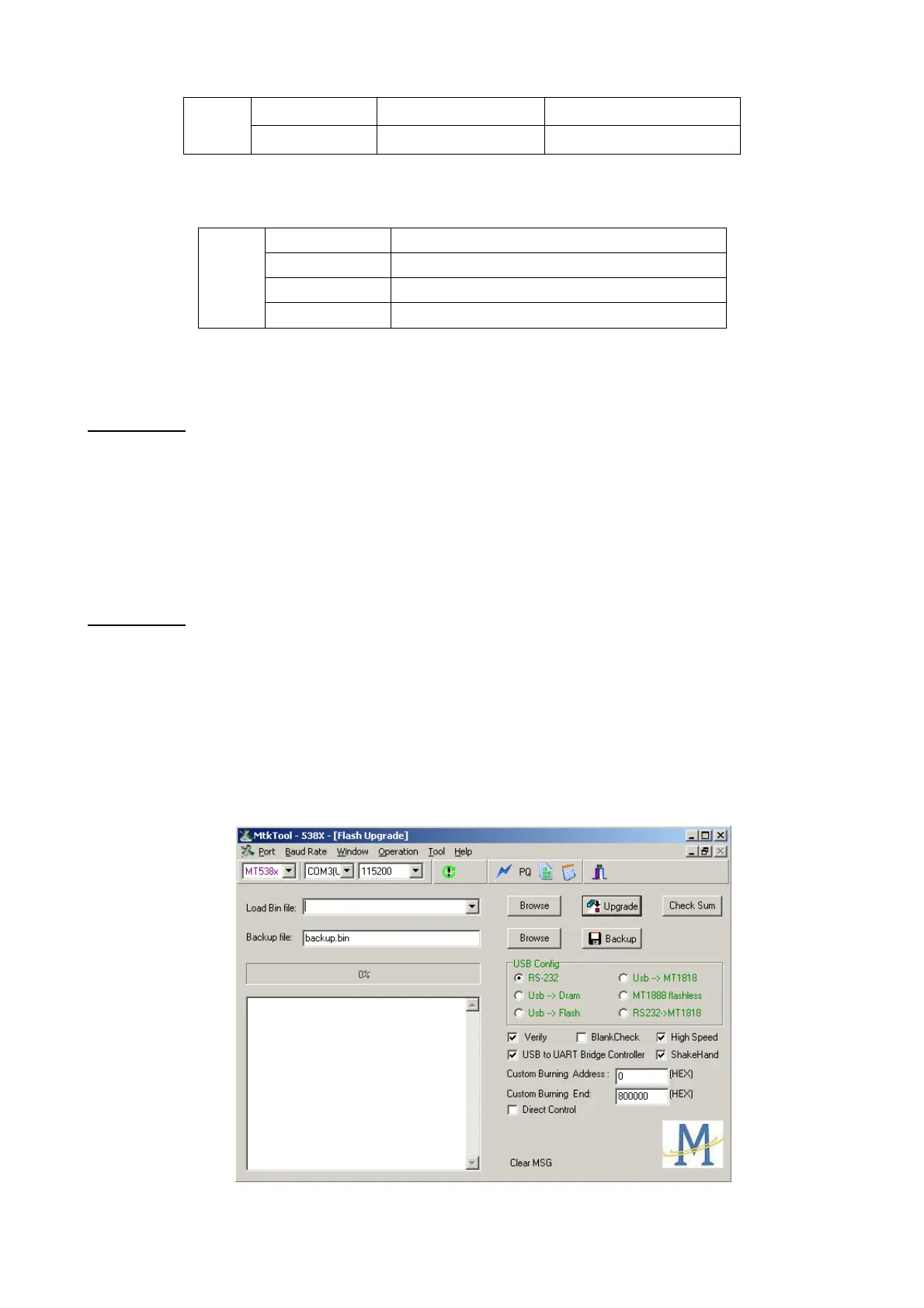
3. Start “MTKTOOL.exe” application under MTKxx folder, and set the parameters as below
picture:



 To Next Page