Installation
9
EN
Connecting to other equipment
Before you start, make sure that your TV,VCR and set-top box will be placed in a
location that is conveniently located:
• near an easily-accessible mains wall socket;
• within reach of your TV-antenna and satellite-dish leads,
• within 10 metres of a telephone point. (If not, you will need an extension telephone
lead.)
WARNING
Before you connect your set-top box to any other equipment, you must
disconnect ALL the equipment from the mains supply.
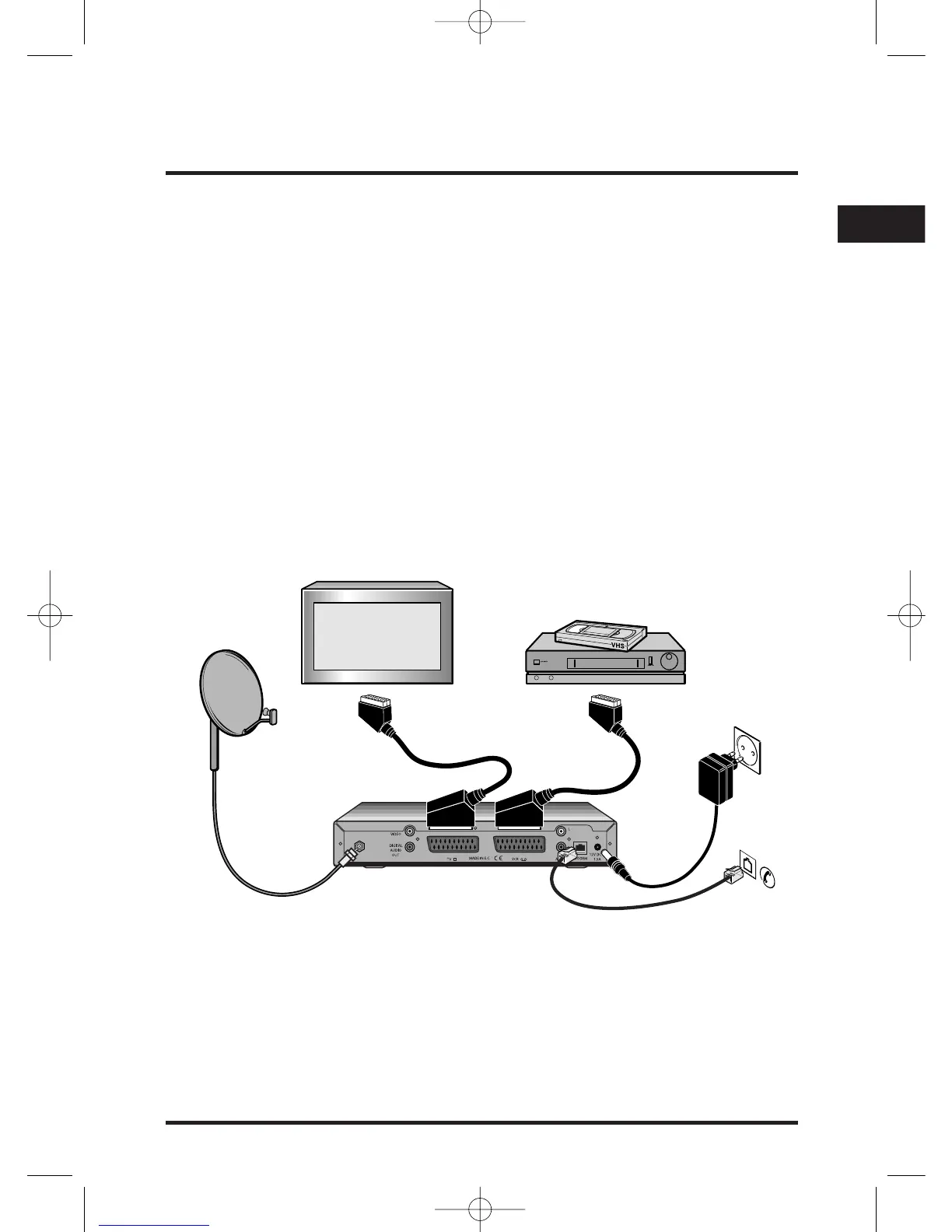
Connection method 1:ToTV and VCR
If you have a VCR and a TV with SCART connectors, you can connect up as shown in
the diagram below.
1. Use the supplied SCART lead to connect your set-top box to your TV's SCART
input as shown.
2. Use a SCART lead (not supplied) to connect your set-top box to your VCR's
SCART input as shown.
3. Connect the lead from your satellite dish to the satellite input connector on your
set-top box as shown.
SCART lead
(not supplied)
Supplied
SCART lead
Lead from
your satellite
dish


 To Next Page