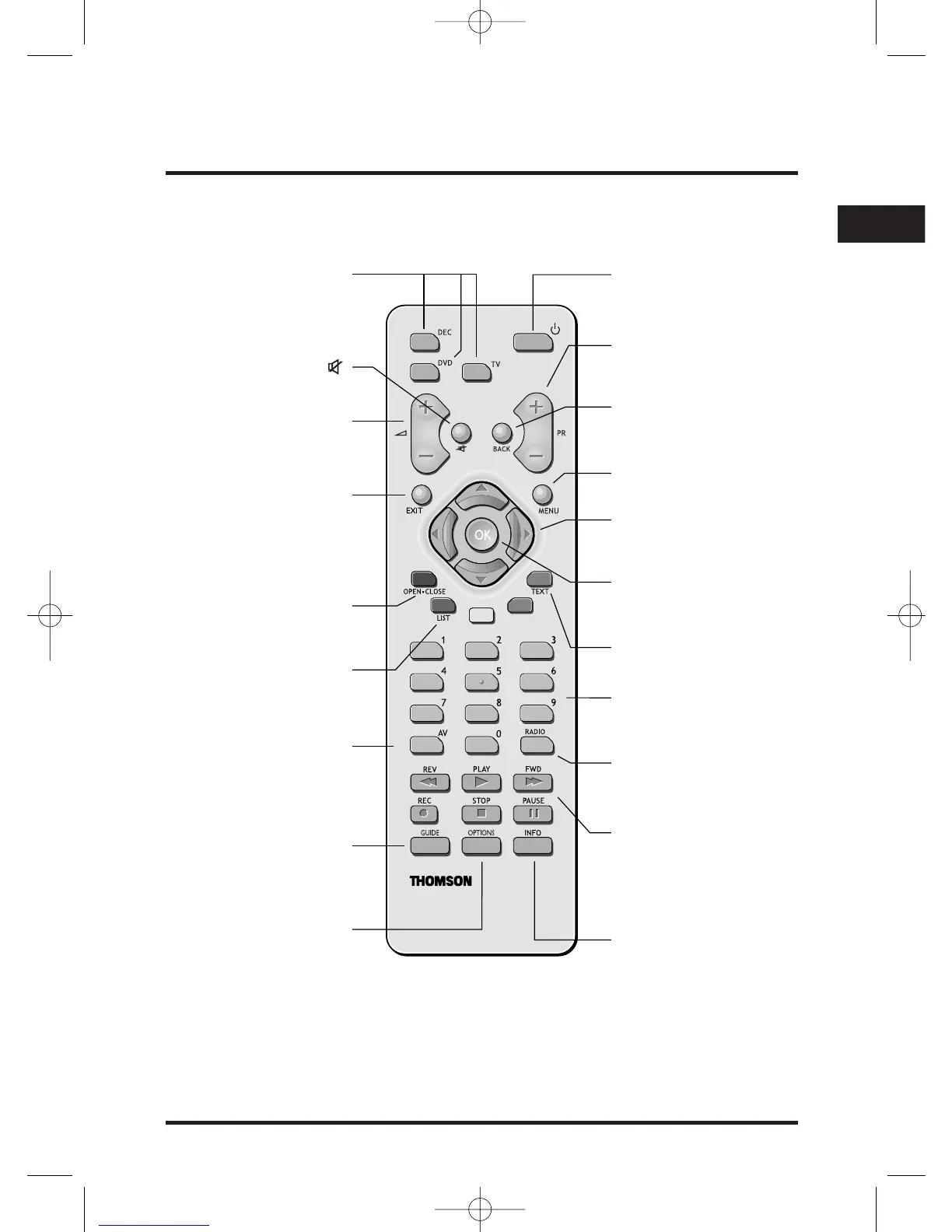
Remote control buttons: quick reference
B
To put your set-top box
into or out of standby.
PR +/-
To change channel
up or down.
BACK
To go back to the previous
TV/Radio channel or menu.
MENU
To display the main menu.
TEXT
To access Teletext.
RADIO
To open the Radio
Navigator.
INFO
To display the zapping
banner and extended
program information.
Note: Some of these buttons are described in more detail on the next page.
V, W, C and B
To move up, down, left and
right through the menu.
OK
To confirm a choice or
make a selection.
DEC/DVD/TV
Select the device you want
to control (Thomson).
a +/-
To change the volume
up or down.
To turn the sound
on or off.
EXIT
To remove a menu or
on screen display and
redisplay digital TV or
Radio.
LIST
Access to TV list.
OPEN•CLOSE
To open access
option window.
Number buttons (0-9)
To change channel and
enter numbers.
GUIDE
To display the Viasat
portal, to use interactive
services (if available).
OPTIONS
To change the audio
or subtitle language
(if available).
DVD shortcuts keys:
Control directly the DVD
player even if you are in TV
or DEC mode on your
remote control unit.
AV
Switch between TV
and SAT programs.


 To Next Page