THUNDER LASER NOVA-51
www.thunderlaser.com DONGGUAN THUNDER LASER EQUIPMENT CO.,LTD
tech@thunderlaser.com No.197, Hudong Road, Shatian Town,
Tel :(86)769 826653 Dongguan, Guangdong, China
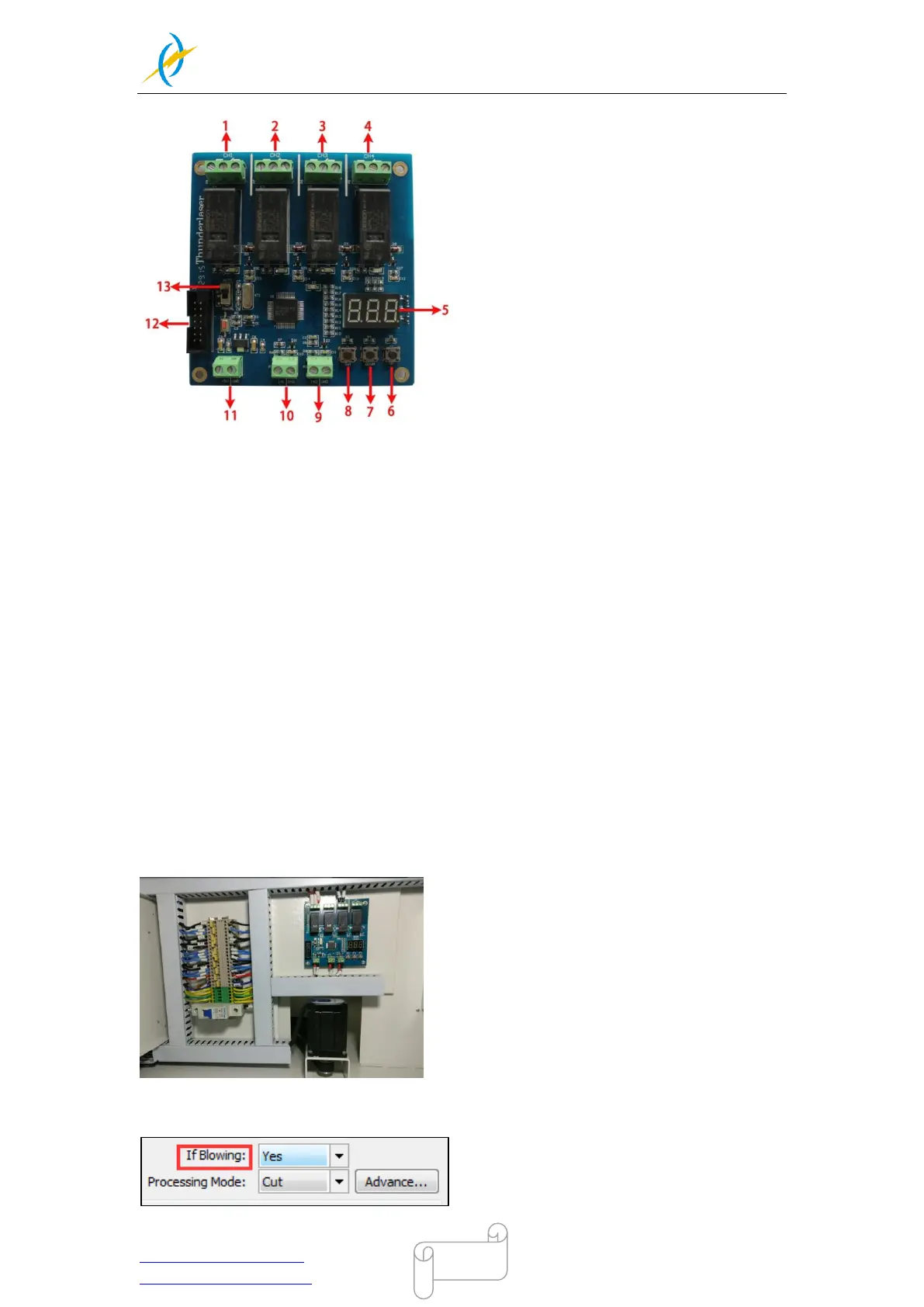
About TL-Timer controller interface and buttons description:
1:Interface 1,connection with warning light ,delay time is set to 0 second(Factory default
settings, change it if required)
2:Interface 2,spare interface,users can connect the relevant equipment if require
3:Interface 3,connection with exhaust fan,delay time is set to 15 second(Factory default
settings, change it if required)
4:Interface 4,spare interface,users can connect the relevant equipment if required
5:LED lights display,set the delay time for viewing each interface and enter
6:”UP” button to increase delay time
7:”DOWN” button to reduce delay time
8:”Set” button to confirm your setting
9:Interface 9,” lid state” interface
10:Interface 10, “Working state” interface
11: Interface 11, 5V DC voltage power interface
12: upgrade interface
13: auto and manual
Where the TL-Timer is installed with Thunder Laser machine, please refer to the pictures
as below(Backside of machine):
In addition: The on/off of air pump is controlled by the layer of software, like below:



 To Next Page