13
7.2 The Configuration page of the local GUI
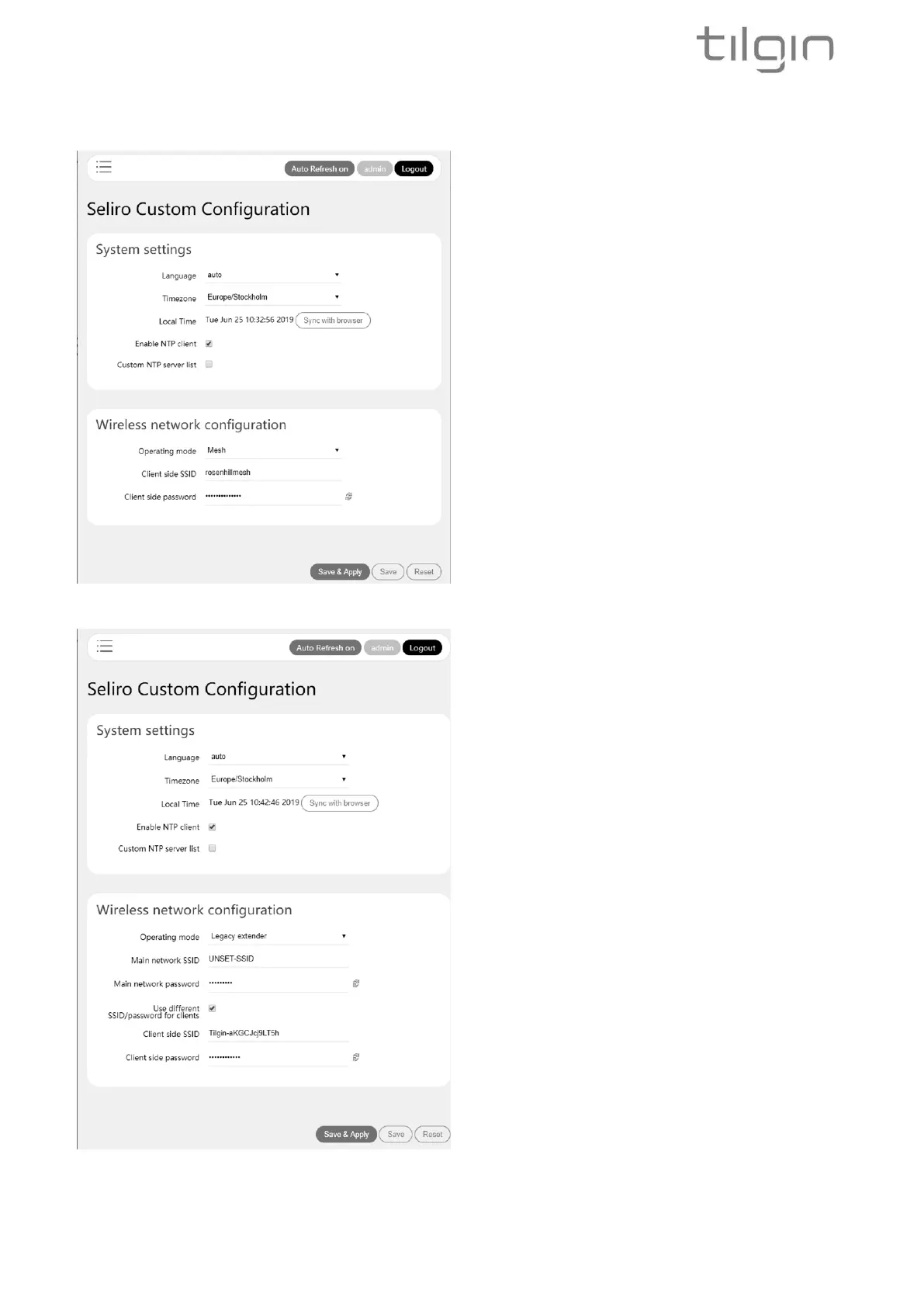
The configuration page of the local GUI allow
you to configure language, which means Wi-Fi
according to the regulations in your country. If it
is set to auto, which is the normal case, then
this is already configured by your operator
Time zone and NTP, which is normally also
configured by your operator.
Operating mode, here mesh, choose between
full mesh and legacy extender mode as
described in this guide.
Client side SSID and password, which is the
network name and password the IHD103 will
use in your home for home devices to connect
to.
When choosing the legacy extender mode from
the menu of the GUI, there is an option to
choose which Wi-Fi network to let the IHD103
connect to and extend. This is the main network
SSID and password option to the left. This is an
alternative to the WPS procedure. This option is
not available in mesh mode.
There is also an option to select a different
SSID and password for the network that the
IHD103 extends. Either to use the same as the
device connects to and extends, or to use a
different SSID network name and password.


 To Next Page