11-4
ZRA_Aero Z Owner’s Manual
OM_ZRA_Aero Z_0913RevA
CHAPTER 11: CASTERS And FORKS
Note: Occasionally, it may be necessary to adjust the frame alignment of your TiLite Aero Z or ZRA. The most
common symptom of an alignment issue is a “oating” caster, one caster does not contact the ground which can
cause the chair to not track in a straight line. Alignment issues are easily resolved using the following procedure:
1. Place the wheelchair on a smooth, level surface with the casters trailing rearward.
2. Make sure that all tires are properly inated, that the camber tube is properly centered on the frame side to side,
that the camber tube is straight relative to the rear of the frame, that the toe-in/toe-out is correctly set up, and the
angle adjustable casters are square to level surface.
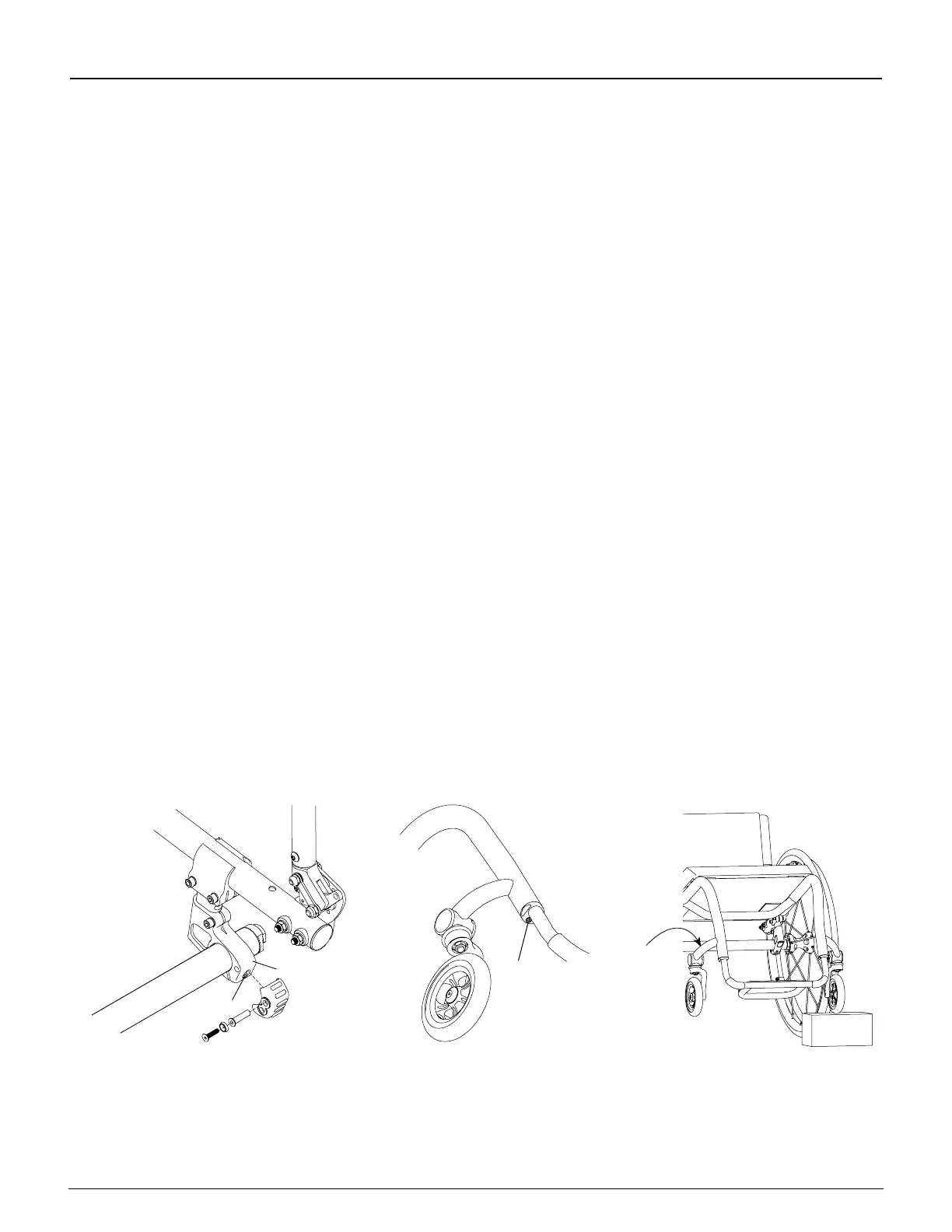
3. Loosen, but do not remove, the Allen screw in the footrest clamp only on the side of the oating caster as shown
in Figure 11-5. Once the screw is loose and the full head of the screw is exposed, strike the Allen wrench with a
mallet upward to release the internal wedge in the footrest clamp. See “Titanium Footrest - Adjusting the Height”
on page 3-2.
Note: Figure 11-5 depicts the footrest clamps on the ZRA. If you have an Aero Z, locate the corresponding
screws that secure the footrest assembly to the frame.
4. Loosen, but do not remove, the Allen screw in the camber tube clamp on the side opposite the oating caster as
shown in Figure 11-4. If your chair includes the bumper assembly, you will need to remove the assembly prior to
loosening the screw in the clamp.
5. Wiggle the chair and let it settle on to the at surface to release any bind that may have existed within the chair
assembly.
6. Make sure your footrest is set to your desired seat-to-footrest measurement, and, using a ruler or measuring tape,
make sure the left and right sides of the footrest are the same distance to the level surface.
7. If the above adjustments correct the oater, securely tighten all Allen screw loosened in Step 3 and then the
screw loosened in Step 4. If not, proceed to Steps 8 through 10.
8. Loosen, but do not remove, the Allen screw on the footrest clamp only on the side of the chair with the oating
caster. If your chair is a ZRA, after loosening the screw, strike the Allen wrench with a rubber mallet upward to
release the internal lock wedge in the footrest clamp. See “Titanium Footrest (ZRA) - Adjusting the Height” on
page 3-2.
9. Place a wood block under the other caster (which is not oating) as shown in Figure 11-6.
10. Apply gentle downward pressure on the caster mount of the oating caster. It is advisable that you have
an assistant to place downward pressure on the opposite side of the chair at the backrest when making this
adjustment.
11. Remove the wood block and check to see if the caster still oats. If the caster no longer oats, securely tighten
the Allen screw on the footrest clamp. If the caster still oats, or if the other caster starts to oat, check that the
footrest is level and repeat Steps 8 through 11 until the caster no longer oats.
Figure 11-4
Allen Screws on Camber Clamp
Figure 11-5
Allen Screws on Footrest Clamp
Figure 11-6
Fixing a Floating Caster
Apply
Pressure
Here
Allen
Screw
Camber Tube
Clamp
Allen
Screw
Frog Legs
®
IWARNING
Always mount identical size casters and forks on both sides of your chair.
If you ignore this Warning, you may fall, tip
over or lose control of the wheelchair and seriously injure yourself or others or damage the wheelchair.



 To Next Page