EasyManua.ls Logo

TIPTEL IP 280 - LED Instruction

TIPTEL IP 280
84 pages
Print Icon
To Next Page IconTo Next Page
To Previous Page IconTo Previous Page
Loading...
Enterprise IP Phone Using the Basic Phone Functions
- 7 -
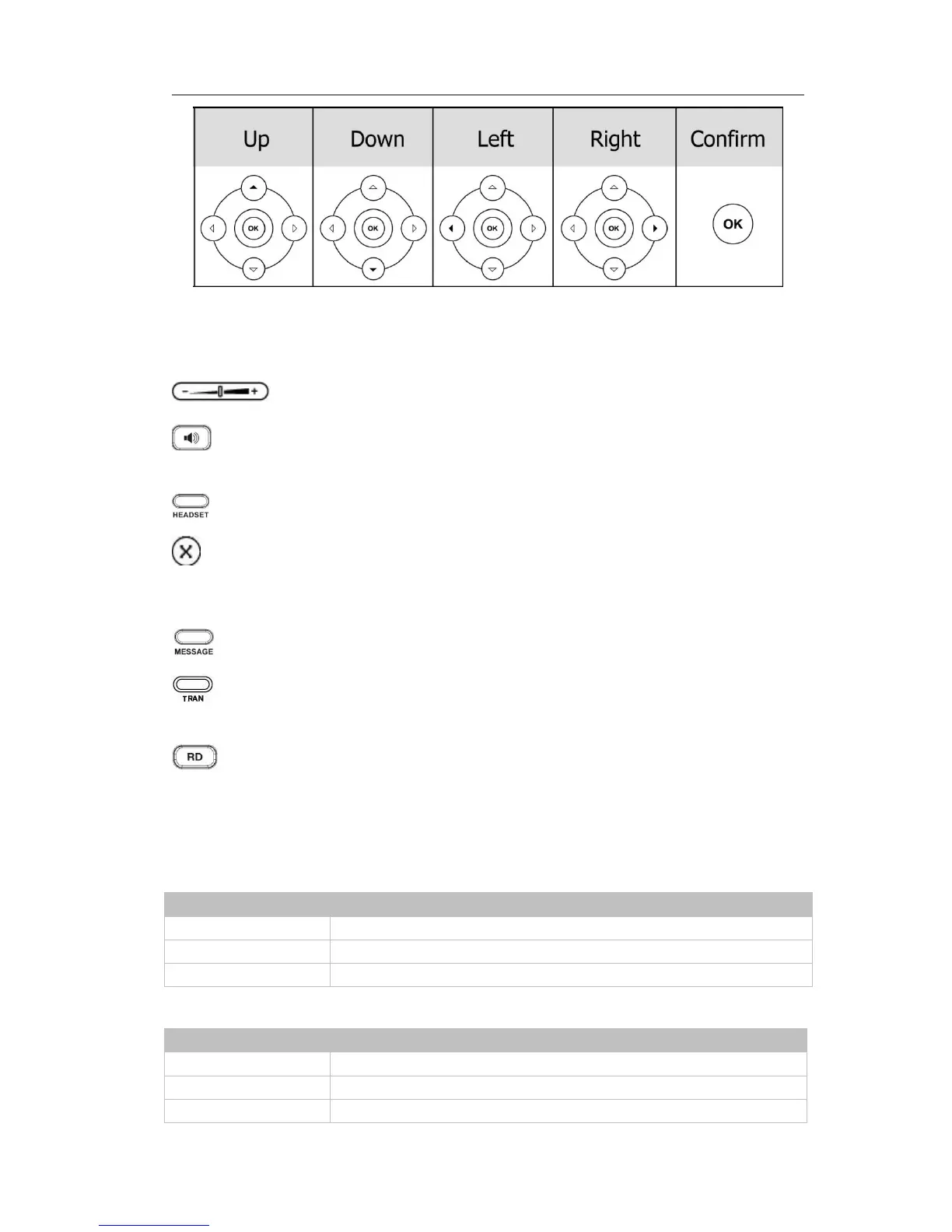
Audio Device Control Keys
Use the audio device control keys to perform the following actions depending on your
phone type:
Adjust the volume of the handset, headset, speaker and ring tone;
Allows for hands-free communication during calls;
Press to switch to the Group Listening mode.
Place and receive calls through an optionally connected headset;
Mute audio transmission locally during calls;
Hard Feature Keys
Allow users to access the voicemail directly;
Forward the current call to the third party;
When the phone is idle, press to enter the forward configuration page.
Press to enter the Dialed Calls interface and choose a record to dial out.
LED Instruction
Table 1 Line Keys

LED Status
Description
Steady green
The account is active
Blinking green
There is an incoming call to the account, or there is a call on hold
Off
The phone is in idle status whatever registered /unregistered
Table 2 Line Keys set to BLF
LED Status
Description
Steady green
The monitored account is in idle status
Fast blinking green
There is an incoming call to the monitored account
Slow blinking green
The monitored account is on a conversation

Table of Contents

Other manuals for TIPTEL IP 280

Related product manuals