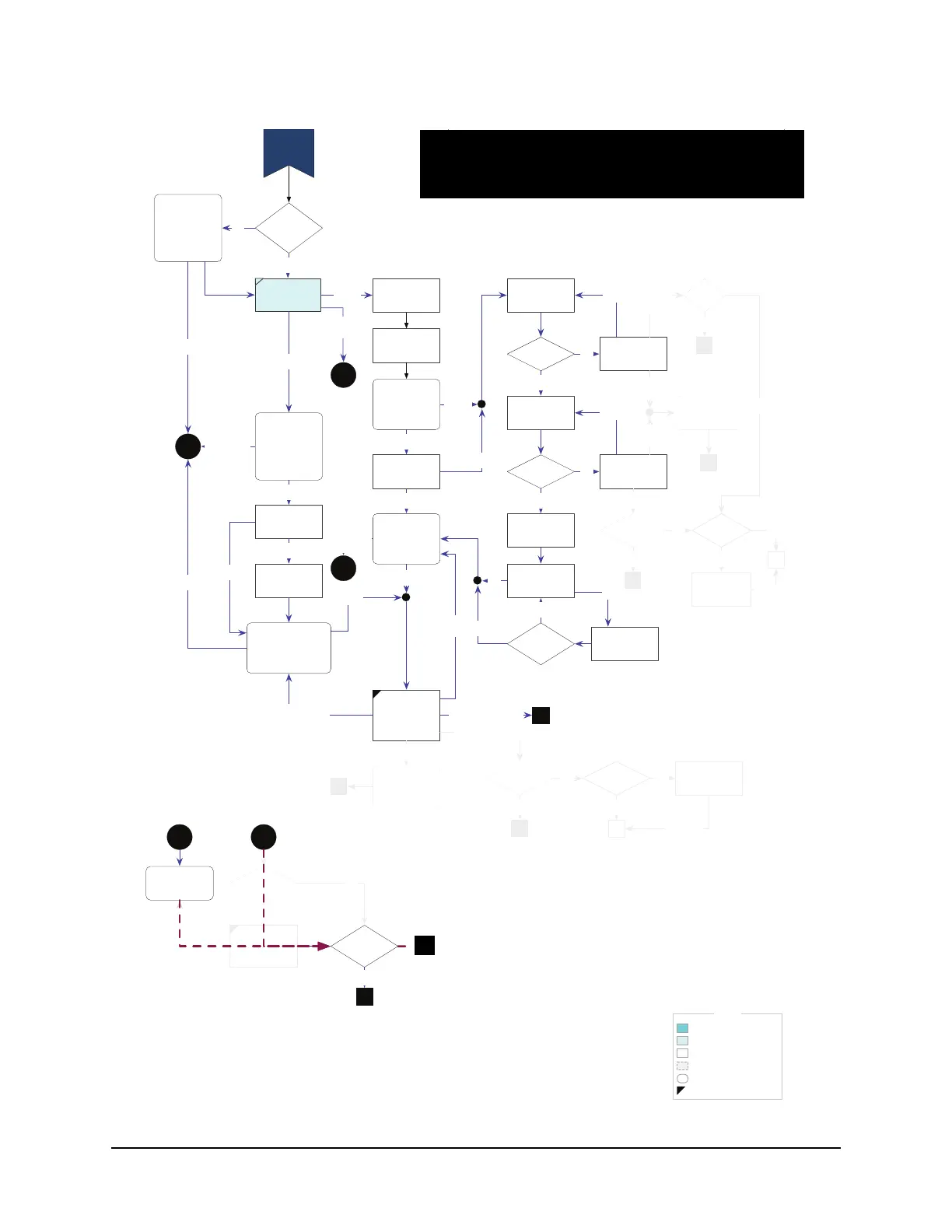
LEGEND
“Rarely used” screen
LEFTing disallowed
“Sometimes used” screen
“Always used” screen
“Invisible” (logic only) screen
Action
Succeeded
Enter IP
Address
DHCP Client
ID?
DHCP
Failed
Enter DHCP
Client ID
Y
Failed
Y
Enter Gateway
Address
Network Setup
Problem
Network Setup
Complete
Failed
Use phone line instead
Enter Primary
DNS Address
N
Succeeded
Static IP Setup
Succeeded
Static
No
Enter Subnet
Mask
Use These
Addresses?
Change net settings
Valid?
Y
Invalid
Subnet Mask
N
Retry
Valid?
Y
Invalid
Gateway
Address
N
change
Failed
Succeeded
Use phone
instead
Use phone
instead
Skip
net setup
for now
2
2
4
Try again
(static)
Skip net setup for now
N
Connection
type = Phone?
Y
In Guided
Setup?
Connection
type is phone?
Y
3
N
1
N
5
Failed
Self-
assigned
1st time doing
network setup?
Y
N
Second failed
service call?
Y
N
6
Enter DNS
Address
Enter Another
DNS Address?
Y
3
rd
DNS
address?
N
N
1: Done setting up TCP/IP; begin network connection (D1)
2: Use phone instead (C4)
3: Done setting up network, but using phone for connections; begin phone connection (D2)
4: Change network settings (C1)
5: Done setting up TCP/IP; return to Phone/Network Connection
6: ???
7: Set Demo mode to Video Loop and go to Demo Mode (A1.5)
8: Done setting up TCP/IP; begin network connection (D1.1)
Non-Demo Mode: Pressing Bail buttons on these screens goes to the “Stop Now?” screen,
outside of Guided Setup.
Demo Mode: Pressing Bail buttons on these screens BONKs.
Set connection
type to Phone
20-second
attempt to obtain
DHCP IP address
AND (if
applicable)
connect to TiVo
service
20-second
attempt to obtain
DHCP IP address
AND (if
applicable)
connect to TiVo
service
20-second
attempt to obtain
DHCP IP address AND
(if applicable) connect
to TiVo service
Attempt to
validate IP
address & locate
gateway
(< 5 sec)
Set connection
type to Phone
Attempt to
validate IP
address & locate
gateway
(< 5 sec)
Configure an ad
hoc IP address
C3a
C3a
C3a
Succeeded
C3b
Y
C3b
Demo Mode?
Try again
(dynamic)
N
Y
Demo Mode? Y
N
3
Skip net setup for now
Demo
Mode?
Y
N
3
3 7
Interactive?
Continue
N
Video Loop
Demo Warning
Y
7
Interactive?
Continue
N
Video Loop
Demo
Warning
Y
C3: TCP/IP
Setup
Y
IP Address
Y
%NUM OF
TUNERS% =
0?
N
Y
8
4 - Change Network Settings.
5 - Done setting up TCP/IP; return to Phone/Network Connection
8 - Done setting up TCP/IP; begin network connection (D1.1).
8


 To Next Page