INSPECTION AND MAINTENANCE42
9
Wash the engine before long-term storage.
Run the engine at low speed with the
Remote Control lever (or Shift lever) set to
Neutral to flush out fresh water from the
cooling system and in the process remove
salt, mud and other foreign particles.
Replacing the propeller
A worn-out or bent propeller will lower the
motor's performance, and cause engine
trouble.
Before removing the propeller, remove the
spark plug caps from the spark plugs to
protect against personal injury.
Do not begin propeller removal and instal-
lation procedure with spark plug caps
attached, shift in forward or reverse, main
switch at other than "OFF", engine stop
cord attached to the switch, and starter
key attached, or engine could accidentally
start leading to serious personal injury.
Disconnect battery cable if possible.
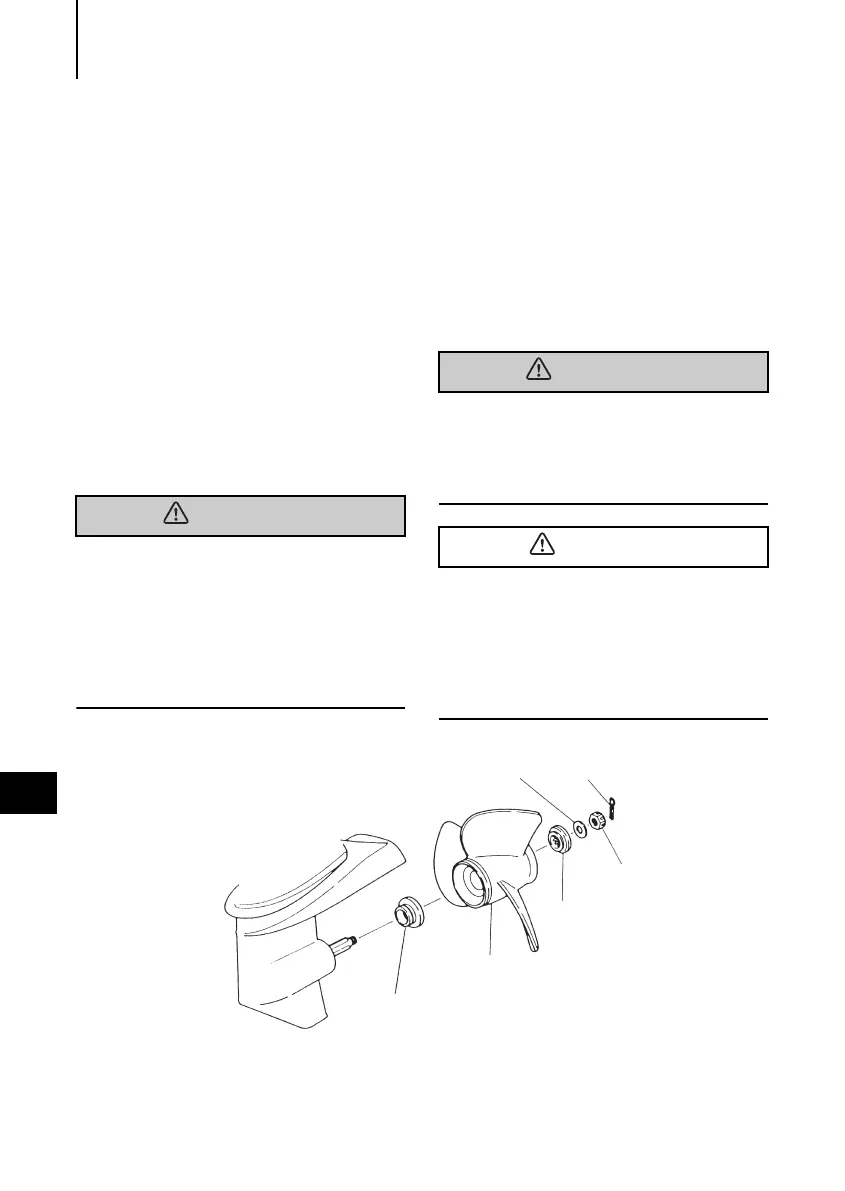
1
Pull out the split pin and remove the
propeller nut and washer.
2
Remove the propeller by pulling toward
you.
3
Apply genuine grease to the propeller
shaft before mounting the new propeller.
4
Fit the washer, securely tighten the nut
and insert the split pin.
Do not hold propeller with hand(s) when
loosening or tightening propeller nut. Put a
piece of wood block between propeller
blade and anti-ventilation plate to hold pro-
peller.
Do not install propeller without thrust
holder, or propeller boss could be dam-
aged.
Do not reuse split pin.
After putting split pin, open the end to
prevent it from coming off which could
lead to coming off of propeller.
Washer Split pin
Propeller
thrust holder
Propeller
Stopper
Nut
MWX50D2_E.book Page 42 Thursday, August 18, 2011 5:29 PM


 To Next Page