2 Tone Commander 8610/8620 User Guide
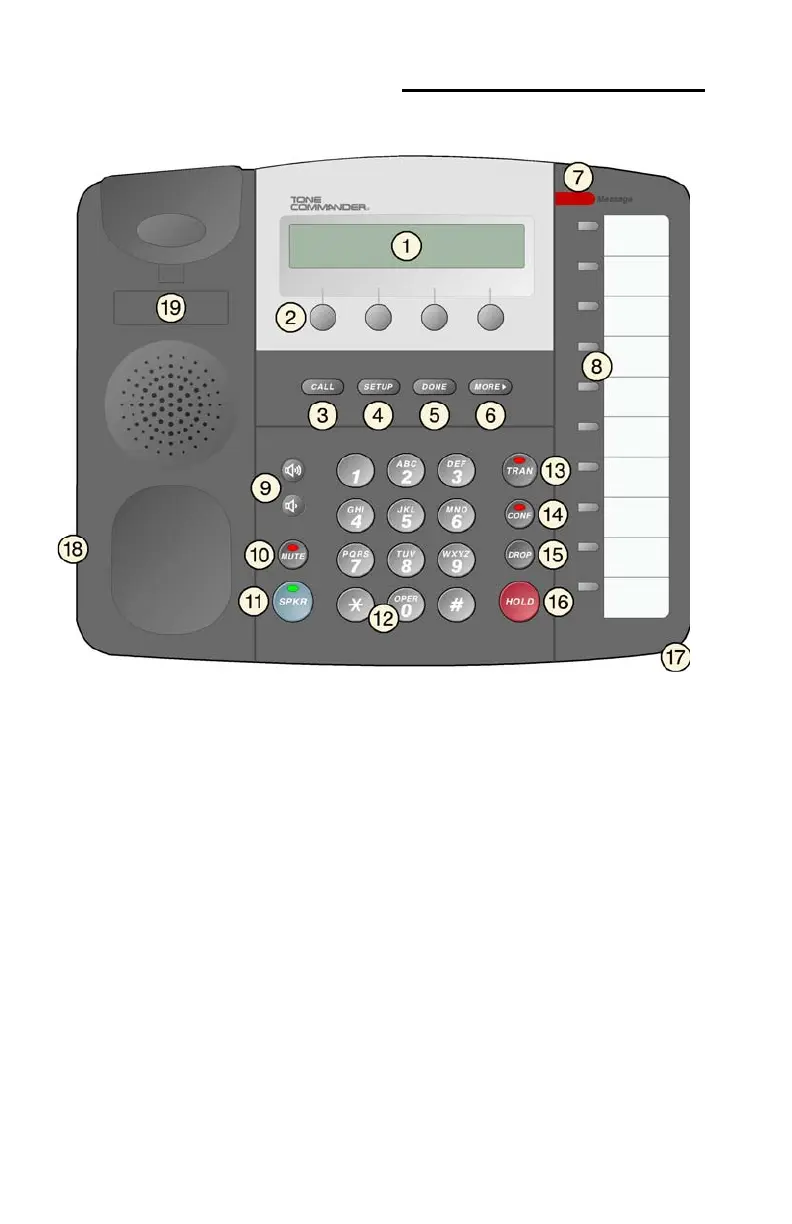
Controls and Indicators
1) Display – shows the call state, caller ID, dialed digits, network call
control messages, and elapsed time during calls. When not on a
call, the date, time of day, and softkey options are displayed.
The viewing is primarily set by selecting the high or low base
mounting position (page 20). Viewing angle display clarity can be
altered by adjusting the display contrast (page 38).
2) Softkeys – select the function displayed above the key on the
second line of the display.
3)
CALL Key – selects the Call Identification Display, Call Log, and
Call Directory modes (pages 8, 12, and 15).
4)
SETUP Key – enters Setup Mode (page 23).
5)
DONE Key – exits the current menu, saves any changes made,
and returns to the previous menu options.



 To Next Page