4.3. Configuring prescription types
30
field. Refer to Recording CropSpec readings, page 19 for details on
recording average CropSpec readings. Enter the following data values
to complete the configuration:
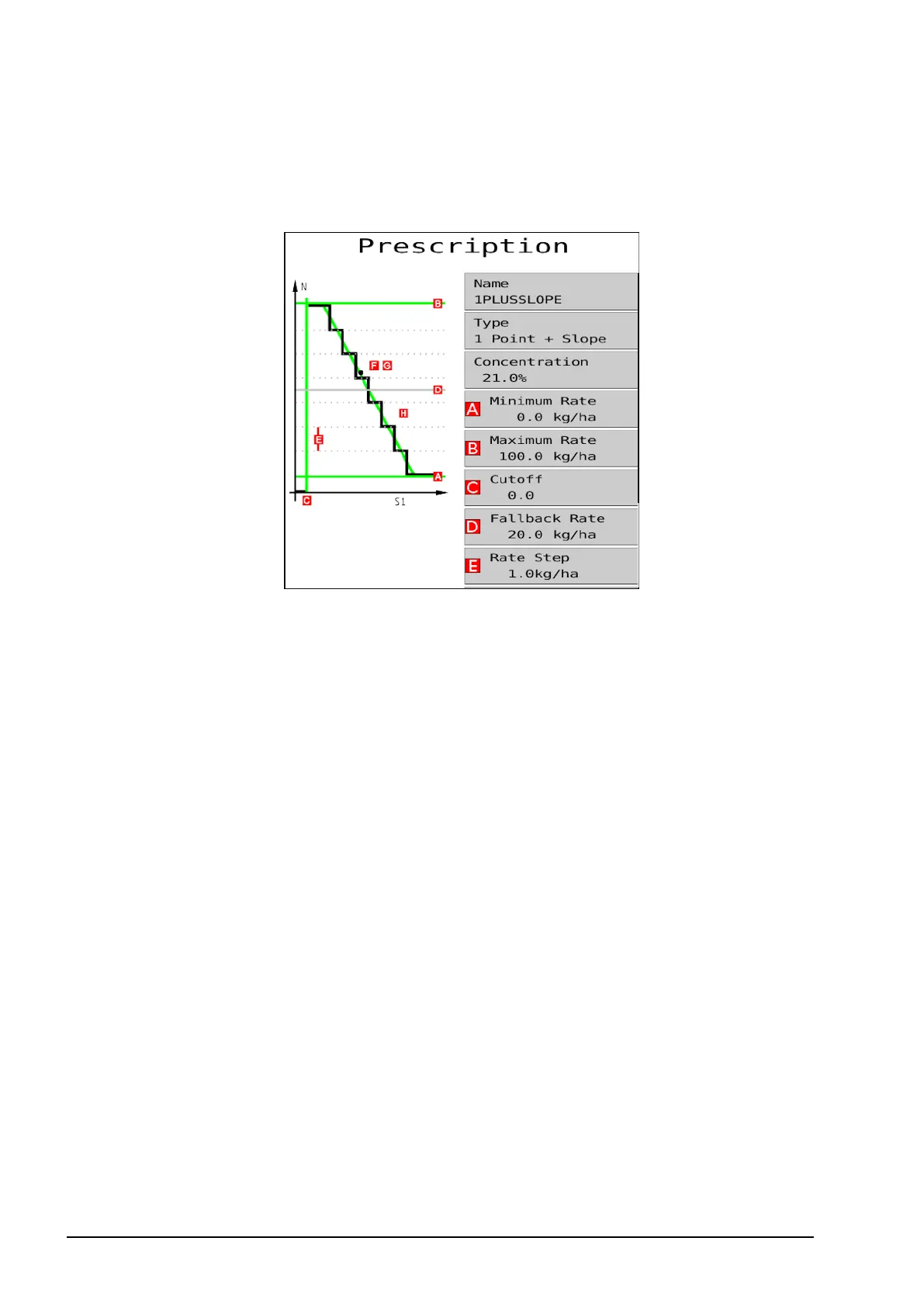
l Concentration %: The ratio of the active ingredient in the
product being applied (nitrogen if Nitrogen Content based
Mass/Area selected in output configuration, see page 14).
l Minimum Rate: The minimum rate of the active ingredient that
should be applied relative to the amount of biomass detected.
l Maximum Rate: The maximum rate of the active ingredient that
should be applied relative to the amount of biomass detected.
Note: To set the rate based on the desired amount of total
product (as opposed to active ingredient), set the concentration to
100%.
l Cutoff: The CropSpec value at which the applicator will stop
applying product. When the CropSpec value is equal to or less
than this value, the application rate drops to zero.
l Fallback Rate: The application rate that the software should
default to if unable to obtain a valid reading from either sensor.
This can happen if no biomass is detected.
l Rate Step: This defines the amount of change of application rate
as the CropSpec value increases or decreases. The values entered



 To Next Page