The Topcon IS-100 is an ophthalmic unit designed to support and position instruments for patient examination and diagnosis. It features electronically regulated power contacts and an electric lifting group for patient seating.
Function Description
The ophthalmic unit facilitates the examination and diagnosis of patients by providing a stable and adjustable platform for various ophthalmic instruments. The integrated ophthalmology chair ensures patient comfort and proper positioning during examinations. Optional components like a phoropter arm and lens drawer enhance the unit's versatility.
Important Technical Specifications
Unit IS-100:
- Power supply: 110-240 VAC / 50-60 Hz
- Consumption: 850 VA
- Electrical classification: Class I / Type B
- Maximum power of the first tabletop instrument: 160 VA
- Maximum power of the second tabletop instrument: 150 VA
- Slow start system (bulb protection): Yes
- Unit lamp output: 24 VDC - 9 W
- General protection (junction box):
- 220 V: 2 x F4A/L/250 V Ø5 x 20 mm
- 110 V: 2 x F8A/L/250 V Ø5 x 20 mm
- Net weight: 120 kg
- Gross weight: 140 kg
- Maximum load on the tabletop: 35 kg
- Maximum acceptable load for support 3 (phoropter): 10.3 kg
- Maximum acceptable load for support 3 (light, screen, etc.): 6 kg
Ophthalmology chair OC-8:
- 30° rotation (patient access) with hand brake: Yes
- 2 armrests and reclining footrest: Yes
- Minimum height: 430 mm
- Maximum height: 630 mm
- Maximum load: 170 kg
- Consumption: 24 VDC / Max. 4.4 A
- Electrical classification: Class I / Type B
- Net weight: 30 kg
- Gross weight: 50 kg
- Work cycle: 10% max / 2 min - 18 min
Environmental Conditions for Storage/Installation:
- Temperature: 10 °C - 40 °C
- Moisture: 30% - 75%
- Atmospheric pressure: 700 hPa - 1060 hPa
- Free from condensation and dust.
- Not exposed to direct sunlight.
Usage Features
The unit is operated via a keypad and features an optional phoropter arm and lens drawer.
Keypad:
The keypad allows for:
- Power On/Off: The on/off button lights up blue when in standby and green when in use.
- Chair Height Adjustment: Buttons to raise and lower the chair.
- LED Light Control: Switch on the LED light strip and adjust its brightness (reduce/increase).
Ophthalmology Chair (OC-8):
The chair features a vertical lifting group for height adjustment, controlled by the keypad. It also includes a hand brake for locking and unlocking its rotation. The chair offers 30° rotation for patient access, two armrests, and a reclining footrest.
Tabletop:
The tabletop has two types of movement:
- Rotation: The tabletop can turn 90°, ranging from the rest position to the work position. If instruments are installed, care must be taken not to turn it beyond its maximum length.
- Horizontal Sliding: The tabletop can slide horizontally to position the instruments (first or second instrument). Mechanical fixing ensures the position of the tabletop. A safety sensor prevents the chair lifting group from moving upwards if there is contact with the legs, allowing it to lower to free the legs.
Phoropter Arm (Optional):
The phoropter arm has various adjustments for precise positioning to the patient's face:
- Regulation Force: Adjusted by loosening a safety screw and turning an Allen wrench.
- Maximum Vertical Rotation: Limited by turning a screw; tightening reduces rotation.
- Vertical Position: Locked or unlocked using a handle.
- Lock Vertical Sliding: A slider locks the vertical position.
- Horizontal Position: A slider moves the phoropter horizontally.
- Horizontal Direction: A slider locks the horizontal position.
Lens Drawer (Optional):
This trolley is designed to hold test lenses in its drawer and provides a support tray for other items.
Maintenance Features
For correct maintenance, contact TOPCON's official dealer for work requiring trained technicians. However, some user-level maintenance actions are outlined:
Safety Precautions for Maintenance:
- Always disconnect the device from the mains before carrying out any operations.
- Do not flood or wet the device with water, as it contains electronic components.
- Never use household detergents or foam for cleaning.
Cleaning:
- Clean devices with a damp cloth and mild detergent.
- Avoid abrasive cleaners, powders, scouring pads, steel wool, or sandpaper, as these can damage the tabletop finish and reduce its chemical and stain resistance.
- The laminate of the tabletop is chemically resistant to bleach, ammonium chlorides, and other antimicrobials.
- Do not apply cleaning products directly to the device.
- For disinfection, use specific products from the market or an aqueous solution with an alcohol base and components of quaternary ammonium, observing the action and drying time.
- For disinfection of hard-to-reach areas, small objects, or small areas in the proximity of the patient that have been contaminated and are not likely to be disinfected by heat or immersion in a solution, apply the disinfectant as a spray.
- It is recommended to use neutral products to avoid damage to sensitive parts.
- Apply cleaning products on a clean cloth and then clean the device with the cloth.
Corrective Maintenance (User Level):
Thermal repair of superficial scratches on the tabletop:
This procedure is only valid for the tabletop.
- Put a paper towel on the scratched surface.
- Spray the paper towel with water.
- Iron the paper towel at maximum temperature.
- Caution: The iron should be at its maximum temperature.
- Warning: Do not iron for more than 5 seconds. In addition, during ironing, the iron must be kept in constant motion on the paper towel.
- Remove the paper towel and dry the surface.
- Repeat the operation as many times as necessary.
- Caution: It is not possible to repair with this procedure scratches that have penetrated the protective surface of the tabletop.
Lifting motor of the chair not operational:
If the lifting motor is not operational due to thermal protection from overload or continuous use without respecting the work cycle (2 minutes of work within a range of 18 minutes), perform the following checks:
- Wait for the reset: if the fault is due to an overload of the lifting group, wait until the temperature drops.
- Check the corresponding fuses.
- Warning: Before replacing fuses, disconnect the unit from the power supply.
- Check that the supply voltage matches the specifications of the unit.
- Check the correct connection of the power supply wiring.
If these checks do not resolve the fault, contact the technical support team.

 Need help?
 General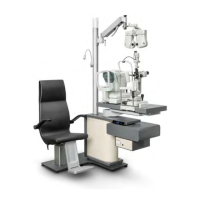

 To Next Page










