2
2.4 Connecting up your digital receiver 11
2.4.1 Connecting to the antenna
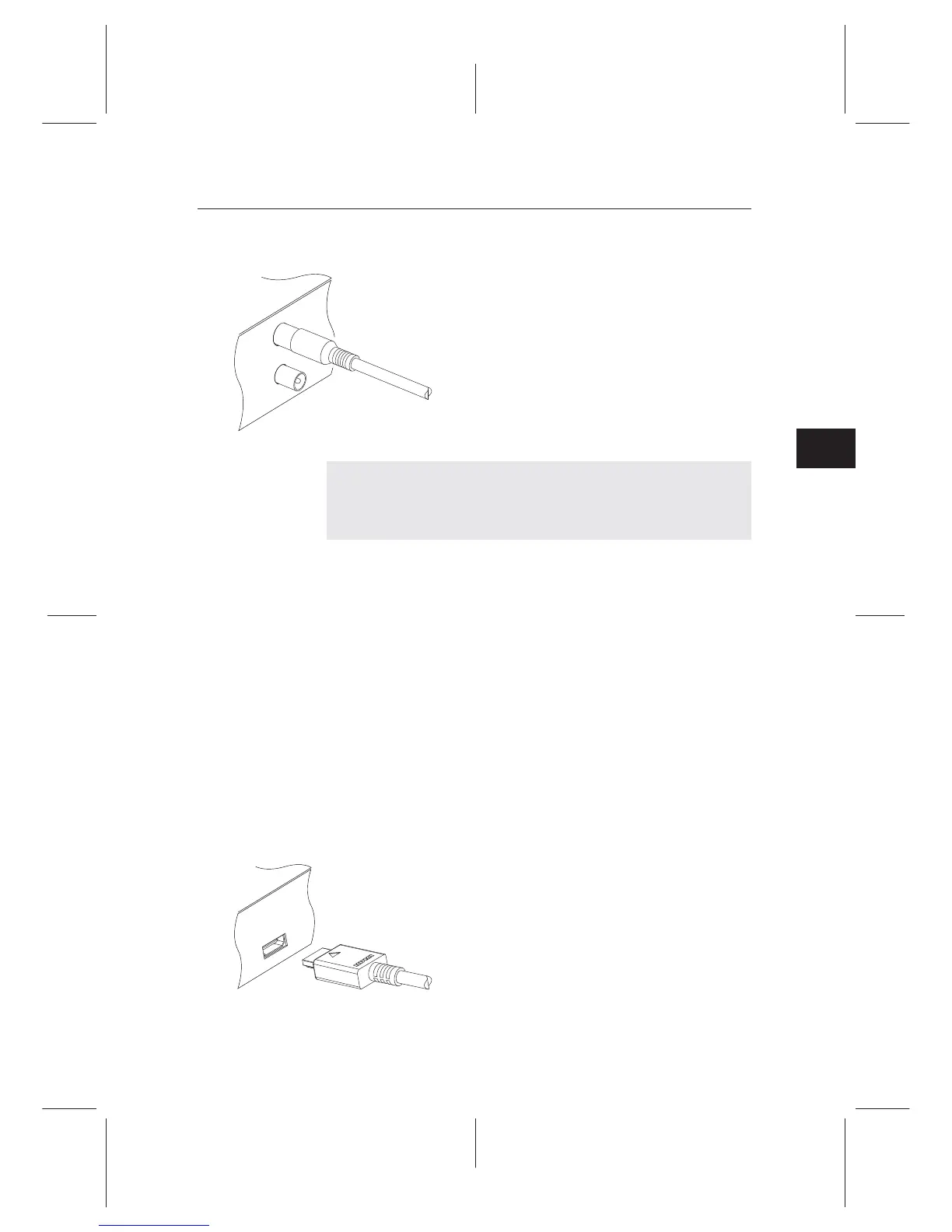
Whatever sort of connection you have be-
tween the digital receiver and the television,
you need to connect the digital receiver to the
antenna so that it can receive digital televi-
sion broadcasts. Connect the antenna cable
to the ANT IN connector. If you have an-
other digital receiver, you may link it from
the ANT OUT connector.
NOTE
ANT OUT may also be linked to your television, VCR, or
DVD recorder to loop an analogue signal.
2.4.2 Connecting to your television set
For all the following connections of the digital receiver, we rec-
ommend you to use the rst connector to get the best picture
quality. If your television does not have a matching connector,
then use the next connector in the following order for a better
picture quality.
1. HDMI connector (HDMI)
2. Composite connector (AUDIO, VIDEO)
You should congure audio and video settings after connect-
ing up the digital receiver. See §4.1 for a detailed description.
To use the HDMI output
If you have a high denition television set,
you should use an HDMI cable for best re-
sults. Plug one end of the cable into the HDMI
socket on the digital receiver, and plug the
other end into the matching socket on your
television. In this case, you do not have to
make audio connection because it can output
stereo audio or digital audio as well.














 To Next Page