44 Recording and playback
back into standby mode again in one minute. However, if you
press any button on the remote control or on the front panel
even just one time, the digital receiver will not switch into
standby mode.
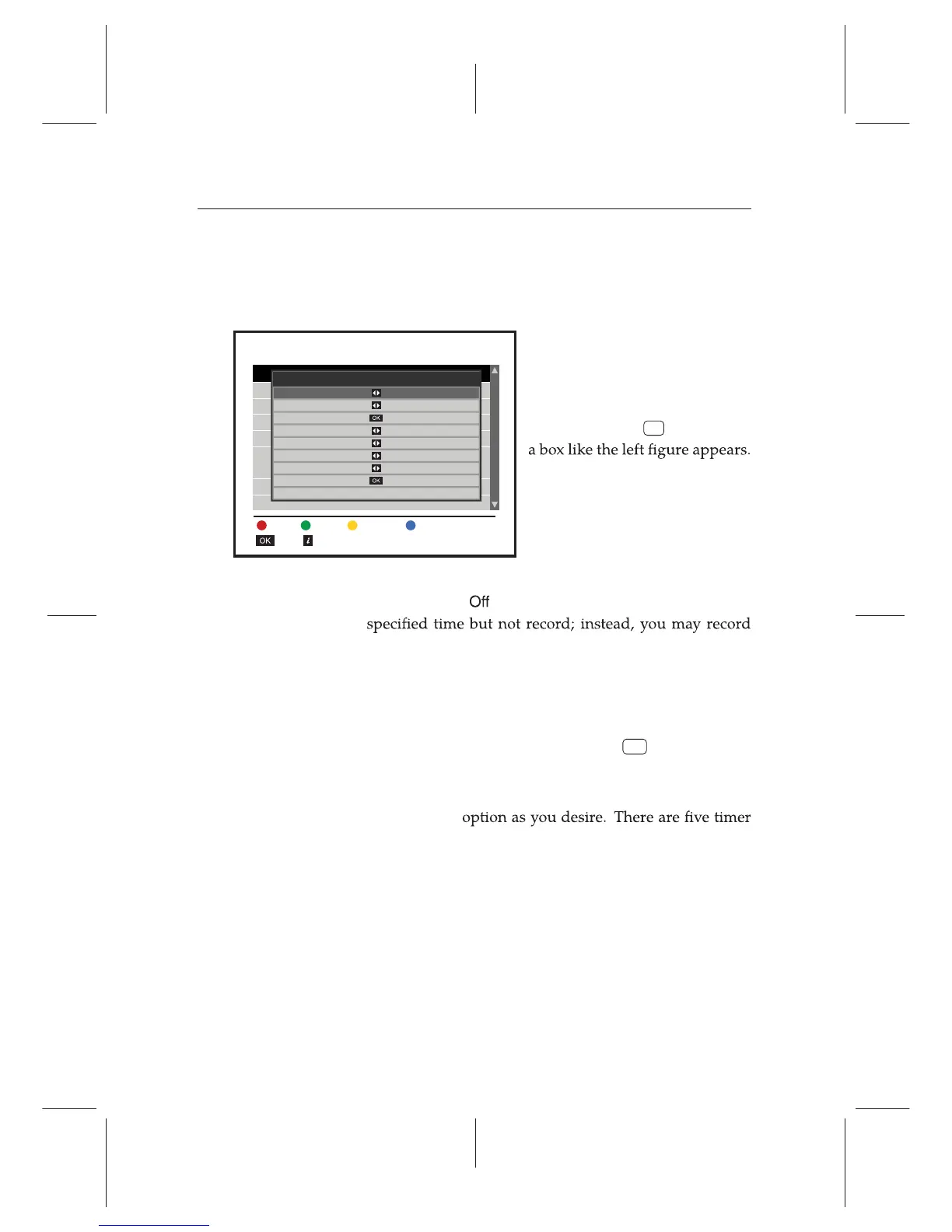
To add a timer recording, se-
lect the Recording e Reserva-
tion menu, then the timer list will
be displayed. To add a new timer
event, press the
F1 button, and
Take the following steps:
1. Set the Record option to On to make a recording. If this
option is set to
, the digital receiver will turn on at the
with your video recorder or suchlike in this case.
2. You may have two sources for recording: TV, radio
Set the Type option to your desired source.
3. Set the Service option to the service which provides the
programme you want. Pressing the
OK button on this
option displays a services list, from which you can select
your desired service.
4. Set the Mode
modes:
One Time means literally ‘one time’.
Every Day means literally ‘every day’.
Every Weekend means ‘Saturday and Sunday every week’.
Weekly means ‘one day every week’.
Insert
Edit information
Delete Delete All Sort By Time
Reservation
September 02 05:16
Entry Information
Record On
Type
TV
Service
1004.ABC News
Mode One Time
Date
02/09/2015-Wed
Start Time
07:48 (-0/+0)
Duration
30 Min
File Name
OK














 To Next Page