Driving Forward
Note: Always use caution when backing up and turning.
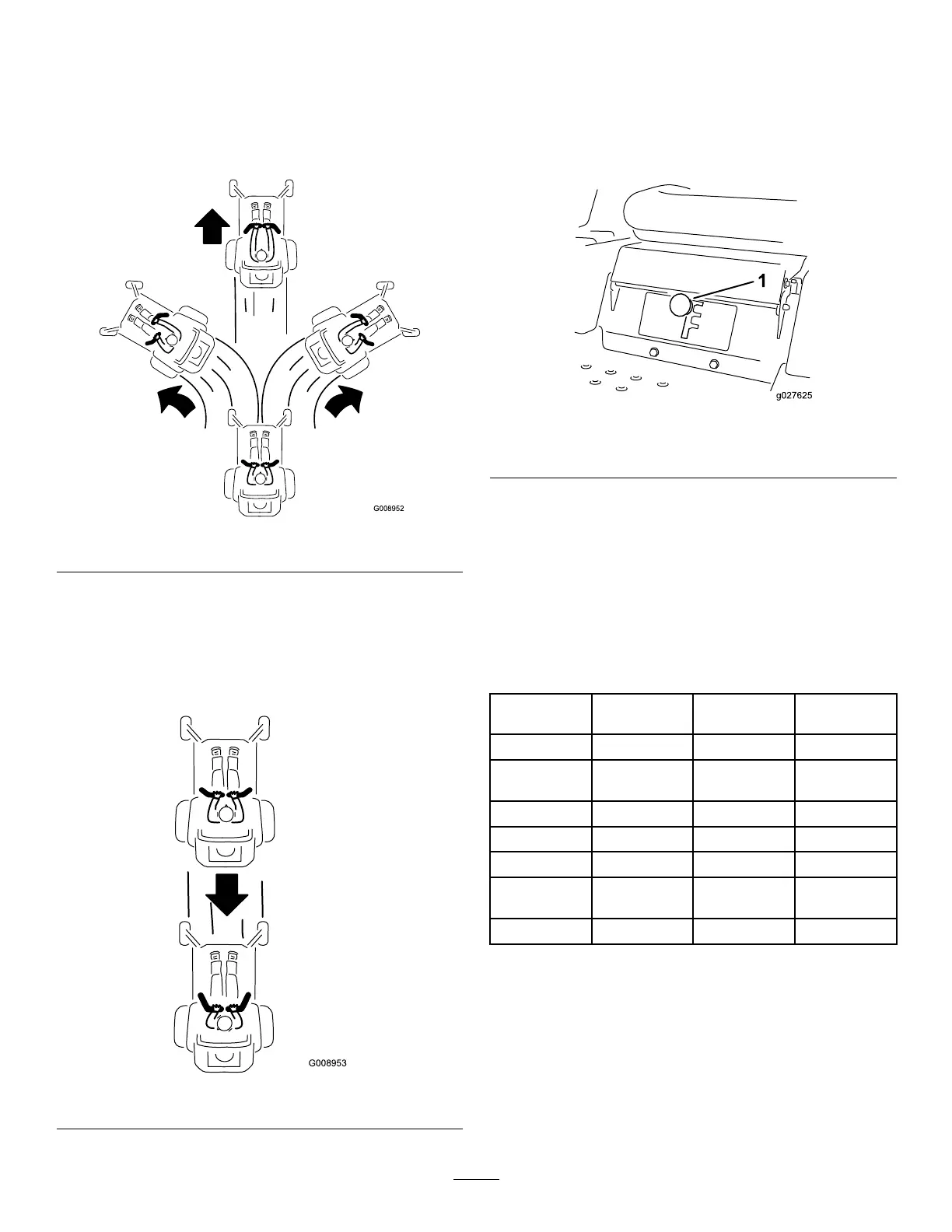
1. Move the levers to the center, unlocked position.
2. To go forward, slowly push the motion-control levers
forward (Figure 22).
g008952
Figure 22
Driving Backward
1. Move the levers to the center, unlocked position.
2. To go backward, slowly pull the motion-control levers
rearward (Figure 23).
g008953
Figure 23
Using the Smart Speed
TM
Control
System
The Smart Speed
TM
Control-System lever, located below the
operating position (Figure 24), gives the operator a choice
to drive the machine at 3 ground speed ranges—trim, tow,
and mow.
g027625
Figure 24
1. Smart-speed lever
To change speeds, do the following:
1. Move the motion-control levers to neutral and outward
to the PARK position.
2. Disengage the blade-control switch.
3. Adjust the lever to the desired position.
The following are only recommendations for use.
Adjustments vary by grass type, moisture content, and the
height of the grass.
Suggested
uses:
Trim Tow Mow
Parking X
Heavy, wet
grass
X
Training X
Bagging X
Mulching X
Normal
mowing
X
Transport X
Trim
This is the lowest speed. The suggested uses for this speed
are as follows:
• Parking
• Heavy, wet grass mowing conditions
• Training
21


 To Next Page