10
Chapter 3: Quick Start
DXi Quick Start Guide
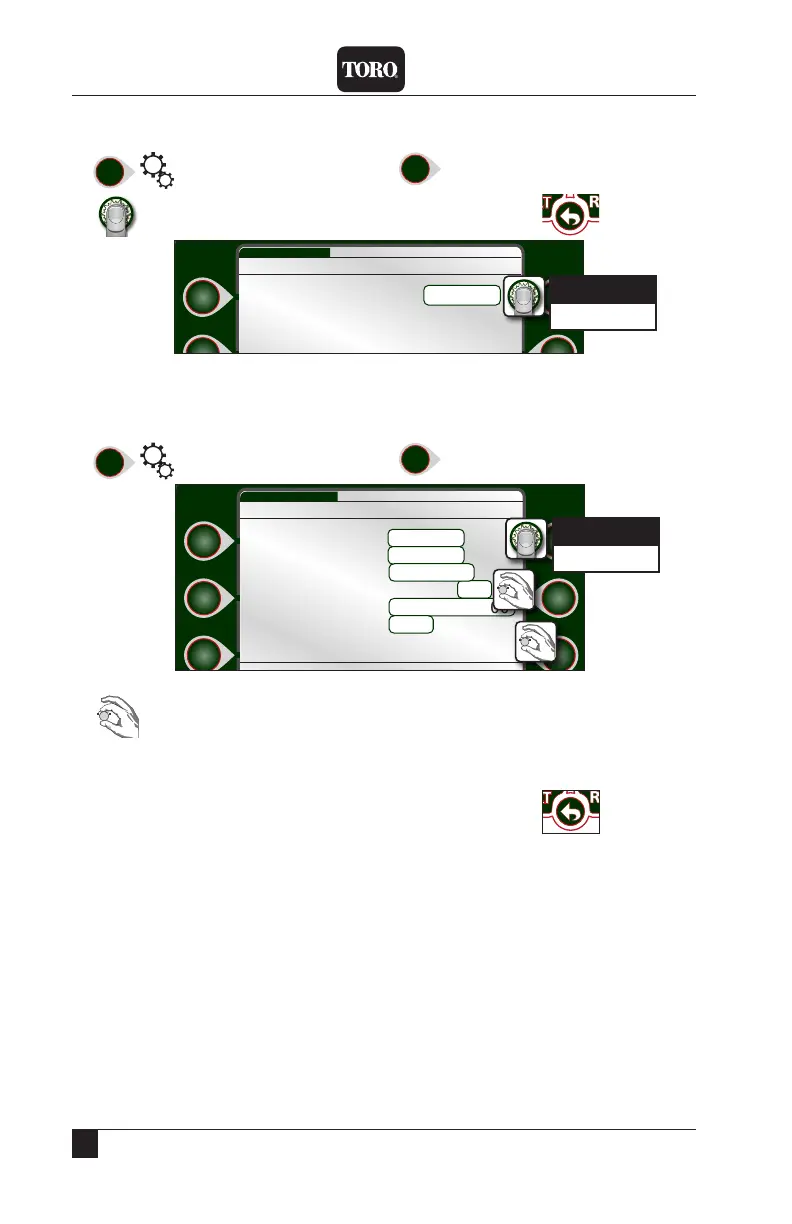
Setting the Language
1) Setup
2) Language
3) to change language.
4) When done, press .
Setting Current Date and Time
1) Setup
2) Time/Date
3) Switch between the 3 time/date elds.
4) Using the navigation techniques from page 14, adjust elds as necessary.
5) Repeat as necessary for the other elds. When done, press
Language English
Setup Language WED 5:43:40 PM
English
Espanol
Time Format 24-Hour
Time 5:43PM
Date 02/08/17
Sync time to cloud No
Std Time Zone MST/UTC-0700
DST Mode U.S.
Setup Time/Date WED 5:43:40 PM
24-Hour
AM/PM


 To Next Page
 Loading...