Controls
Becomefamiliarwithallthecontrolsbeforeyoustart
theengineandoperatethetractionunit.
ControlPanel
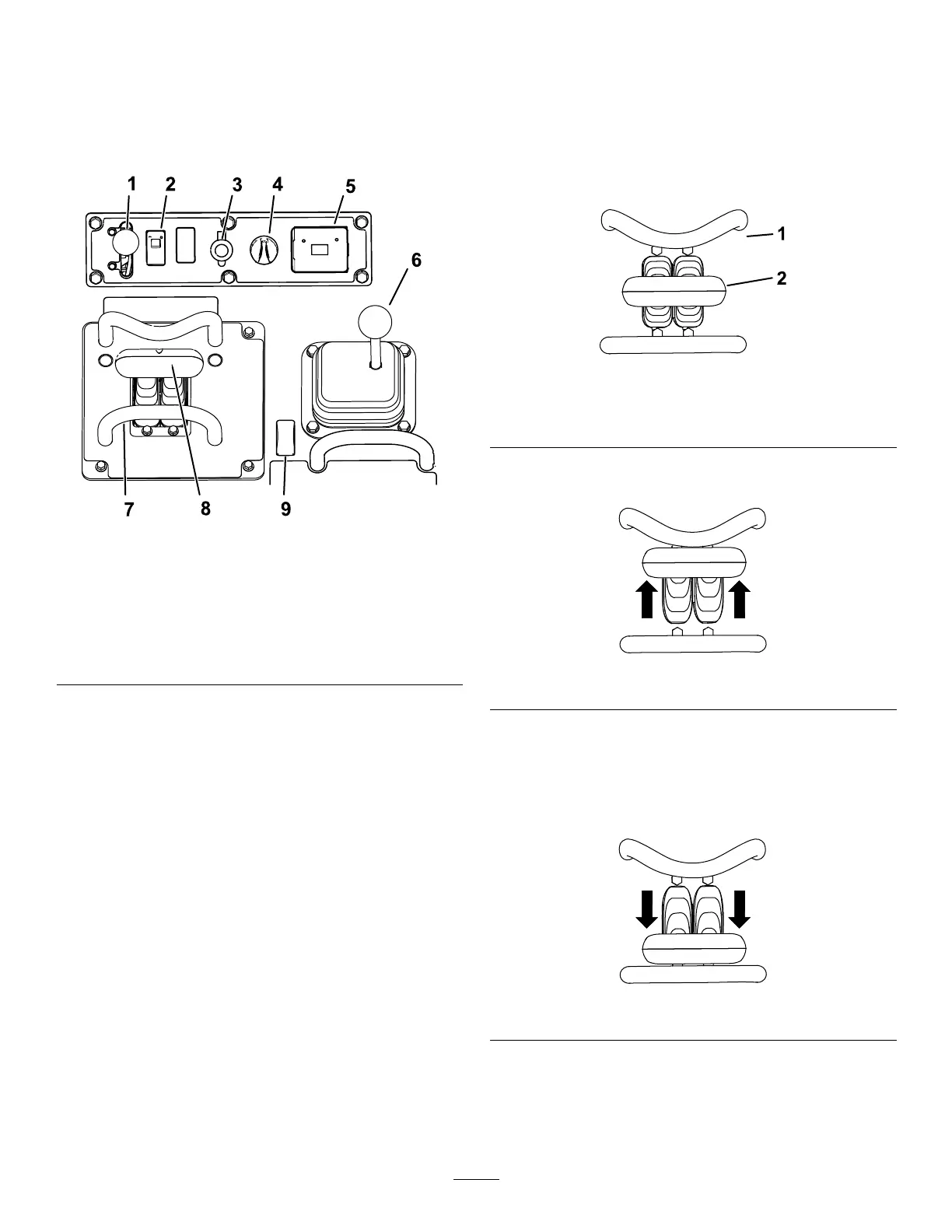
g411223
Figure4
1.Throttlelever
6.Loader-arm/attachment-tilt
lever
2.Traction-enableswitch
7.Referencebar
3.Powersocket8.Tractioncontrol
4.Keyswitch9.Auxiliaryhydraulicsswitch
5.Hourmeter10.Loadervalvelock
KeySwitch
Thekeyswitch,usedtostartandshutofftheengine,
has3positions:OFF,RUN,andSTART.
ThrottleLever
Movethecontrolforwardtoincreasetheenginespeed
andrearwardtodecreasespeed.
ReferenceBar
Whendrivingthetractionunit,usethereferencebar
asahandleandaleveragepointforcontrollingthe
tractioncontrolandtheauxiliary-hydraulicslever.T o
ensuresmooth,controlledoperation,donottake
yourhandsoffthereferencebarswhileoperatingthe
machine.
Traction-EnableSwitch
Thetractioncontrolisautomaticallydisabledwhen
startingthemachine.T ogglethetraction-enable
switchafterstartingthemachinetousethetraction
control.
TractionControl
g259646
Figure5
1.Referencebar
2.Tractioncontrol
•Tomoveforward,movethetractioncontrol
forward.
g259645
Figure6
•Tomoverearward,movethetractioncontrol
rearward.
Important:Whenreversing,lookbehindyou
forobstructionsandkeepyourhandsonthe
referencebar.
g259647
Figure7
12


 To Next Page