14
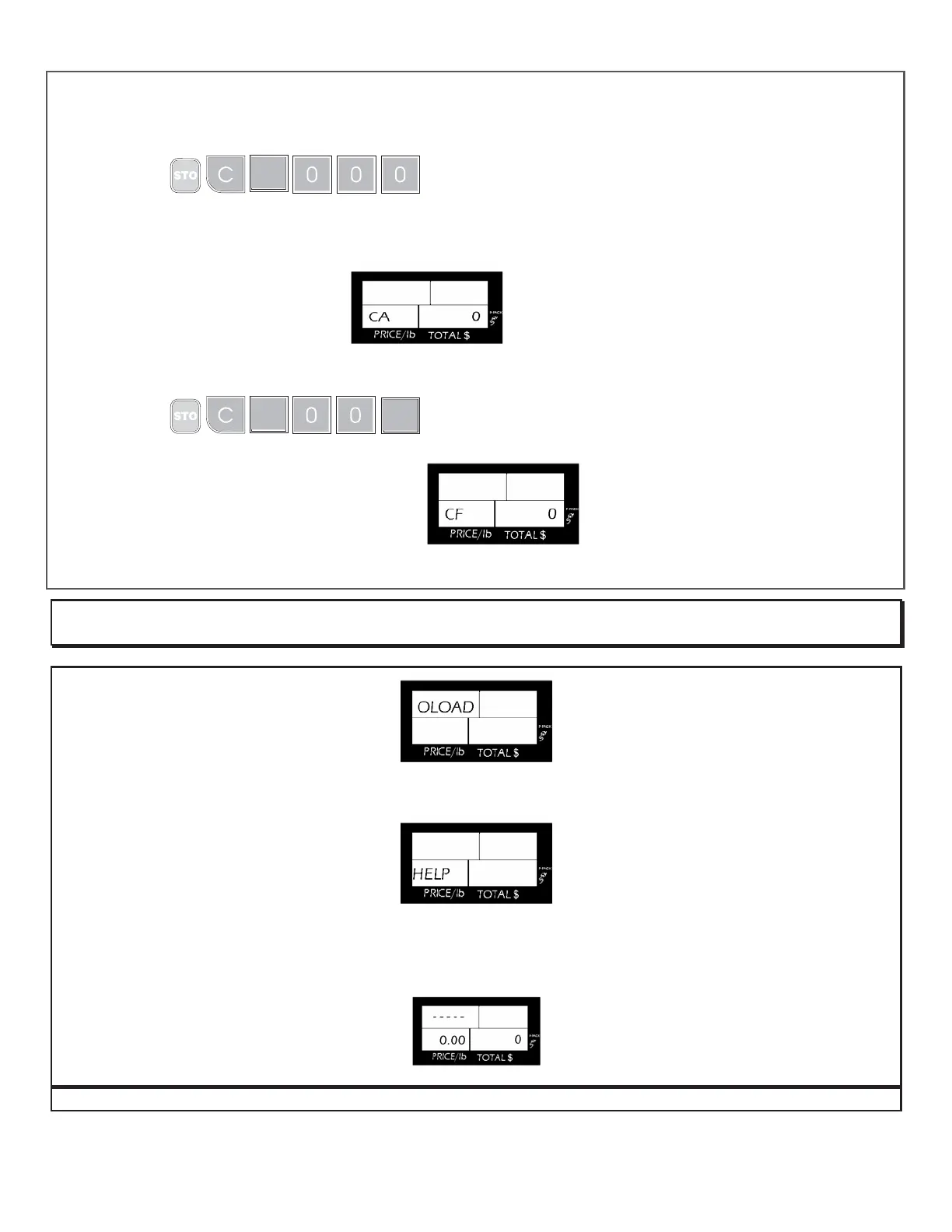
To check the counter follow these instructions:
Calibration counter
1.- Turn on the scale
2. Press
during the initial countdown, at the end of the countdown the view
finder will display.
B) Counter of times that the internal configuration has been changed
1.- Turn on the scale
2. Press
during the initial countdown, at the end of the countdown the view
finder will display
If any of the two cases, to get the normal operation mode, just turn off the scale and turn on. Your scale leaves the
factory like the examples.
OTHER IMPORTANT MESSAGES THAT APPEAR ON THE SCALE
This message indicates that a weight that exceeds the maximum capacity has been placed on the scale. To correct it
simply, remove the over weight.
This message appears in two different situations:
a) When the scale is turned on with an excessive weight on the plate (near to the half capacity of the scale). To correct this
situation remove the weight on the scale, turn off the scale, and then turn it on again.
b) When the scale was handled roughly and/or got hitted during the shipment, wich caused irreversible damages in its
operation. In this case call your authorized distributor.
1
1
1



 To Next Page