EN-10
MAIN SCREENS AND FUNCTIONS (continued)
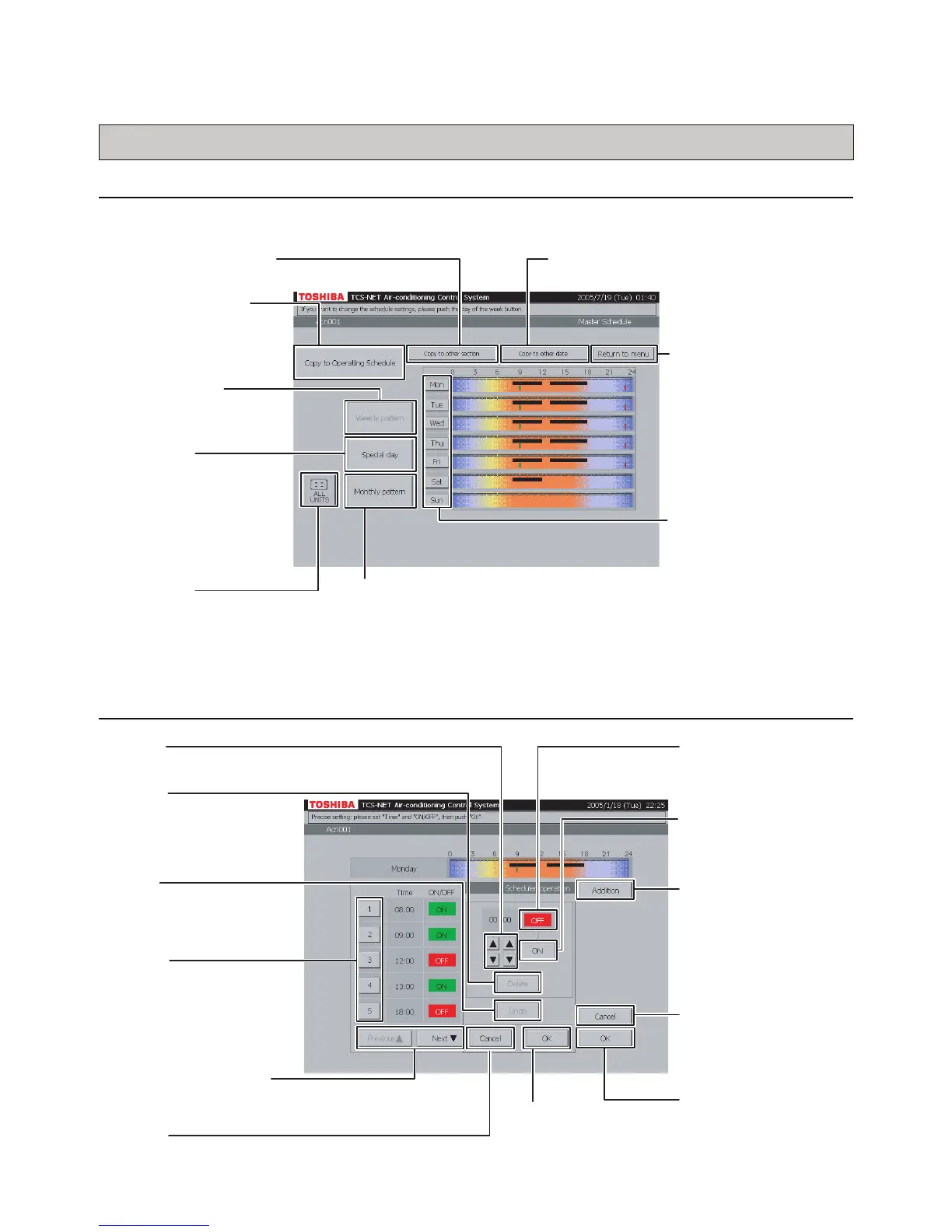
(3) Master Schedule Weekly Pattern Setting Screen
(3) -1. Weekly Pattern Setting Screen
[Master Schedule]
(3) -2. Master Schedule Detail Setting Screen
Monthly pattern
Sets and checks a monthly schedule.
ALL UNITS
Selects an air conditioner
whose schedule you want to
check.
Special day
Sets and checks
special day patterns.
Weekly pattern
Sets and checks a
weekly pattern.
Copy to other section
Copies a schedule to other sections.
Copy to other date
Copies a schedule to other dates.
Return to menu
Returns to the
Schedule screen.
Mon / Tue / Wed / Thu /
Fri / Sat / Sun
Sets and checks
detailed schedule of a
selected day of the
week.
Copy to Operating
Schedule
Copies a master schedule
to the Operating Schedule.
OK
Executes addition or
change of a schedule.
Previous ▲ / Next ▼
Switches display of schedule list.
1 to 20
Changes or deletes a
schedule.
▲ / ▼
Sets time.
Addition
Adds a schedule.
ON
Turns on air
conditioners at the
specified time.
OFF
Turns off air
conditioners at the
specified time.
Delete
Deletes a schedule.
Undo
Undoes a schedule
that is being updated.
Cancel
Returns to the Weekly
Pattern Check screen
(Fig. 20-2) without
setting a daily schedule.
OK
Executes daily
schedule setting.
Cancel
Cancels addition or change of a schedule.


 To Next Page
 Loading...