17-EN
ENGLISH
5
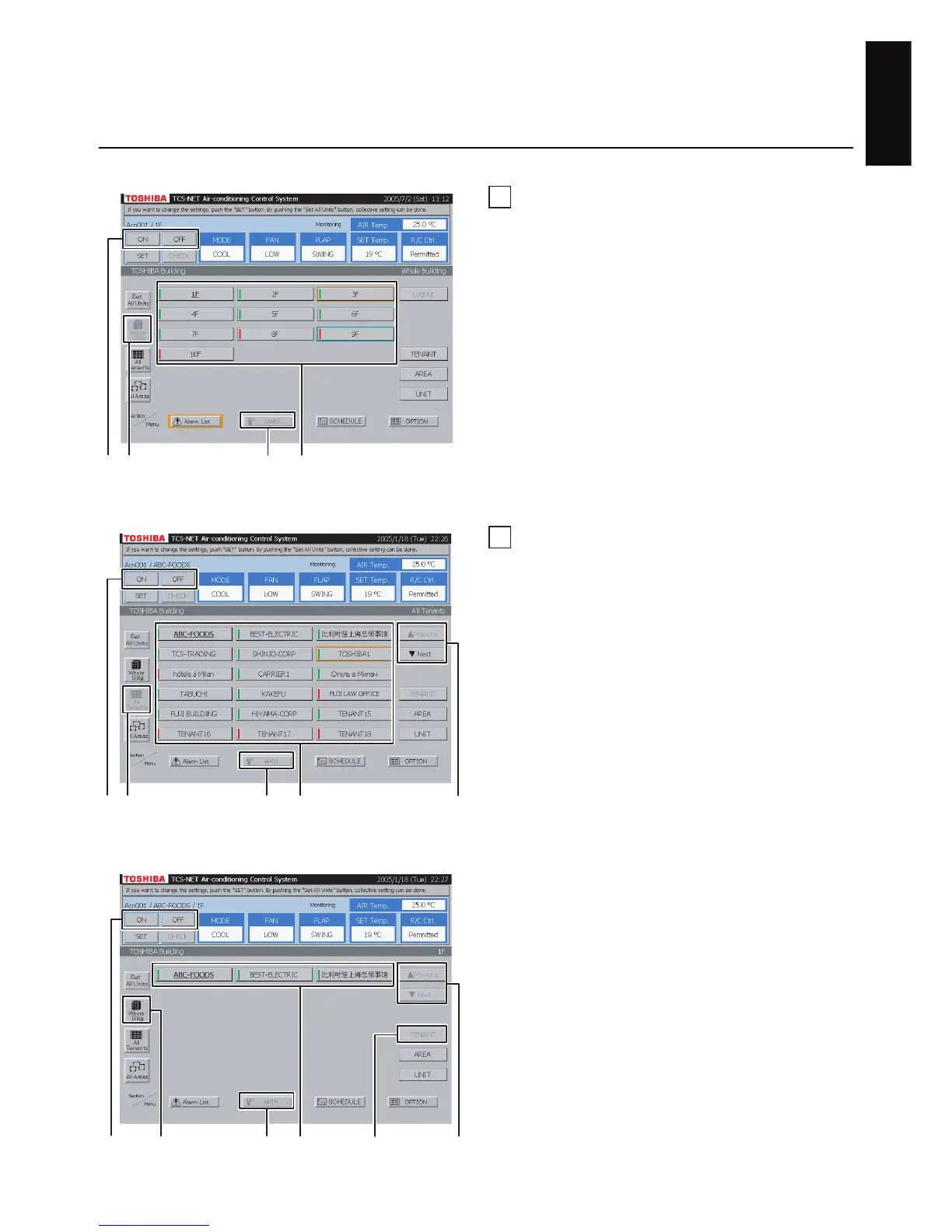
ON/OFF by block
A Select [MAIN].
B Select [Whole Bldg].
C Choose a block for which you want to turn on/off
air conditioners.
D Push [ON] to turn on, and [OFF] to turn off.
6
ON/OFF by tenant
<Choose a tenant from all tenants>
A Select [MAIN].
B Select [All Tenants].
C Choose a tenant for which you want to turn on/
off air conditioners.
D When the tenant list ranges over two or more
pages, use the [▲ Previous] and [▼ Next]
buttons.
E Push [ON] to turn on, and [OFF] to turn off.
Fig. 6-1 Choose from All Tenants
<Choose a tenant by block>
A Select [MAIN].
B Select [Whole Bldg].
C Select [TENANT].
D Choose a tenant for which you want to turn on/
off air conditioners.
E When the tenant list ranges over two or more
pages, use the [▲ Previous] and [▼ Next]
buttons.
F Push [ON] to turn on, and [OFF] to turn off.
Fig. 6-2 Choose Tenant by Block
Turning ON/OFF Air Conditioners
D B
CA
B
C
D
E A
B
D
E
AF
C


 To Next Page
 Loading...