EN-20
8
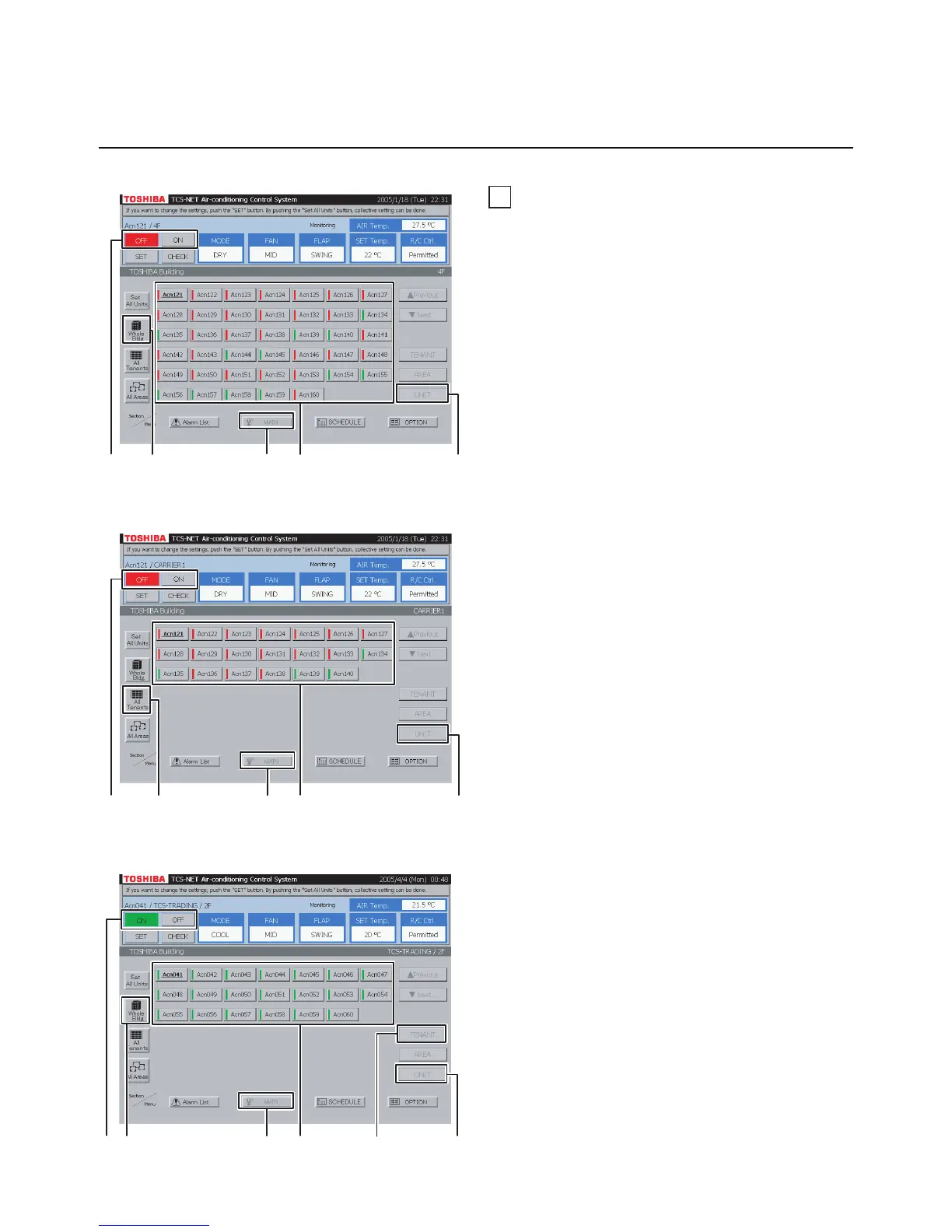
ON/OFF by unit
<Choose an air conditioner from block>
A Select [MAIN].
B Select [Whole Bldg].
Choose a block.
C Select [UNIT].
D Choose an air conditioner which you want to
turn on or off.
E Push [ON] to turn on, and [OFF] to turn off.
<Choose an air conditioner from tenant>
A Select [MAIN].
B Select [All Tenants].
Choose a tenant.
C Select [UNIT].
D Choose an air conditioner which you want to
turn on or off.
E Push [ON] to turn on, and [OFF] to turn off.
Fig. 8-2 Choose from Tenant
<Choose an air conditioner from tenant by
block>
A Select [MAIN].
B Select [Whole Bldg].
Choose a block to which tenants belong.
C Select [TENANT].
Choose a tenant.
D Select [UNIT].
E Choose an air conditioner which you want to
turn on or off.
F Push [ON] to turn on, and [OFF] to turn off.
Fig. 8-3 Choose from Tenant by Block
Turning ON/OFF Air Conditioners (continued)
Fig. 8-1 Choose from Block
HOW TO OPERATE (continued)
B
D
E
C
A
E A
B
C
D
F A
B
D
E
C


 To Next Page
 Loading...