EN-58
HOW TO OPERATE (continued)
37
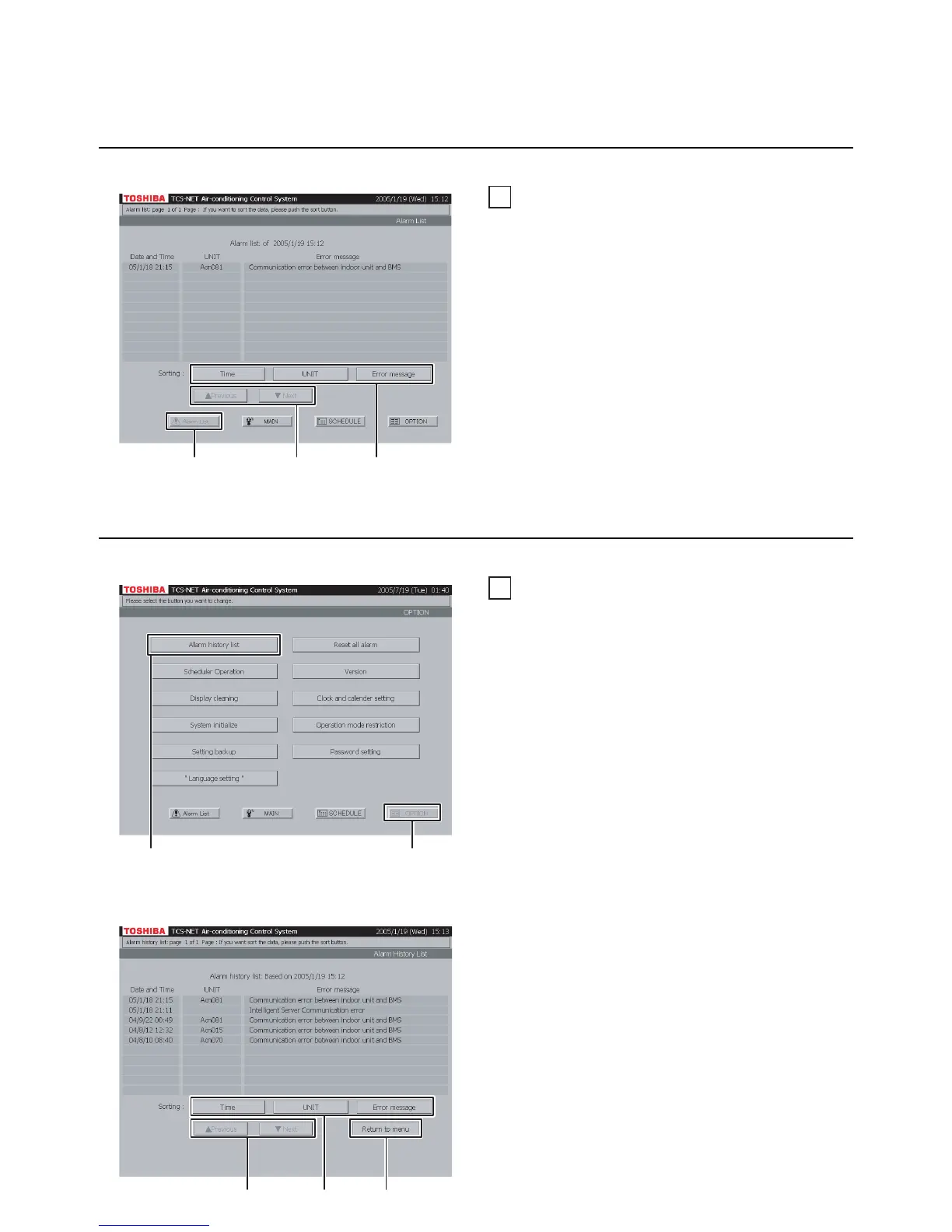
Checking alarms in the list
A Push [Alarm List] to monitor current alarms.
B Push [Time] to sort alarms chronologically from
the latest.
Push [UNIT] to sort alarms in the order of air
conditioner number.
Push [Error message] to sort alarms by
category.
C Switch the alarm list using the [▲ Previous] and
[▼ Next] buttons.
Fig. 38-1 Menu Screen
Fig. 38-2 Alarm History List Screen
Checking Alarms of Air Conditioners
38
Alarm history list
A list of alarm history is displayed. It can be sorted
in a chronological order, in the order of air
conditioner number, or by alarm category.
A Push [OPTION]. The Menu screen (Fig. 38-1)
appears.
To return to the Monitoring screen, push [MAIN].
B Push [Alarm history list]. The Alarm History List
screen (Fig. 38-2) appears.
C Push [Time] to sort alarms chronologically from
the latest.
Push [UNIT] to sort alarms in the order of air
conditioner number.
Push [Error message] to sort alarms by
category.
D Switch the alarm history list using the
[▲ Previous] and [▼ Next] buttons.
E To return to the Menu screen (Fig. 38-1), push
[OPTION].
Other Settings
A
CB
A
B
E
D
C


 To Next Page
 Loading...